OpenStack企业级部署(T版)
手动集群部署
openstack:
  python开发的
    identity
    compute
      管理端
      客户端
    networking
      管理端
      客户端
        自服务网络
        桥接网络
    dashboard
架构
| 主机名 | 外网IP | VIP | 内网IP | 内存 | CPU | 磁盘 | 角色 |
|---|---|---|---|---|---|---|---|
| openstack-controller1.stangj.local | 192.168.139.31 | 无 | 172.16.1.31 | 4G | 2 核心 | 80G | 管理节点01 |
| openstack-controller2.stangj.local | 192.168.139.32 | 无 | 172.16.1.32 | 4G | 2 核心 | 80G | 管理节点02 |
| openstack-mysql.stangj.local | 192.168.139.33 | 无 | 172.16.1.33 | 2G | 2 核心 | 80G | 数据库,memcacahe,RabbitMQ |
| openstack-node1.stangj.local | 192.168.139.34 | 无 | 172.16.1.34 | 3G | 2 核心 | 80G | 计算节点 |
| openstack-node2.stangj.local | 192.168.139.35 | 无 | 172.16.1.34 | 3G | 2 核心 | 80G | 计算节点 |
| openstack-haproxy.stangj.local | 192.168.139.36 | 192.168.139.248 | 无 | 1G | 1核心 | 80G | haproxy,keepalived |
1)前期准备
1.1)版本查看
`可以看到我们能装T版`
[root@openstack-controller1 ~]# yum list centos-release-openstack*
Loaded plugins: fastestmirror
Loading mirror speeds from cached hostfile
 * base: mirrors.aliyun.com
 * extras: mirrors.aliyun.com
 * updates: mirrors.aliyun.com
Available Packages
centos-release-openstack-queens.noarch                                        1-2.el7.centos
centos-release-openstack-rocky.noarch                                         1-1.el7.centos
centos-release-openstack-stein.noarch                                         1-1.el7.centos
centos-release-openstack-train.noarch                                         1-1.el7.centos
1.2)时间同步
"controller1作为时间同步服务器"
[root@openstack-controller1 ~]# yum install chrony -y
[root@openstack-controller1 ~]# vim /etc/chrony.conf
# 添加对应下面内容
#server 0.centos.pool.ntp.org iburst
#server 1.centos.pool.ntp.org iburst
#server 2.centos.pool.ntp.org iburst
#server 3.centos.pool.ntp.org iburst
server ntp1.aliyun.com iburst
server ntp2.aliyun.com iburst
server ntp3.aliyun.com iburst
# Allow NTP client access from local network.
allow 192.168.139.0/24
allow 172.16.1.0/24
`启动服务`
[root@openstack-controller1 ~]# systemctl enable --now chronyd.service
`验证`
[root@openstack-controller1 ~]# chronyc sources
210 Number of sources = 2
MS Name/IP address Stratum Poll Reach LastRx Last sample
===============================================================================
^- 120.25.115.20 2 6 35 48 +866us[ +866us] +/- 22ms
^* 203.107.6.88 2 6 17 49 -4324us[-9570us] +/- 21ms
"其他节点配置(集群涉及到的节点都要配置--我演示一个)"
[root@openstack-mysql ~]# yum install chrony -y
[root@openstack-mysql ~]# vim /etc/chrony.conf
#server 0.centos.pool.ntp.org iburst
#server 1.centos.pool.ntp.org iburst
#server 2.centos.pool.ntp.org iburst
#server 3.centos.pool.ntp.org iburst
server 192.168.139.31 iburst # 添加这条信息指向controller1
[root@openstack-mysql ~]# systemctl enable --now chronyd.service
[root@openstack-mysql ~]# chronyc sources
210 Number of sources = 1
MS Name/IP address Stratum Poll Reach LastRx Last sample
===============================================================================
^* 192.168.139.31 3 6 37 60 -2089ns[ -943us] +/- 16ms
1.3)配置openstack官方源
`controller管理节点`
[root@openstack-controller1 ~]# yum -y install centos-release-openstack-train.noarch
[root@openstack-controller1 ~]# yum install -y python2-PyMySQL libibverbs python-memcached
[root@openstack-controller1 ~]# yum -y install python-openstackclient openstack-selinux
[root@openstack-controller1 ~]# yum -y install https://rdo.fedorapeople.org/rdo-release.rpm
`node计算节点`
[root@openstack-node1 ~]# yum -y install centos-release-openstack-train.noarch
[root@openstack-node1 ~]# yum -y install python-openstackclient openstack-selinux
[root@openstack-node1 ~]# yum -y install https://rdo.fedorapeople.org/rdo-release.rpm
`数据库节点`
[root@openstack-mysql ~]# yum -y install centos-release-openstack-train.noarch
[root@openstack-mysql ~]# yum -y install https://rdo.fedorapeople.org/rdo-release.rpm
1.4)数据库配置
[root@openstack-mysql ~]# yum install mariadb mariadb-server
[root@openstack-mysql ~]# cat > /etc/my.cnf.d/openstack.cnf <<EOF
[mysqld]
bind-address = 0.0.0.0
default-storage-engine = innodb
innodb_file_per_table = on
max_connections = 4096
collation-server = utf8_general_ci
character-set-server = utf8
EOF
[root@openstack-mysql ~]# systemctl enable --now mariadb
1.5)RabbitMQ配置
[root@openstack-mysql ~]# cat >> /etc/hosts << EOF
192.168.139.33 openstack-mysql.stangj.local openstack-mysql
EOF
[root@openstack-mysql ~]# yum install -y rabbitmq-server
[root@openstack-mysql ~]# systemctl enable --now rabbitmq-server.service
[root@openstack-mysql ~]# rabbitmqctl add_user openstack openstack123
[root@openstack-mysql ~]# rabbitmqctl set_permissions openstack ".*" ".*" ".*"
`查询插件`
[root@openstack-mysql ~]# rabbitmq-plugins list
 Configured: E = explicitly enabled; e = implicitly enabled
 | Status:   * = running on rabbit@openstack-mysql
 |/
[  ] amqp_client                       3.6.16
[  ] cowboy                            1.0.4
[  ] cowlib                            1.0.2
[  ] rabbitmq_amqp1_0                  3.6.16
[  ] rabbitmq_auth_backend_ldap        3.6.16
[  ] rabbitmq_auth_mechanism_ssl       3.6.16
[  ] rabbitmq_consistent_hash_exchange 3.6.16
[  ] rabbitmq_event_exchange           3.6.16
[  ] rabbitmq_federation               3.6.16
[  ] rabbitmq_federation_management    3.6.16
[  ] rabbitmq_jms_topic_exchange       3.6.16
[  ] rabbitmq_management               3.6.16 # 开启这个插件
[  ] rabbitmq_management_agent         3.6.16
[  ] rabbitmq_management_visualiser    3.6.16
[  ] rabbitmq_mqtt                     3.6.16
[  ] rabbitmq_random_exchange          3.6.16
[  ] rabbitmq_recent_history_exchange  3.6.16
[  ] rabbitmq_sharding                 3.6.16
[  ] rabbitmq_shovel                   3.6.16
[  ] rabbitmq_shovel_management        3.6.16
[  ] rabbitmq_stomp                    3.6.16
[  ] rabbitmq_top                      3.6.16
[  ] rabbitmq_tracing                  3.6.16
[  ] rabbitmq_trust_store              3.6.16
[  ] rabbitmq_web_dispatch             3.6.16
[  ] rabbitmq_web_mqtt                 3.6.16
[  ] rabbitmq_web_mqtt_examples        3.6.16
[  ] rabbitmq_web_stomp                3.6.16
[  ] rabbitmq_web_stomp_examples       3.6.16
[  ] sockjs                            0.3.4
`打开插件`
[root@openstack-mysql ~]# rabbitmq-plugins enable rabbitmq_management
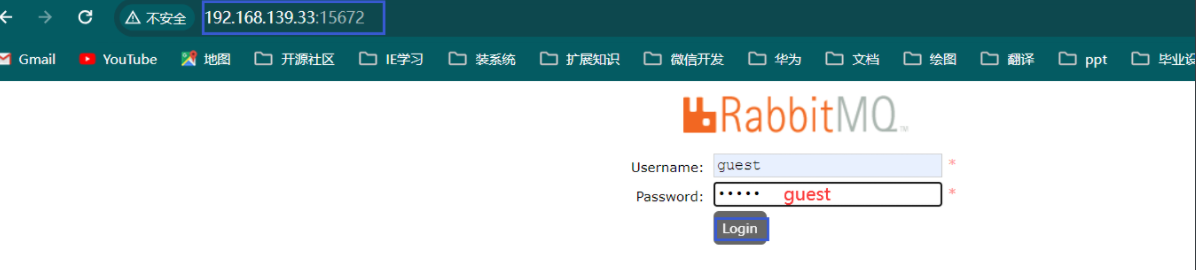
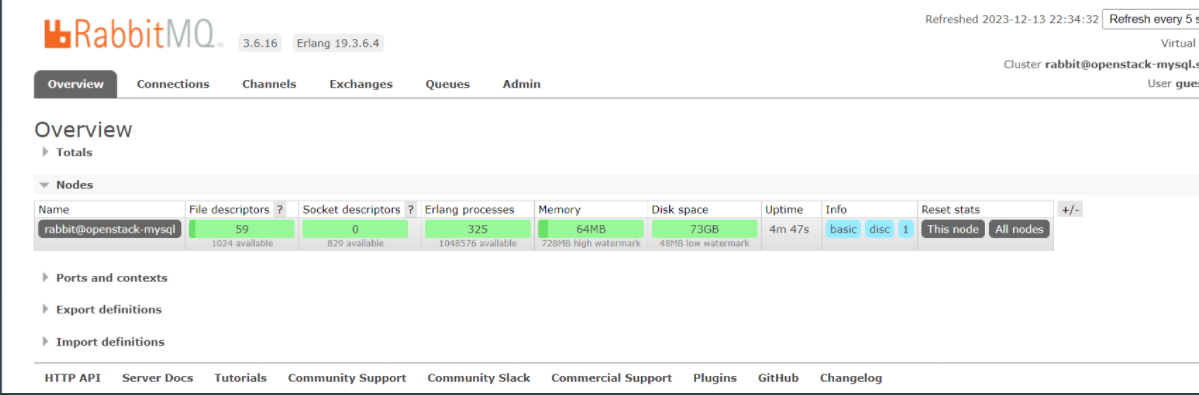
访问 http://192.168.139.33:15672/
1.6)配置memcached
[root@openstack-mysql ~]# yum -y install memcached
[root@openstack-controller1 ~]# yum install python-memcached
[root@openstack-mysql ~]# vim  /etc/sysconfig/memcached
PORT="11211"
USER="memcached"
MAXCONN="1024"
CACHESIZE="512"           #修改缓存大小
OPTIONS="-l 0.0.0.0,::1"  #修改地址
[root@openstack-mysql ~]# systemctl enable --now memcached.service
1.7)配置haproxy
[root@openstack-haproxy ~]# yum -y install haproxy
[root@openstack-haproxy ~]# yum -y install keepalived
`配置keepalived`
[root@openstack-haproxy ~]# vim /etc/keepalived/keepalived.conf
global_defs {
smtp_connect_timeout 30
router_id LVS_DEVEL
vrrp_skip_check_adv_addr
vrrp_strict
vrrp_iptables
vrrp_garp_interval 0
vrrp_gna_interval 0
}
vrrp_instance VI_1 {
state MASTER
interface eth0
virtual_router_id 51
priority 100
advert_int 1
authentication {
auth_type PASS
auth_pass 1111
}
virtual_ipaddress {
192.168.139.248 dev eth0 label eth0:0
}
}
[root@openstack-haproxy ~]# systemctl enable --now keepalived.service
`配置haproxy`
[root@openstack-haproxy ~]# vim /etc/haproxy/haproxy.cfg
# 把后面的frontend和backend模块配置全部删除
# 最后一行添加
listen openstack-mysql-3306
bind 192.168.139.248:3306
mode tcp
server 192.168.139.33 192.168.139.33:3306 check inter 3s fall 3 rise 5
listen openstack-mq-5672
bind 192.168.139.248:5672
mode tcp
server 192.168.139.33 192.168.139.33:5672 check inter 3s fall 3 rise 5
listen openstack-memcached-11211
bind 192.168.139.248:11211
mode tcp
server 192.168.139.33 192.168.139.33:11211 check inter 3s fall 3 rise 5
[root@openstack-haproxy ~]# echo 'net.ipv4.ip_nonlocal_bind = 1' >> /etc/sysctl.conf
[root@openstack-haproxy ~]# sysctl -p
[root@openstack-haproxy ~]# systemctl enable --now haproxy.service
[root@openstack-haproxy ~]# ss -tnl
State Recv-Q Send-Q Local Address:Port Peer Address:Port
LISTEN 0 128 *:22 *:*
LISTEN 0 100 127.0.0.1:25 *:*
LISTEN 0 128 192.168.139.248:5672 *:*
LISTEN 0 128 192.168.139.248:3306 *:*
LISTEN 0 128 192.168.139.248:11211 *:*
LISTEN 0 128 [::]:22 [::]:*
LISTEN 0 100 [::1]:25 [::]:*
验证
[root@openstack-controller1 ~]# telnet 192.168.139.248 3306
Trying 192.168.139.248...
Connected to 192.168.139.248.
Escape character is '^]'.
[root@openstack-controller1 ~]# telnet 192.168.139.248 5672
Trying 192.168.139.248...
Connected to 192.168.139.248.
Escape character is '^]'.
[root@openstack-controller1 ~]# telnet 192.168.139.248 11211
Trying 192.168.139.248...
Connected to 192.168.139.248.
Escape character is '^]'.
2)安装keystone
2.1)创建keystone数据库
[root@openstack-mysql ~]# mysql
MariaDB [(none)]> CREATE DATABASE keystone;
MariaDB [(none)]> GRANT ALL PRIVILEGES ON keystone.* TO 'keystone'@'%' IDENTIFIED BY 'keystone123';
`controller节点验证`
[root@openstack-controller1 ~]# yum -y install mariadb
[root@openstack-controller1 ~]# mysql -ukeystone -h192.168.139.33 -pkeystone123
Welcome to the MariaDB monitor. Commands end with ; or \g.
Your MariaDB connection id is 9
Server version: 10.3.20-MariaDB MariaDB Server
Copyright (c) 2000, 2018, Oracle, MariaDB Corporation Ab and others.
Type 'help;' or '\h' for help. Type '\c' to clear the current input statement.
MariaDB [(none)]>
[root@openstack-controller1 ~]# mysql -ukeystone -h192.168.139.248 -pkeystone123
Welcome to the MariaDB monitor. Commands end with ; or \g.
Your MariaDB connection id is 11
Server version: 10.3.20-MariaDB MariaDB Server
Copyright (c) 2000, 2018, Oracle, MariaDB Corporation Ab and others.
Type 'help;' or '\h' for help. Type '\c' to clear the current input statement.
MariaDB [(none)]>
2.2)下载配置keystone
[root@openstack-controller1 ~]# yum -y install openstack-keystone httpd mod_wsgi
`添加vip的域名解析`
[root@openstack-controller1 ~]# echo '192.168.139.248 openstack-vip.stangj.local' >> /etc/hosts
`修改配置`
[root@openstack-controller1 ~]# vim /etc/keystone/keystone.conf
[database] # 在这个模块下面添加下面这一行信息
connection = mysql+pymysql://keystone:keystone123@openstack-vip.stangj.local/keystone
[token]    # 在这个模块下面添加下面这一行信息
rovider = fernet
2.3)初始化keystone数据库
[root@openstack-controller1 ~]# su -s /bin/sh -c "keystone-manage db_sync" keystone
`验证是否初始化成功`
[root@openstack-controller1 ~]# mysql -ukeystone -h192.168.139.248 -pkeystone123 -e "use keystone ; show tables"
+------------------------------------+
| Tables_in_keystone |
+------------------------------------+
| access_rule |
| access_token |
| application_credential |
| application_credential_access_rule |
| application_credential_role |
| assignment |
| config_register |
......................................
......................................
| user_group_membership |
| user_option |
| whitelisted_config |
+------------------------------------+
2.4)初始化 Fernet 密钥存储库
[root@openstack-controller1 ~]# keystone-manage fernet_setup --keystone-user keystone --keystone-group keystone
[root@openstack-controller1 ~]# keystone-manage credential_setup --keystone-user keystone --keystone-group keystone
2.5)引导身份服务
[root@openstack-haproxy ~]# vim /etc/haproxy/haproxy.cfg
# 在最后一行添加下面4行内容
listen openstack-keystone-5000
  bind 192.168.139.248:5000
  mode tcp
  server 192.168.139.31 192.168.139.31:5000 check inter 3s fall 3 rise 5
[root@openstack-haproxy ~]# systemctl restart haproxy.service
# 设置,密码为admin
[root@openstack-controller1 ~]# keystone-manage bootstrap --bootstrap-password admin \
  --bootstrap-admin-url http://openstack-vip.stangj.local:5000/v3/ \
  --bootstrap-internal-url http://openstack-vip.stangj.local:5000/v3/ \
  --bootstrap-public-url http://openstack-vip.stangj.local:5000/v3/ \
  --bootstrap-region-id RegionOne
`验证`
[root@openstack-controller1 ~]# mysql -ukeystone -h192.168.139.248 -pkeystone123 -e "select * from keystone.service "
+----------------------------------+----------+---------+----------------------+
| id                               | type     | enabled | extra                |
+----------------------------------+----------+---------+----------------------+
| 5b32c1198b6d4a9da1659bc0a201d89e | identity |       1 | {"name": "keystone"} |
+----------------------------------+----------+---------+----------------------+
[root@openstack-controller1 ~]# mysql -ukeystone -h192.168.139.248 -pkeystone123 -e "select * from keystone.endpoint "
+----------------------------------+--------------------+-----------+----------------------------------+--------------------------------------------+-------+---------+-----------+
| id                               | legacy_endpoint_id | interface | service_id                       | url                                        | extra | enabled | region_id |
+----------------------------------+--------------------+-----------+----------------------------------+--------------------------------------------+-------+---------+-----------+
| 20caaef3b2ee4ff7898d1e7b7f1e41dc | NULL               | admin     | 5b32c1198b6d4a9da1659bc0a201d89e | http://openstack-vip.stangj.local:5000/v3/ | {}    |       1 | RegionOne |
| ad54a4233c0e4a23ba56f86960ff97a9 | NULL               | public    | 5b32c1198b6d4a9da1659bc0a201d89e | http://openstack-vip.stangj.local:5000/v3/ | {}    |       1 | RegionOne |
| def9f3253353499fbc24a851445198c9 | NULL               | internal  | 5b32c1198b6d4a9da1659bc0a201d89e | http://openstack-vip.stangj.local:5000/v3/ | {}    |       1 | RegionOne |
+----------------------------------+--------------------+-----------+----------------------------------+--------------------------------------------+-------+---------+-----------+
2.6)配置Apache HTTP 服务器
[root@openstack-controller1 ~]# vim /etc/httpd/conf/httpd.conf
# 在96行左右添加下面这一行信息
ServerName 192.168.139.31:80
[root@openstack-controller1 ~]# ln -s /usr/share/keystone/wsgi-keystone.conf /etc/httpd/conf.d/
[root@openstack-controller1 ~]# systemctl enable --now httpd.service
`验证服务`
[root@openstack-controller1 ~]# curl 192.168.139.31:5000
{"versions": {"values": [{"status": "stable", "updated": "2019-07-19T00:00:00Z", "media-types": [{"base": "application/json", "type": "application/vnd.openstack.identity-v3+json"}], "id": "v3.13", "links": [{"href": "http://192.168.139.31:5000/v3/", "rel": "self"}]}]}}
[root@openstack-controller1 ~]# curl 192.168.139.248:5000
{"versions": {"values": [{"status": "stable", "updated": "2019-07-19T00:00:00Z", "media-types": [{"base": "application/json", "type": "application/vnd.openstack.identity-v3+json"}], "id": "v3.13", "links": [{"href": "http://192.168.139.248:5000/v3/", "rel": "self"}]}]}}
[root@openstack-controller1 ~]# curl openstack-vip.stangj.local:5000
{"versions": {"values": [{"status": "stable", "updated": "2019-07-19T00:00:00Z", "media-types": [{"base": "application/json", "type": "application/vnd.openstack.identity-v3+json"}], "id": "v3.13", "links": [{"href": "http://openstack-vip.stangj.local:5000/v3/", "rel": "self"}]}]}}
2.7)配置环境变量来配置管理帐户
[root@openstack-controller1 ~]# cat admin.sh
export OS_USERNAME=admin
export OS_PASSWORD=admin
export OS_PROJECT_NAME=admin
export OS_PROJECT_NAME=admin
export OS_USER_DOMAIN_NAME=Default
export OS_PROJECT_DOMAIN_NAME=Default
export OS_AUTH_URL=http://openstack-vip.stangj.local:5000/v3
export OS_IDENTITY_API_VERSION=3
`生效配置`
[root@openstack-controller1 ~]# source admin.sh
`验证服务`
[root@openstack-controller1 ~]# openstack user list
+----------------------------------+-------+
| ID                               | Name  |
+----------------------------------+-------+
| 5c4b6243d95742799de0fc97ef119967 | admin |
+----------------------------------+-------+
2.8)创建域、项目、用户和角色
`创建域`
[root@openstack-controller1 ~]# openstack domain create --description "An Example Domain" example
# [root@openstack-controller1 ~]# openstack domain list
+-------------+----------------------------------+
| Field       | Value                            |
+-------------+----------------------------------+
| description | An Example Domain                |
| enabled     | True                             |
| id          | 7233934db37f4e839da0bbc62bdebdf5 |
| name        | example                          |
| options     | {}                               |
| tags        | []                               |
+-------------+----------------------------------+
`创建项目`
[root@openstack-controller1 ~]# openstack project create --domain default --description "Service Project" service
# [root@openstack-controller1 ~]# openstack project list
+-------------+----------------------------------+
| Field       | Value                            |
+-------------+----------------------------------+
| description | Service Project                  |
| domain_id   | default                          |
| enabled     | True                             |
| id          | 024872cab1fb4329997f4bb552cc7439 |
| is_domain   | False                            |
| name        | service                          |
| options     | {}                               |
| parent_id   | default                          |
| tags        | []                               |
+-------------+----------------------------------+
`在default域-创建项目:myproject`
[root@openstack-controller1 ~]# openstack project create --domain default --description "Demo Project" myproject
+-------------+----------------------------------+
| Field       | Value                            |
+-------------+----------------------------------+
| description | Demo Project                     |
| domain_id   | default                          |
| enabled     | True                             |
| id          | 35e14efc4bb64fd18ab58ab793881459 |
| is_domain   | False                            |
| name        | myproject                        |
| options     | {}                               |
| parent_id   | default                          |
| tags        | []                               |
+-------------+----------------------------------+
`创建用户:myuser`
[root@openstack-controller1 ~]# openstack user create --domain default --password-prompt myuser
User Password: # myuser
Repeat User Password:# myuser
+---------------------+----------------------------------+
| Field               | Value                            |
+---------------------+----------------------------------+
| domain_id           | default                          |
| enabled             | True                             |
| id                  | f40449a65bcf491aaf44cc4f8e09f3fa |
| name                | myuser                           |
| options             | {}                               |
| password_expires_at | None                             |
+---------------------+----------------------------------+
`创建角色:myrole`
[root@openstack-controller1 ~]# openstack role create myrole
+-------------+----------------------------------+
| Field       | Value                            |
+-------------+----------------------------------+
| description | None                             |
| domain_id   | None                             |
| id          | b1cf825f18194c858ba735c3a873e87b |
| name        | myrole                           |
| options     | {}                               |
+-------------+----------------------------------+
`将角色添加到项目和用户:myrole/myproject/myuser`
[root@openstack-controller1 ~]# openstack role add --project myproject --user myuser myrole
2.9)验证操作
[root@openstack-controller1 ~]# unset OS_AUTH_URL OS_PASSWORD
`获取admin的token信息`
[root@openstack-controller1 ~]# openstack --os-auth-url http://openstack-vip.stangj.local:5000/v3 --os-project-domain-name Default --os-user-domain-name Default --os-project-name admin --os-username admin token issue
Password: # admin
Password: # admin
+------------+-----------------------------------------------------------------------------------------------------------------------------------------------------------------------------------------+
| Field | Value |
+------------+-----------------------------------------------------------------------------------------------------------------------------------------------------------------------------------------+
| expires | 2023-12-14T14:14:02+0000 |
| id | gAAAAABlev-an7oKiReVcaIQg31zanfyHEpBjozbYq_6ZH8mWKMyp0vxm0HEUlxkrY7_799ihK64p4Gq5zeaAUH4g4jBpB2I0Ij5xDojvfZ66qTIPUB9TakErlw9UoI1E9bpOwowYgoOOKlJlO28mBoxKWga7A8akmCgiDTzP4rUYL5B8Xs24rQ |
| project_id | 227934ef1b5b44cc942a8e4f1f5f7695 |
| user_id | 5c4b6243d95742799de0fc97ef119967 |
+------------+-----------------------------------------------------------------------------------------------------------------------------------------------------------------------------------------+
`获取myuser的token信息`
[root@openstack-controller1 ~]# openstack --os-auth-url http://openstack-vip.stangj.local:5000/v3 --os-project-domain-name Default --os-user-domain-name Default --os-project-name myproject --os-username myuser token issue
Password: # myuser
Password: # myuser
+------------+-----------------------------------------------------------------------------------------------------------------------------------------------------------------------------------------+
| Field | Value |
+------------+-----------------------------------------------------------------------------------------------------------------------------------------------------------------------------------------+
| expires | 2023-12-14T14:17:03+0000 |
| id | gAAAAABlewBPx4yTCZIklPPqD-XnXsciBnECZYhDPKZkenFzYdE9GuTH-xRPuhh4Z9rrLiCb7X6e_rjqR2WdTk9Sz94HkrNi4KPjdun7HW-4wesLLOV7ijz4Vgvt999fnWNaDNTwKvqumfcQ1XinMLyszeSD1yvFB4FeQ610Ns18oUa0Tc_44jc |
| project_id | 35e14efc4bb64fd18ab58ab793881459 |
| user_id | f40449a65bcf491aaf44cc4f8e09f3fa |
+------------+-----------------------------------------------------------------------------------------------------------------------------------------------------------------------------------------+
2.10)新增配置环境变量来配置管理帐户
[root@openstack-controller1 ~]# vim admin.sh
export OS_PROJECT_DOMAIN_NAME=Default
export OS_USER_DOMAIN_NAME=Default
export OS_PROJECT_NAME=admin
export OS_USERNAME=admin
export OS_PASSWORD=admin
export OS_AUTH_URL=http://openstack-vip.stangj.local:5000/v3
export OS_IDENTITY_API_VERSION=3
export OS_IMAGE_API_VERSION=2
[root@openstack-controller1 ~]# source admin.sh
`验证`
[root@openstack-controller1 ~]# openstack token issue
+------------+-----------------------------------------------------------------------------------------------------------------------------------------------------------------------------------------+
| Field | Value |
+------------+-----------------------------------------------------------------------------------------------------------------------------------------------------------------------------------------+
| expires | 2023-12-14T14:23:33+0000 |
| id | gAAAAABlewHVbjqu-4t9Cb8gYROYZEvrE1Bmex9B_49MM440TDgdBnptkCE0JofDodbImCNsQxZL-kYqFWEBW2yBS_cUQemsxD5XwjR9ObHci22B2swgagR9RJwqrAtgRr7blM2T92kGJ56ymcpPk-DwEcjku387qrMZM6Lxruwl71GPDYvCf-Y |
| project_id | 227934ef1b5b44cc942a8e4f1f5f7695 |
| user_id | 5c4b6243d95742799de0fc97ef119967 |
+------------+-----------------------------------------------------------------------------------------------------------------------------------------------------------------------------------------+
`创建普通变量环境`
[root@openstack-controller1 ~]# vim demo.sh
export OS_PROJECT_DOMAIN_NAME=Default
export OS_USER_DOMAIN_NAME=Default
export OS_PROJECT_NAME=myproject
export OS_USERNAME=myuser
export OS_PASSWORD=myuser
export OS_AUTH_URL=http://openstack-vip.stangj.local:5000/v3
export OS_IDENTITY_API_VERSION=3
export OS_IMAGE_API_VERSION=2
[root@openstack-controller1 ~]# source demo.sh
`验证`
[root@openstack-controller1 ~]# openstack token issue
+------------+-----------------------------------------------------------------------------------------------------------------------------------------------------------------------------------------+
| Field | Value |
+------------+-----------------------------------------------------------------------------------------------------------------------------------------------------------------------------------------+
| expires | 2023-12-14T14:26:22+0000 |
| id | gAAAAABlewJ-s4Aj73WgUyZemZ9eL9S7myndeVnxUOmiWM3IvXTwtw7pIzzIFyxlw3vTrC200w08X2iqTFVcY8Ih4jCzLDQMqi4VpS2emWmqG73uy7NI_tAR6KasEYPRoZSl--2Wa7HCdv9i6y6GnKDtgisVkCtG3Ew7CPBDq991w0cXBRpxL_Q |
| project_id | 35e14efc4bb64fd18ab58ab793881459 |
| user_id | f40449a65bcf491aaf44cc4f8e09f3fa |
+------------+-----------------------------------------------------------------------------------------------------------------------------------------------------------------------------------------+
3)安装glance
3.1)存储准备工作
# 因为性能原因我就拿openstack-haproxy.stangj.local主机做nfs
[root@openstack-haproxy ~]# mkdir /data/glance -p
[root@openstack-haproxy ~]# yum -y install nfs-utils
[root@openstack-haproxy ~]# echo '/data/glance *(rw,no_root_squash)' > /etc/exports
[root@openstack-haproxy ~]# systemctl enable --now nfs
`验证`
[root@openstack-controller1 ~]# yum -y install nfs-utils
[root@openstack-controller1 ~]# showmount -e 192.168.139.36
Export list for 192.168.139.36:
/data/glance *
3.2)创建glance数据库
[root@openstack-mysql ~]# mysql
MariaDB [(none)]> CREATE DATABASE glance;
MariaDB [(none)]> GRANT ALL PRIVILEGES ON glance.* TO 'glance'@'%' IDENTIFIED BY 'glance123';
[root@openstack-controller1 ~]# source admin.sh
`创建glance账号`
[root@openstack-controller1 ~]# openstack user create --domain default --password-prompt glance
User Password: # glance
Repeat User Password: # glance
+---------------------+----------------------------------+
| Field               | Value                            |
+---------------------+----------------------------------+
| domain_id           | default                          |
| enabled             | True                             |
| id                  | 34a900b8a67f40439804c830cd5957da |
| name                | glance                           |
| options             | {}                               |
| password_expires_at | None                             |
+---------------------+----------------------------------+
`将角色添加到用户和项目:admin/glance/service`
# 让glance拥有service项目的admin权限
[root@openstack-controller1 ~]# openstack role add --project service --user glance admin
[root@openstack-controller1 ~]# openstack service list
+----------------------------------+----------+----------+
| ID                               | Name     | Type     |
+----------------------------------+----------+----------+
| 5b32c1198b6d4a9da1659bc0a201d89e | keystone | identity |
+----------------------------------+----------+----------+
3.3)创建服务实体glance
[root@openstack-controller1 ~]# openstack service create --name glance --description "OpenStack Image" image
+-------------+----------------------------------+
| Field       | Value                            |
+-------------+----------------------------------+
| description | OpenStack Image                  |
| enabled     | True                             |
| id          | e53a2bd43aaf48f1840064e9cb594293 |
| name        | glance                           |
| type        | image                            |
+-------------+----------------------------------+
[root@openstack-controller1 ~]# openstack service list
+----------------------------------+----------+----------+
| ID                               | Name     | Type     |
+----------------------------------+----------+----------+
| 5b32c1198b6d4a9da1659bc0a201d89e | keystone | identity |
| e53a2bd43aaf48f1840064e9cb594293 | glance   | image    |
+----------------------------------+----------+----------+
3.4)创建Image 服务 API 端点:
[root@openstack-controller1 ~]# openstack endpoint create --region RegionOne image public http://openstack-vip.stangj.local:9292
+--------------+----------------------------------------+
| Field        | Value                                  |
+--------------+----------------------------------------+
| enabled      | True                                   |
| id           | 3fc61c0f302d41359da99b80ca32853f       |
| interface    | public                                 |
| region       | RegionOne                              |
| region_id    | RegionOne                              |
| service_id   | e53a2bd43aaf48f1840064e9cb594293       |
| service_name | glance                                 |
| service_type | image                                  |
| url          | http://openstack-vip.stangj.local:9292 |
+--------------+----------------------------------------+
[root@openstack-controller1 ~]# openstack endpoint create --region RegionOne image internal http://openstack-vip.stangj.local:9292
+--------------+----------------------------------------+
| Field        | Value                                  |
+--------------+----------------------------------------+
| enabled      | True                                   |
| id           | 671f3dd8ddd643d08b922df0f9c7f4d8       |
| interface    | internal                               |
| region       | RegionOne                              |
| region_id    | RegionOne                              |
| service_id   | e53a2bd43aaf48f1840064e9cb594293       |
| service_name | glance                                 |
| service_type | image                                  |
| url          | http://openstack-vip.stangj.local:9292 |
+--------------+----------------------------------------+
[root@openstack-controller1 ~]# openstack endpoint create --region RegionOne image admin http://openstack-vip.stangj.local:9292
+--------------+----------------------------------------+
| Field        | Value                                  |
+--------------+----------------------------------------+
| enabled      | True                                   |
| id           | afea7ab2f5914bcca88f088957f6144f       |
| interface    | admin                                  |
| region       | RegionOne                              |
| region_id    | RegionOne                              |
| service_id   | e53a2bd43aaf48f1840064e9cb594293       |
| service_name | glance                                 |
| service_type | image                                  |
| url          | http://openstack-vip.stangj.local:9292 |
+--------------+----------------------------------------+
3.5)配置haporxy代理
[root@openstack-haproxy ~]# vim /etc/haproxy/haproxy.cfg
# 最后一行加入下面4行信息
listen openstack-glance-9292
  bind 192.168.139.248:9292
  mode tcp
  server 192.168.139.31 192.168.139.31:9292 check inter 3s fall 3 rise 5
[root@openstack-haproxy ~]# systemctl restart haproxy.service
[root@openstack-haproxy ~]# ss -tnl | grep 9292
LISTEN     0      128    192.168.139.248:9292                     *:*
3.6)部署glance服务
[root@openstack-controller1 ~]# yum -y install openstack-glance
3.7)配置glance服务
[root@openstack-controller1 ~]# vim /etc/glance/glance-api.conf
[database] # 在这个模块下面添加下面这一行信息
connection = mysql+pymysql://glance:glance123@openstack-vip.stangj.local/glance
[keystone_authtoken] # 在这个模块下面添加下面这9行信息
www_authenticate_uri = http://openstack-vip.stangj.local:5000
auth_url = http://openstack-vip.stangj.local:5000
memcached_servers = openstack-vip.stangj.local:11211
auth_type = password
project_domain_name = Default
user_domain_name = Default
project_name = service
username = glance
password = glance
[paste_deploy] # 在这个模块下面添加下面这一行信息
flavor = keystone
[glance_store] # 在这个模块下面添加下面这3行信息
stores = file,http
default_store = file
filesystem_store_datadir = /var/lib/glance/images
3.8)初始化glance数据库
[root@openstack-controller1 ~]# su -s /bin/sh -c "glance-manage db_sync" glance
`验证`
[root@openstack-controller1 ~]# mysql -uglance -h192.168.139.248 -pglance123 -e "use glance ; show tables"
+----------------------------------+
| Tables_in_glance                 |
+----------------------------------+
| alembic_version                  |
| image_locations                  |
| image_members                    |
| image_properties                 |
| image_tags                       |
| images                           |
| metadef_namespace_resource_types |
| metadef_namespaces               |
| metadef_objects                  |
| metadef_properties               |
| metadef_resource_types           |
| metadef_tags                     |
| migrate_version                  |
| task_info                        |
| tasks                            |
+----------------------------------+
3.9)启动glance服务
[root@openstack-controller1 ~]# systemctl enable --now openstack-glance-api.service
[root@openstack-controller1 ~]# tail -f /var/log/glance/api.log
).  Its value may be silently ignored in the future.
2023-12-14 22:43:40.534 3133 INFO glance.common.wsgi [-] Starting 4 workers
2023-12-14 22:43:40.536 3133 INFO glance.common.wsgi [-] Started child 3145
2023-12-14 22:43:40.537 3145 INFO eventlet.wsgi.server [-] (3145) wsgi starting up on http://0.0.0.0:9292
2023-12-14 22:43:40.538 3133 INFO glance.common.wsgi [-] Started child 3146
2023-12-14 22:43:40.540 3146 INFO eventlet.wsgi.server [-] (3146) wsgi starting up on http://0.0.0.0:9292
2023-12-14 22:43:40.542 3133 INFO glance.common.wsgi [-] Started child 3147
2023-12-14 22:43:40.543 3147 INFO eventlet.wsgi.server [-] (3147) wsgi starting up on http://0.0.0.0:9292
2023-12-14 22:43:40.545 3133 INFO glance.common.wsgi [-] Started child 3148
2023-12-14 22:43:40.547 3148 INFO eventlet.wsgi.server [-] (3148) wsgi starting up on http://0.0.0.0:9292
3.10)挂存储
[root@openstack-controller1 ~]# systemctl stop openstack-glance-api.service
[root@openstack-controller1 ~]# showmount -e 192.168.139.36
Export list for 192.168.139.36:
/data/glance *
[root@openstack-controller1 ~]# mount -t nfs 192.168.139.36:/data/glance /var/lib/glance/images
[root@openstack-controller1 ~]# vim /etc/fstab
# 最后一行添加下面这一行内容
192.168.139.36:/data/glance /var/lib/glance/images nfs defaults,_netdev 0 0
[root@openstack-controller1 ~]# mount -a
[root@openstack-controller1 ~]# id glance
uid=161(glance) gid=161(glance) groups=161(glance)
[root@openstack-controller1 ~]# chown -R  161:161 /var/lib/glance/images/
[root@openstack-controller1 ~]# ll -d /var/lib/glance/images/
drwxr-xr-x 2 glance glance 6 Dec 14 21:31 /var/lib/glance/images/
[root@openstack-haproxy ~]# ll -d /data/glance/
drwxr-xr-x 2 161 161 6 Dec 14 21:31 /data/glance/
`启动服务`
[root@openstack-controller1 ~]# systemctl start openstack-glance-api.service
3.11)验证操作
[root@openstack-controller1 ~]# source admin.sh
[root@openstack-controller1 ~]# wget http://download.cirros-cloud.net/0.4.0/cirros-0.4.0-x86_64-disk.img
[root@openstack-controller1 ~]# glance image-create --name "cirros-0.4.0" \
  --file cirros-0.4.0-x86_64-disk.img \
  --disk-format qcow2 --container-format bare \
  --visibility public

+------------------+----------------------------------------------------------------------------------+
| Property         | Value                                                                            |
+------------------+----------------------------------------------------------------------------------+
| checksum         | 443b7623e27ecf03dc9e01ee93f67afe                                                 |
| container_format | bare                                                                             |
| created_at       | 2023-12-14T15:34:49Z                                                             |
| disk_format      | qcow2                                                                            |
| id               | 060a4a23-5aa8-4176-8f31-0ccd318ebf2a                                             |
| min_disk         | 0                                                                                |
| min_ram          | 0                                                                                |
| name             | cirros-0.4.0                                                                     |
| os_hash_algo     | sha512                                                                           |
| os_hash_value    | 6513f21e44aa3da349f248188a44bc304a3653a04122d8fb4535423c8e1d14cd6a153f735bb0982e |
|                  | 2161b5b5186106570c17a9e58b64dd39390617cd5a350f78                                 |
| os_hidden        | False                                                                            |
| owner            | 227934ef1b5b44cc942a8e4f1f5f7695                                                 |
| protected        | False                                                                            |
| size             | 12716032                                                                         |
| status           | active                                                                           |
| tags             | []                                                                               |
| updated_at       | 2023-12-14T15:34:50Z                                                             |
| virtual_size     | Not available                                                                    |
| visibility       | public                                                                           |
+------------------+----------------------------------------------------------------------------------+
`验证服务`
[root@openstack-controller1 ~]# openstack image list
+--------------------------------------+--------------+--------+
| ID                                   | Name         | Status |
+--------------------------------------+--------------+--------+
| 060a4a23-5aa8-4176-8f31-0ccd318ebf2a | cirros-0.4.0 | active |
+--------------------------------------+--------------+--------+
# 或者 [root@openstack-controller1 ~]# glance image-list
# 删除镜像 [root@openstack-controller1 ~]# glance image-delete fd47df49-7e2b-4e16-a4fe-fd8ca6ffb5f7
[root@openstack-haproxy ~]# ll  /data/glance/
total 12420
-rw-r----- 1 161 161 12716032 Dec 14 23:34 060a4a23-5aa8-4176-8f31-0ccd318ebf2a
4)安装Placement
4.1)创建Placement数据库
[root@openstack-mysql ~]# mysql
MariaDB [(none)]> CREATE DATABASE placement;
MariaDB [(none)]> GRANT ALL PRIVILEGES ON placement.* TO 'placement'@'%' IDENTIFIED BY 'placement123';
`验证`
[root@openstack-controller1 ~]# mysql -uplacement -h192.168.139.248 -pplacement123
Welcome to the MariaDB monitor. Commands end with ; or \g.
Your MariaDB connection id is 9
Server version: 10.3.20-MariaDB MariaDB Server
Copyright (c) 2000, 2018, Oracle, MariaDB Corporation Ab and others.
Type 'help;' or '\h' for help. Type '\c' to clear the current input statement.
MariaDB [(none)]>
4.2)配置用户和端点
[root@openstack-controller1 ~]# source admin.sh
[root@openstack-controller1 ~]# openstack user create --domain default --password-prompt placement
User Password: # placement
Repeat User Password: # placement
+---------------------+----------------------------------+
| Field | Value |
+---------------------+----------------------------------+
| domain_id | default |
| enabled | True |
| id | cb85bb0ca6494d2fa018e0a9de0e946b |
| name | placement |
| options | {} |
| password_expires_at | None |
+---------------------+----------------------------------+
`将 Placement 用户添加到具有 admin 角色的服务项目`
# 让placement拥有service项目的admin权限`
[root@openstack-controller1 ~]# openstack role add --project service --user placement admin
`在服务目录中创建 Placement API 条目`
[root@openstack-controller1 ~]# openstack service create --name placement --description "Placement API" placement
+-------------+----------------------------------+
| Field | Value |
+-------------+----------------------------------+
| description | Placement API |
| enabled | True |
| id | e4512019643e4fd48c916b67ab8d0ec4 |
| name | placement |
| type | placement |
+-------------+----------------------------------+
4.3)创建 Placement API 服务端点:
[root@openstack-controller1 ~]# openstack endpoint create --region RegionOne placement public http://openstack-vip.stangj.local:8778
+--------------+----------------------------------------+
| Field        | Value                                  |
+--------------+----------------------------------------+
| enabled      | True                                   |
| id           | 78ae4d21b4424bb1b0c8029dc7959ca5       |
| interface    | public                                 |
| region       | RegionOne                              |
| region_id    | RegionOne                              |
| service_id   | e4512019643e4fd48c916b67ab8d0ec4       |
| service_name | placement                              |
| service_type | placement                              |
| url          | http://openstack-vip.stangj.local:8778 |
+--------------+----------------------------------------+
[root@openstack-controller1 ~]# openstack endpoint create --region RegionOne placement internal http://openstack-vip.stangj.local:8778
+--------------+----------------------------------------+
| Field        | Value                                  |
+--------------+----------------------------------------+
| enabled      | True                                   |
| id           | dd7caa1565864e4baf5aeed582ad19f9       |
| interface    | internal                               |
| region       | RegionOne                              |
| region_id    | RegionOne                              |
| service_id   | e4512019643e4fd48c916b67ab8d0ec4       |
| service_name | placement                              |
| service_type | placement                              |
| url          | http://openstack-vip.stangj.local:8778 |
+--------------+----------------------------------------+
[root@openstack-controller1 ~]# openstack endpoint create --region RegionOne placement admin http://openstack-vip.stangj.local:8778
+--------------+----------------------------------------+
| Field        | Value                                  |
+--------------+----------------------------------------+
| enabled      | True                                   |
| id           | e7fcd33ba0994973a0b9bb2bc7b8c3cb       |
| interface    | admin                                  |
| region       | RegionOne                              |
| region_id    | RegionOne                              |
| service_id   | e4512019643e4fd48c916b67ab8d0ec4       |
| service_name | placement                              |
| service_type | placement                              |
| url          | http://openstack-vip.stangj.local:8778 |
+--------------+----------------------------------------+
`验证`
[root@openstack-controller1 ~]# openstack endpoint list
+----------------------------------+-----------+--------------+--------------+---------+-----------+--------------------------------------------+
| ID                               | Region    | Service Name | Service Type | Enabled | Interface | URL                                        |
+----------------------------------+-----------+--------------+--------------+---------+-----------+--------------------------------------------+
| 1df308c037cc4cb195da67db34438c57 | RegionOne | glance       | image        | True    | public    | http://openstack-vip.stangj.local:9292     |
| 20caaef3b2ee4ff7898d1e7b7f1e41dc | RegionOne | keystone     | identity     | True    | admin     | http://openstack-vip.stangj.local:5000/v3/ |
| 3fc61c0f302d41359da99b80ca32853f | RegionOne | glance       | image        | True    | public    | http://openstack-vip.stangj.local:9292     |
| 671f3dd8ddd643d08b922df0f9c7f4d8 | RegionOne | glance       | image        | True    | internal  | http://openstack-vip.stangj.local:9292     |
| 78ae4d21b4424bb1b0c8029dc7959ca5 | RegionOne | placement    | placement    | True    | public    | http://openstack-vip.stangj.local:8778     |
| 8005d074d03a4ead8c85d54e7ffd143a | RegionOne | glance       | image        | True    | internal  | http://openstack-vip.stangj.local:9292     |
| ad54a4233c0e4a23ba56f86960ff97a9 | RegionOne | keystone     | identity     | True    | public    | http://openstack-vip.stangj.local:5000/v3/ |
| afea7ab2f5914bcca88f088957f6144f | RegionOne | glance       | image        | True    | admin     | http://openstack-vip.stangj.local:9292     |
| dd7caa1565864e4baf5aeed582ad19f9 | RegionOne | placement    | placement    | True    | internal  | http://openstack-vip.stangj.local:8778     |
| def9f3253353499fbc24a851445198c9 | RegionOne | keystone     | identity     | True    | internal  | http://openstack-vip.stangj.local:5000/v3/ |
| e7fcd33ba0994973a0b9bb2bc7b8c3cb | RegionOne | placement    | placement    | True    | admin     | http://openstack-vip.stangj.local:8778     |
+----------------------------------+-----------+--------------+--------------+---------+-----------+--------------------------------------------+
4.4)配置haporxy代理
[root@openstack-haproxy ~]# vim /etc/haproxy/haproxy.cfg
# 在最后一行加入下面内容
listen openstack-placement-8778
  bind 192.168.139.248:8778
  mode tcp
  server 192.168.139.31 192.168.139.31:8778 check inter 3s fall 3 rise 5
[root@openstack-haproxy ~]# systemctl restart haproxy.service
[root@openstack-haproxy ~]# ss -tnl | grep 8778
LISTEN     0      128    192.168.139.248:8778                     *:*
4.5)部署placement
[root@openstack-controller1 ~]# yum -y install openstack-placement-api
3.7)配置placement服务
[placement_database] # 在此模块下面添加下面一行信息
connection = mysql+pymysql://placement:placement123@openstack-vip.stangj.local/placement
[api] # 在此模块下面添加下面一行信息
auth_strategy = keystone
[keystone_authtoken] # 在此模块下面添加下面8行信息
auth_url = http://openstack-vip.stangj.local:5000/v3
memcached_servers = openstack-vip.stangj.local:11211
auth_type = password
project_domain_name = Default
user_domain_name = Default
project_name = service
username = placement
password = placement
4.8)初始化placement数据库
[root@openstack-controller1 ~]# su -s /bin/sh -c "placement-manage db sync" placement
/usr/lib/python2.7/site-packages/pymysql/cursors.py:170: Warning: (1280, u"Name 'alembic_version_pkc' ignored for PRIMARY key.")
  result = self._query(query)
##############################上面的Warning请忽略不会影响使用##############################
`验证`
[root@openstack-controller1 ~]# mysql -uplacement -h192.168.139.248 -pplacement123 -e "use placement ; show tables"
+------------------------------+
| Tables_in_placement          |
+------------------------------+
| alembic_version              |
| allocations                  |
| consumers                    |
| inventories                  |
| placement_aggregates         |
| projects                     |
| resource_classes             |
| resource_provider_aggregates |
| resource_provider_traits     |
| resource_providers           |
| traits                       |
| users                        |
+------------------------------+
4.9)解httpd带来的问题(以免后续会出现403)
[root@openstack-controller1 ~]# httpd -v
Server version: Apache/2.4.6 (CentOS)
Server built:   May 30 2023 14:01:11
`修改配置文件`
[root@openstack-controller1 ~]# vim /etc/httpd/conf.d/00-placement-api.conf
# 在最后一行添加下面9行内容
<Directory /usr/bin>
   <IfVersion >= 2.4>
      Require all granted
   </IfVersion>
   <IfVersion < 2.4>
      Order allow,deny
      Allow from all
   </IfVersion>
</Directory>
`重启httpd服务`
[root@openstack-controller1 ~]# systemctl restart httpd
4.10)验证服务
[root@openstack-controller1 ~]# source admin.sh
[root@openstack-controller1 ~]# placement-status upgrade check
+----------------------------------+
| Upgrade Check Results            |
+----------------------------------+
| Check: Missing Root Provider IDs |
| Result: Success                  |
| Details: None                    |
+----------------------------------+
| Check: Incomplete Consumers      |
| Result: Success                  |
| Details: None                    |
+----------------------------------+
[root@openstack-controller1 ~]# curl 192.168.139.31:8778
{"versions": [{"status": "CURRENT", "min_version": "1.0", "max_version": "1.36", "id": "v1.0", "links": [{"href": "", "rel": "self"}]}]}
[root@openstack-controller1 ~]# curl 192.168.139.248:8778
{"versions": [{"status": "CURRENT", "min_version": "1.0", "max_version": "1.36", "id": "v1.0", "links": [{"href": "", "rel": "self"}]}]}
5)安装Nova
5.1)配置nova控制节点
5.1.1)创建Nova数据库
[root@openstack-mysql ~]# mysql
MariaDB [(none)]> CREATE DATABASE nova_api;
MariaDB [(none)]> CREATE DATABASE nova;
MariaDB [(none)]> CREATE DATABASE nova_cell0;
MariaDB [(none)]> GRANT ALL PRIVILEGES ON nova_api.* TO 'nova'@'%' IDENTIFIED BY 'nova123';
MariaDB [(none)]> GRANT ALL PRIVILEGES ON nova.* TO 'nova'@'%' IDENTIFIED BY 'nova123';
MariaDB [(none)]> GRANT ALL PRIVILEGES ON nova_cell0.* TO 'nova'@'%' IDENTIFIED BY 'nova123';
5.1.2)配置用户和端点
[root@openstack-controller1 ~]# source admin.sh
[root@openstack-controller1 ~]# openstack user create --domain default --password-prompt nova
User Password: # nova
Repeat User Password: # nova
+---------------------+----------------------------------+
| Field | Value |
+---------------------+----------------------------------+
| domain_id | default |
| enabled | True |
| id | a4dea845d5b7456fb2ba6f426d59f8ba |
| name | nova |
| options | {} |
| password_expires_at | None |
+---------------------+----------------------------------+
`将 nova 用户添加到具有 admin 角色的服务项目`
# 让nova拥有service项目的admin权限`
[root@openstack-controller1 ~]# openstack role add --project service --user nova admin
`创建service实体:nova`
[root@openstack-controller1 ~]# openstack service create --name nova --description "OpenStack Compute" compute
+-------------+----------------------------------+
| Field | Value |
+-------------+----------------------------------+
| description | OpenStack Compute |
| enabled | True |
| id | ba27d9ae56314e208a3b9b7e1dead803 |
| name | nova |
| type | compute |
+-------------+----------------------------------+
5.1.3)Create the Compute API service endpoints:
[root@openstack-controller1 ~]# openstack endpoint create --region RegionOne compute public http://openstack-vip.stangj.local:8774/v2.1
+--------------+---------------------------------------------+
| Field        | Value                                       |
+--------------+---------------------------------------------+
| enabled      | True                                        |
| id           | d5564488f45d47009640dcea5e0083f8            |
| interface    | public                                      |
| region       | RegionOne                                   |
| region_id    | RegionOne                                   |
| service_id   | ba27d9ae56314e208a3b9b7e1dead803            |
| service_name | nova                                        |
| service_type | compute                                     |
| url          | http://openstack-vip.stangj.local:8774/v2.1 |
+--------------+---------------------------------------------+
[root@openstack-controller1 ~]# openstack endpoint create --region RegionOne compute internal http://openstack-vip.stangj.local:8774/v2.1
+--------------+---------------------------------------------+
| Field        | Value                                       |
+--------------+---------------------------------------------+
| enabled      | True                                        |
| id           | bce779f873ad48cdaf7aa65c9c310e0b            |
| interface    | internal                                    |
| region       | RegionOne                                   |
| region_id    | RegionOne                                   |
| service_id   | ba27d9ae56314e208a3b9b7e1dead803            |
| service_name | nova                                        |
| service_type | compute                                     |
| url          | http://openstack-vip.stangj.local:8774/v2.1 |
+--------------+---------------------------------------------+
[root@openstack-controller1 ~]# openstack endpoint create --region RegionOne compute admin http://openstack-vip.stangj.local:8774/v2.1
+--------------+---------------------------------------------+
| Field        | Value                                       |
+--------------+---------------------------------------------+
| enabled      | True                                        |
| id           | 229163f968084cef9cc0150d1c7b14d8            |
| interface    | admin                                       |
| region       | RegionOne                                   |
| region_id    | RegionOne                                   |
| service_id   | ba27d9ae56314e208a3b9b7e1dead803            |
| service_name | nova                                        |
| service_type | compute                                     |
| url          | http://openstack-vip.stangj.local:8774/v2.1 |
+--------------+---------------------------------------------+
`验证`
[root@openstack-controller1 ~]# openstack endpoint list
[root@openstack-controller1 ~]# openstack endpoint list
+----------------------------------+-----------+--------------+--------------+---------+-----------+---------------------------------------------+
| ID                               | Region    | Service Name | Service Type | Enabled | Interface | URL                                         |
+----------------------------------+-----------+--------------+--------------+---------+-----------+---------------------------------------------+
| 1df308c037cc4cb195da67db34438c57 | RegionOne | glance       | image        | True    | public    | http://openstack-vip.stangj.local:9292      |
| 20caaef3b2ee4ff7898d1e7b7f1e41dc | RegionOne | keystone     | identity     | True    | admin     | http://openstack-vip.stangj.local:5000/v3/  |
| 229163f968084cef9cc0150d1c7b14d8 | RegionOne | nova         | compute      | True    | admin     | http://openstack-vip.stangj.local:8774/v2.1 |
| 3fc61c0f302d41359da99b80ca32853f | RegionOne | glance       | image        | True    | public    | http://openstack-vip.stangj.local:9292      |
| 671f3dd8ddd643d08b922df0f9c7f4d8 | RegionOne | glance       | image        | True    | internal  | http://openstack-vip.stangj.local:9292      |
| 78ae4d21b4424bb1b0c8029dc7959ca5 | RegionOne | placement    | placement    | True    | public    | http://openstack-vip.stangj.local:8778      |
| 8005d074d03a4ead8c85d54e7ffd143a | RegionOne | glance       | image        | True    | internal  | http://openstack-vip.stangj.local:9292      |
| ad54a4233c0e4a23ba56f86960ff97a9 | RegionOne | keystone     | identity     | True    | public    | http://openstack-vip.stangj.local:5000/v3/  |
| afea7ab2f5914bcca88f088957f6144f | RegionOne | glance       | image        | True    | admin     | http://openstack-vip.stangj.local:9292      |
| bce779f873ad48cdaf7aa65c9c310e0b | RegionOne | nova         | compute      | True    | internal  | http://openstack-vip.stangj.local:8774/v2.1 |
| d5564488f45d47009640dcea5e0083f8 | RegionOne | nova         | compute      | True    | public    | http://openstack-vip.stangj.local:8774/v2.1 |
| dd7caa1565864e4baf5aeed582ad19f9 | RegionOne | placement    | placement    | True    | internal  | http://openstack-vip.stangj.local:8778      |
| def9f3253353499fbc24a851445198c9 | RegionOne | keystone     | identity     | True    | internal  | http://openstack-vip.stangj.local:5000/v3/  |
| e7fcd33ba0994973a0b9bb2bc7b8c3cb | RegionOne | placement    | placement    | True    | admin     | http://openstack-vip.stangj.local:8778      |
+----------------------------------+-----------+--------------+--------------+---------+-----------+---------------------------------------------+
5.1.4)配置haporxy代理
[root@openstack-haproxy ~]# vim /etc/haproxy/haproxy.cfg
# 在最后一行加入下面内容
listen openstack-nova-8774
bind 192.168.139.248:8774
mode tcp
server 192.168.139.31 192.168.139.31:8774 check inter 3s fall 3 rise 5
listen openstack-nova_api-8775
bind 192.168.139.248:8775
mode tcp
server 192.168.139.31 192.168.139.31:8775 check inter 3s fall 3 rise 5
[root@openstack-haproxy ~]# systemctl restart haproxy.service
[root@openstack-haproxy ~]# ss -tnl | grep 8774
LISTEN 0 128 192.168.139.248:8774 *:*
5.1.5)部署nova-conductor
[root@openstack-controller1 ~]# yum -y install openstack-nova-api openstack-nova-conductor openstack-nova-novncproxy openstack-nova-scheduler
5.1.6)配置nova-conductor
[root@openstack-controller1 ~]# vim /etc/nova/nova.conf
[DEFAULT] # 在此模块下面添加下面4行信息
enabled_apis = osapi_compute,metadata
transport_url = rabbit://openstack:openstack123@openstack-vip.stangj.local:5672/
use_neutron = true
firewall_driver = nova.virt.firewall.NoopFirewallDriver
[api_database] # 在此模块下面添加下面一行信息
connection = mysql+pymysql://nova:nova123@openstack-vip.stangj.local/nova_api
[database] # 在此模块下面添加下面一行信息
connection = mysql+pymysql://nova:nova123@openstack-vip.stangj.local/nova
[api] # 在此模块下面添加下面一行信息
auth_strategy = keystone
[keystone_authtoken] # 在此模块下面添加下面9行信息
www_authenticate_uri = http://openstack-vip.stangj.local:5000/
auth_url = http://openstack-vip.stangj.local:5000/
memcached_servers = openstack-vip.stangj.local:11211
auth_type = password
project_domain_name = Default
user_domain_name = Default
project_name = service
username = nova
password = nova
[vnc] # 在此模块下面添加下面3行信息
enabled = true
server_listen = 192.168.139.31
server_proxyclient_address = 192.168.139.31
[glance] # 在此模块下面添加下面一行信息
api_servers = http://openstack-vip.stangj.local:9292
[oslo_concurrency] # 在此模块下面添加下面一行信息
lock_path = /var/lib/nova/tmp
[placement] # 在此模块下面添加下面8行信息
region_name = RegionOne
project_domain_name = Default
project_name = service
auth_type = password
user_domain_name = Default
auth_url = http://openstack-vip.stangj.local:5000/v3
username = placement
password = placement
5.1.7)初始化nova数据库
[root@openstack-controller1 ~]# su -s /bin/sh -c "nova-manage api_db sync" nova
[root@openstack-controller1 ~]# mysql -unova -h192.168.139.248 -pnova123 -e "use nova_api ; show tables"
+------------------------------+
| Tables_in_nova_api           |
+------------------------------+
| aggregate_hosts              |
| aggregate_metadata           |
| aggregates                   |
| allocations                  |
| build_requests               |
................................
................................
| resource_providers           |
| traits                       |
| users                        |
+------------------------------+
[root@openstack-controller1 ~]# su -s /bin/sh -c "nova-manage cell_v2 map_cell0" nova
[root@openstack-controller1 ~]# su -s /bin/sh -c "nova-manage cell_v2 create_cell --name=cell1 --verbose" nova
36d692a9-11a3-4d1a-b321-2569f854c0d0
[root@openstack-controller1 ~]# su -s /bin/sh -c "nova-manage db sync" nova
/usr/lib/python2.7/site-packages/pymysql/cursors.py:170: Warning: (1831, u'Duplicate index `block_device_mapping_instance_uuid_virtual_name_device_name_idx`. This is deprecated and will be disallowed in a future release')
  result = self._query(query)
/usr/lib/python2.7/site-packages/pymysql/cursors.py:170: Warning: (1831, u'Duplicate index `uniq_instances0uuid`. This is deprecated and will be disallowed in a future release')
  result = self._query(query)
##############################上面的Warning请忽略不会影响使用##############################
5.1.8)验证 nova cell0 和 cell1 是否正确注册:
[root@openstack-controller1 ~]# su -s /bin/sh -c "nova-manage cell_v2 list_cells" nova
+-------+--------------------------------------+----------------------------------------------------------+-----------------------------------------------------------------+----------+
|  Name |                 UUID                 |                      Transport URL                       |                       Database Connection                       | Disabled |
+-------+--------------------------------------+----------------------------------------------------------+-----------------------------------------------------------------+----------+
| cell0 | 00000000-0000-0000-0000-000000000000 |                          none:/                          | mysql+pymysql://nova:****@openstack-vip.stangj.local/nova_cell0 |  False   |
| cell1 | 36d692a9-11a3-4d1a-b321-2569f854c0d0 | rabbit://openstack:****@openstack-vip.stangj.local:5672/ |    mysql+pymysql://nova:****@openstack-vip.stangj.local/nova    |  False   |
+-------+--------------------------------------+----------------------------------------------------------+-----------------------------------------------------------------+----------+
5.1.9)启动服务
[root@openstack-controller1 ~]# systemctl enable --now \
    openstack-nova-api.service \
    openstack-nova-scheduler.service \
    openstack-nova-conductor.service \
    openstack-nova-novncproxy.service
5.1.10)把novncporxy代理到haporxy
[root@openstack-haproxy ~]# vim /etc/haproxy/haproxy.cfg
# 在最后一行加入下面内容
listen openstack-vnc-6080
  bind 192.168.139.248:6080
  mode tcp
  server 192.168.139.31 192.168.139.31:6080 check inter 3s fall 3 rise 5
[root@openstack-haproxy ~]# systemctl restart haproxy.service
[root@openstack-haproxy ~]# ss -tnl | grep 6080
LISTEN     0      128    192.168.139.248:6080                     *:*
5.1.11)配置nova重启脚(为了方便后续实验)
[root@openstack-controller1 ~]# cat restart_nova.sh
#!/bin/bash
systemctl restart openstack-nova-api.service \
                  openstack-nova-scheduler.service \
                  openstack-nova-conductor.service \
                  openstack-nova-novncproxy.service
5.2)配置nova计算节点
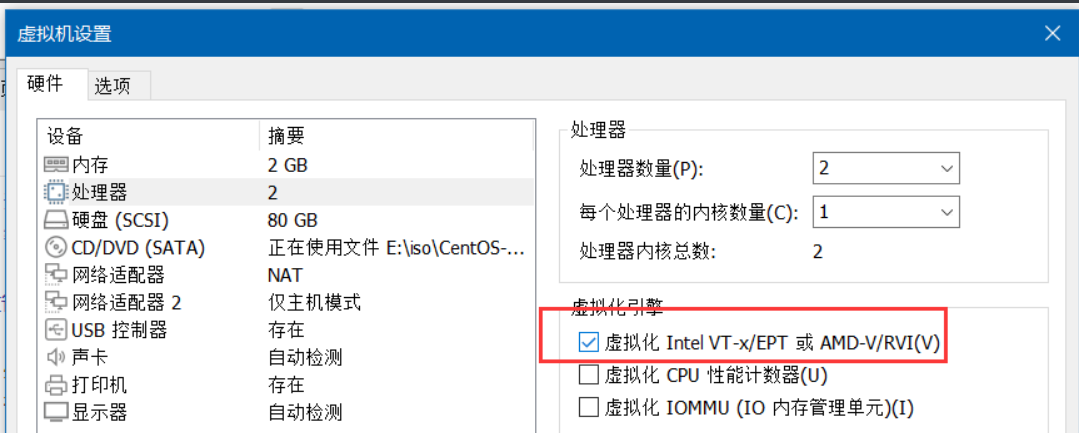
必须保证开虚拟化
5.2.1)部署nova-compute
[root@openstack-node1 ~]# yum -y install openstack-nova-compute
5.2.2)配置nova-compute
[root@openstack-node1 ~]# vim /etc/nova/nova.conf
[DEFAULT] # 在此模块下面添加下面4行信息
enabled_apis = osapi_compute,metadata
transport_url = rabbit://openstack:openstack123@openstack-vip.stangj.local:5672/
use_neutron = true
firewall_driver = nova.virt.firewall.NoopFirewallDriver
[api] # 在此模块下面添加下面一行信息
auth_strategy = keystone
[keystone_authtoken] # 在此模块下面添加下面9行信息
www_authenticate_uri = http://openstack-vip.stangj.local:5000/
auth_url = http://openstack-vip.stangj.local:5000/
memcached_servers = openstack-vip.stangj.local:11211
auth_type = password
project_domain_name = Default
user_domain_name = Default
project_name = service
username = nova
password = nova
[vnc] # 在此模块下面添加下面4行信息
enabled = true
server_listen = 0.0.0.0
server_proxyclient_address = 192.168.139.34
novncproxy_base_url = http://openstack-vip.stangj.local:6080/vnc_auto.html
[glance] # 在此模块下面添加下面一行信息
api_servers = http://openstack-vip.stangj.local:9292
[oslo_concurrency] # 在此模块下面添加下面一行信息
lock_path = /var/lib/nova/tmp
[placement] # 在此模块下面添加下面8行信息
region_name = RegionOne
project_domain_name = Default
project_name = service
auth_type = password
user_domain_name = Default
auth_url = http://openstack-vip.stangj.local:5000/v3
username = placement
password = placement
[libvirt] # 在此模块下面添加下面一行信息
virt_type = qemu
`检测是否可以用虚拟化`
[root@openstack-node1 ~]# egrep -c '(vmx|svm)' /proc/cpuinfo
2
5.2.3)配置hosts解析
[root@openstack-node1 ~]# echo '192.168.139.248 openstack-vip.stangj.local' >> /etc/hosts
5.2.4)启动服务
[root@openstack-node1 ~]# systemctl enable --now libvirtd.service openstack-nova-compute.service
`编写重启nova-compute脚本`
[root@openstack-node1 ~]# cat restart-nova.sh
#!/bin/bash
systemctl restart openstack-nova-compute.service
5.2.5)验证服务
[root@openstack-controller1 ~]# source admin.sh
[root@openstack-controller1 ~]# openstack compute service list --service nova-compute
+----+--------------+------------------------------+------+---------+-------+----------------------------+
| ID | Binary       | Host                         | Zone | Status  | State | Updated At                 |
+----+--------------+------------------------------+------+---------+-------+----------------------------+
| 11 | nova-compute | openstack-node1.stangj.local | nova | enabled | up    | 2023-12-15T15:45:35.000000 |
+----+--------------+------------------------------+------+---------+-------+----------------------------+
5.2.6)发现计算主机
-
如果加入新的node节点需要执行下面操作
[root@openstack-controller1 ~]# su -s /bin/sh -c "nova-manage cell_v2 discover_hosts --verbose" nova
Found 2 cell mappings.
Skipping cell0 since it does not contain hosts.
Getting computes from cell 'cell1': 36d692a9-11a3-4d1a-b321-2569f854c0d0
Checking host mapping for compute host 'openstack-node1.stangj.local': 6e9cc620-e41d-4907-9be0-9ada6b91cef1
Creating host mapping for compute host 'openstack-node1.stangj.local': 6e9cc620-e41d-4907-9be0-9ada6b91cef1
Found 1 unmapped computes in cell: 36d692a9-11a3-4d1a-b321-2569f854c0d0
5.2.7)配置自动发现计算节点
[root@openstack-controller1 ~]# vim /etc/nova/nova.conf
[scheduler] # 在此模块下面添加下面一行信息
discover_hosts_in_cells_interval = 300
`重启nova-conductor服务`
[root@openstack-controller1 ~]# bash restart_nova.sh
5.2.8)验证操作
[root@openstack-controller1 ~]# source admin.sh
[root@openstack-controller1 ~]# openstack compute service list
+----+----------------+------------------------------------+----------+---------+-------+----------------------------+
| ID | Binary         | Host                               | Zone     | Status  | State | Updated At                 |
+----+----------------+------------------------------------+----------+---------+-------+----------------------------+
|  1 | nova-conductor | openstack-controller1.stangj.local | internal | enabled | up    | 2023-12-15T15:53:20.000000 |
|  7 | nova-scheduler | openstack-controller1.stangj.local | internal | enabled | up    | 2023-12-15T15:53:22.000000 |
| 11 | nova-compute   | openstack-node1.stangj.local       | nova     | enabled | up    | 2023-12-15T15:53:25.000000 |
+----+----------------+------------------------------------+----------+---------+-------+----------------------------+
[root@openstack-controller1 ~]# openstack catalog list
+-----------+-----------+---------------------------------------------------------+
| Name      | Type      | Endpoints                                               |
+-----------+-----------+---------------------------------------------------------+
| keystone  | identity  | RegionOne                                               |
|           |           |   admin: http://openstack-vip.stangj.local:5000/v3/     |
|           |           | RegionOne                                               |
|           |           |   public: http://openstack-vip.stangj.local:5000/v3/    |
|           |           | RegionOne                                               |
|           |           |   internal: http://openstack-vip.stangj.local:5000/v3/  |
|           |           |                                                         |
| nova      | compute   | RegionOne                                               |
|           |           |   admin: http://openstack-vip.stangj.local:8774/v2.1    |
|           |           | RegionOne                                               |
|           |           |   internal: http://openstack-vip.stangj.local:8774/v2.1 |
|           |           | RegionOne                                               |
|           |           |   public: http://openstack-vip.stangj.local:8774/v2.1   |
|           |           |                                                         |
| placement | placement | RegionOne                                               |
|           |           |   public: http://openstack-vip.stangj.local:8778        |
|           |           | RegionOne                                               |
|           |           |   internal: http://openstack-vip.stangj.local:8778      |
|           |           | RegionOne                                               |
|           |           |   admin: http://openstack-vip.stangj.local:8778         |
|           |           |                                                         |
| glance    | image     | RegionOne                                               |
|           |           |   public: http://openstack-vip.stangj.local:9292        |
|           |           | RegionOne                                               |
|           |           |   public: http://openstack-vip.stangj.local:9292        |
|           |           | RegionOne                                               |
|           |           |   internal: http://openstack-vip.stangj.local:9292      |
|           |           | RegionOne                                               |
|           |           |   internal: http://openstack-vip.stangj.local:9292      |
|           |           | RegionOne                                               |
|           |           |   admin: http://openstack-vip.stangj.local:9292         |
|           |           |                                                         |
+-----------+-----------+---------------------------------------------------------+
[root@openstack-controller1 ~]# openstack image list
+--------------------------------------+--------------+--------+
| ID                                   | Name         | Status |
+--------------------------------------+--------------+--------+
| 060a4a23-5aa8-4176-8f31-0ccd318ebf2a | cirros-0.4.0 | active |
+--------------------------------------+--------------+--------+
[root@openstack-controller1 ~]# nova-status upgrade check
+--------------------------------+
| Upgrade Check Results          |
+--------------------------------+
| Check: Cells v2                |
| Result: Success                |
| Details: None                  |
+--------------------------------+
| Check: Placement API           |
| Result: Success                |
| Details: None                  |
+--------------------------------+
| Check: Ironic Flavor Migration |
| Result: Success                |
| Details: None                  |
+--------------------------------+
| Check: Cinder API              |
| Result: Success                |
| Details: None                  |
+--------------------------------+
6)安装neutron
6.1)安装neutron-controller节点
6.1.1)创建Nova数据库
[root@openstack-mysql ~]# mysql
MariaDB [(none)]> CREATE DATABASE neutron;
MariaDB [(none)]> GRANT ALL PRIVILEGES ON neutron.* TO 'neutron'@'%' IDENTIFIED BY 'neutron123';
6.1.2)配置用户和端点
[root@openstack-controller1 ~]# source admin.sh
[root@openstack-controller1 ~]# openstack user create --domain default --password-prompt neutron
User Password: # neutron
Repeat User Password: # neutron
+---------------------+----------------------------------+
| Field | Value |
+---------------------+----------------------------------+
| domain_id | default |
| enabled | True |
| id | 282317cd0bb74396a7a12dcdd96aeed0 |
| name | neutron |
| options | {} |
| password_expires_at | None |
+---------------------+----------------------------------+
`将 neutron 用户添加到具有 admin 角色的服务项目`
# 让neutron拥有service项目的admin权限`
[root@openstack-controller1 ~]# openstack role add --project service --user neutron admin
`创建service实体:neutron`
[root@openstack-controller1 ~]# openstack service create --name neutron --description "OpenStack Networking" network
+-------------+----------------------------------+
| Field | Value |
+-------------+----------------------------------+
| description | OpenStack Networking |
| enabled | True |
| id | e4ff8c65882a401a83e2203ce49daeaf |
| name | neutron |
| type | network |
+-------------+----------------------------------+
[root@openstack-controller1 ~]#
6.1.3)Create the Networking service API endpoints:
[root@openstack-controller1 ~]# openstack endpoint create --region RegionOne network public http://openstack-vip.stangj.local:9696
+--------------+----------------------------------------+
| Field        | Value                                  |
+--------------+----------------------------------------+
| enabled      | True                                   |
| id           | 970ca60adf5746299d48f7659d500809       |
| interface    | public                                 |
| region       | RegionOne                              |
| region_id    | RegionOne                              |
| service_id   | e4ff8c65882a401a83e2203ce49daeaf       |
| service_name | neutron                                |
| service_type | network                                |
| url          | http://openstack-vip.stangj.local:9696 |
+--------------+----------------------------------------+
[root@openstack-controller1 ~]# openstack endpoint create --region RegionOne network internal http://openstack-vip.stangj.local:9696
+--------------+----------------------------------------+
| Field        | Value                                  |
+--------------+----------------------------------------+
| enabled      | True                                   |
| id           | 4c5f5ffbba4a4c668377a86cfd4a2320       |
| interface    | internal                               |
| region       | RegionOne                              |
| region_id    | RegionOne                              |
| service_id   | e4ff8c65882a401a83e2203ce49daeaf       |
| service_name | neutron                                |
| service_type | network                                |
| url          | http://openstack-vip.stangj.local:9696 |
+--------------+----------------------------------------+
[root@openstack-controller1 ~]# openstack endpoint create --region RegionOne network internal http://openstack-vip.stangj.local:9696
+--------------+----------------------------------------+
| Field        | Value                                  |
+--------------+----------------------------------------+
| enabled      | True                                   |
| id           | a4faff28e8f146ac8c10835bca6d97bd       |
| interface    | internal                               |
| region       | RegionOne                              |
| region_id    | RegionOne                              |
| service_id   | e4ff8c65882a401a83e2203ce49daeaf       |
| service_name | neutron                                |
| service_type | network                                |
| url          | http://openstack-vip.stangj.local:9696 |
+--------------+----------------------------------------+
[root@openstack-controller1 ~]# openstack endpoint create --region RegionOne network admin http://openstack-vip.stangj.local:9696
+--------------+----------------------------------------+
| Field        | Value                                  |
+--------------+----------------------------------------+
| enabled      | True                                   |
| id           | d8c4e83eab66486983680b69520ca92a       |
| interface    | admin                                  |
| region       | RegionOne                              |
| region_id    | RegionOne                              |
| service_id   | e4ff8c65882a401a83e2203ce49daeaf       |
| service_name | neutron                                |
| service_type | network                                |
| url          | http://openstack-vip.stangj.local:9696 |
+--------------+----------------------------------------+
6.1.4)配置haproxy
[root@openstack-haproxy ~]# vim /etc/haproxy/haproxy.cfg
# 在最后一行添加下面4行内容
listen openstack-neutron-9696
  bind 192.168.139.248:9696
  mode tcp
  server 192.168.139.31 192.168.139.31:9696 check inter 3s fall 3 rise 5
[root@openstack-haproxy ~]# systemctl restart haproxy.service
[root@openstack-haproxy ~]# ss -tnl | grep 9696
LISTEN     0      128    192.168.139.248:9696                     *:*
6.1.5)部署neutron
[root@openstack-controller1 ~]# yum -y install openstack-neutron openstack-neutron-ml2 openstack-neutron-linuxbridge ebtables
6.1.6)配置neutron主配置文件
[root@openstack-controller1 ~]# vim /etc/neutron/neutron.conf
[database] # 在此模块下面添加下面这一行
connection = mysql+pymysql://neutron:neutron123@openstack-vip.stangj.local/neutron
[DEFAULT] # 在此模块下面添加下面这4行
core_plugin = ml2
service_plugins =
transport_url = rabbit://openstack:openstack123@openstack-vip.stangj.local
auth_strategy = keystone
notify_nova_on_port_status_changes = true
notify_nova_on_port_data_changes = true
[keystone_authtoken] # 在此模块下面添加下面这9行
www_authenticate_uri = http://openstack-vip.stangj.local:5000
auth_url = http://openstack-vip.stangj.local:5000
memcached_servers = openstack-vip.stangj.local:11211
auth_type = password
project_domain_name = default
user_domain_name = default
project_name = service
username = neutron
password = neutron
# 配置文件的最后添加下面9行
[nova]
auth_url = http://openstack-vip.stangj.local:5000
auth_type = password
project_domain_name = default
user_domain_name = default
region_name = RegionOne
project_name = service
username = nova
password = nova
[oslo_concurrency] # 在此模块下面添加下面这一行
lock_path = /var/lib/neutron/tmp
6.1.7)Configure the Modular Layer 2 (ML2) plug-in
-
可以从网站上获取完整的ml2_conf.ini
https://docs.openstack.org/newton/config-reference/networking/samples/ml2_conf.ini.html
[root@openstack-controller1 ~]# vim /etc/neutron/plugins/ml2/ml2_conf.ini
[ml2] # 在此模块下面添加下面这4行
type_drivers = flat,vlan
tenant_network_types =
mechanism_drivers = linuxbridge
extension_drivers = port_security
[ml2_type_flat] # 在此模块下面添加下面这一行
flat_networks = external
[securitygroup] # 在此模块下面添加下面这一行
enable_ipset = true
`最终配置信息`
[root@openstack-controller1 ~]# grep '^[a-Z\[]' /etc/neutron/plugins/ml2/ml2_conf.ini
[DEFAULT]
[ml2]
type_drivers = flat,vlan
tenant_network_types =
mechanism_drivers = linuxbridge
extension_drivers = port_security
[ml2_type_flat]
flat_networks = provider
[ml2_type_geneve]
[ml2_type_gre]
[ml2_type_vlan]
[ml2_type_vxlan]
[securitygroup]
enable_ipset = true
6.1.8)Configure the Linux bridge agent
-
可以从网站上获取完整的linuxbridge_agent.ini
https://docs.openstack.org/newton/config-reference/networking/samples/linuxbridge_agent.ini
[root@openstack-controller1 ~]# vim /etc/neutron/plugins/ml2/linuxbridge_agent.ini
[linux_bridge] # 在此模块下面添加下面这一行
physical_interface_mappings = external:eth0
[vxlan] # 在此模块下面添加下面这一行
enable_vxlan = false
[securitygroup] # 在此模块下面添加下面这2行
enable_security_group = true
firewall_driver = neutron.agent.linux.iptables_firewall.IptablesFirewallDriver
6.1.9)修改内核参数
[root@openstack-controller1 ~]# echo -e "net.bridge.bridge-nf-call-iptables = 1\nnet.bridge.bridge-nf-call-ip6tables = 1" >> /etc/sysctl.conf
[root@openstack-controller1 ~]# tail -2 /etc/sysctl.conf
net.bridge.bridge-nf-call-iptables = 1
net.bridge.bridge-nf-call-ip6tables = 1
`加载模块并让内核配置生效`
[root@openstack-controller1 ~]# modprobe br_netfilter
[root@openstack-controller1 ~]# sysctl -p
net.bridge.bridge-nf-call-iptables = 1
net.bridge.bridge-nf-call-ip6tables = 1
6.1.10)配置DHCP
[root@openstack-controller1 ~]# vim /etc/neutron/dhcp_agent.ini
[DEFAULT] # 在此模块下面添加下面这3行
interface_driver = linuxbridge
dhcp_driver = neutron.agent.linux.dhcp.Dnsmasq
enable_isolated_metadata = true
6.1.11)Configure the metadata agent
[root@openstack-controller1 ~]# vim /etc/neutron/metadata_agent.ini
[DEFAULT] # 在此模块下面添加下面这2行
nova_metadata_host = openstack-vip.stangj.local
metadata_proxy_shared_secret = stangj20231216
6.1.12)Configure the Compute service to use the Networking service
[root@openstack-controller1 ~]# vim /etc/nova/nova.conf
[neutron] # 在此模块下面添加下面这10行
auth_url = http://openstack-vip.stangj.local:5000
auth_type = password
project_domain_name = default
user_domain_name = default
region_name = RegionOne
project_name = service
username = neutron
password = neutron
service_metadata_proxy = true
metadata_proxy_shared_secret = stangj20231216
6.1.13)初始化数据库
[root@openstack-controller1 ~]# ln -s /etc/neutron/plugins/ml2/ml2_conf.ini /etc/neutron/plugin.ini
[root@openstack-controller1 ~]# su -s /bin/sh -c "neutron-db-manage --config-file /etc/neutron/neutron.conf --config-file /etc/neutron/plugins/ml2/ml2_conf.ini upgrade head" neutron
`验证数据库`
[root@openstack-controller1 ~]# mysql -uneutron -h192.168.139.248 -pneutron123 -e "use neutron;show tables"
+-----------------------------------------+
| Tables_in_neutron |
+-----------------------------------------+
| address_scopes |
| agents |
| alembic_version |
| allowedaddresspairs |
| arista_provisioned_nets |
...........................................
...........................................
| vcns_router_bindings |
| vips |
| vpnservices |
+-----------------------------------------+
6.1.14)重新启动nova-api API 服务
[root@openstack-controller1 ~]# systemctl restart openstack-nova-api.service
6.1.15)启动网络服务
[root@openstack-controller1 ~]# systemctl enable --now neutron-server.service \
  neutron-linuxbridge-agent.service neutron-dhcp-agent.service \
  neutron-metadata-agent.service
6.1.16)编制neutron的重启脚本
[root@openstack-controller1 ~]# vim restart_neutron.sh
#!/bin/bash
systemctl restart neutron-server.service \
  neutron-linuxbridge-agent.service neutron-dhcp-agent.service \
  neutron-metadata-agent.service
6.2)安装neutron_compute节点
6.2.1)安装相应服务
[root@openstack-node1 ~]# yum -y install openstack-neutron-linuxbridge ebtables ipset bridge-utils
6.2.2)修改配置
[root@openstack-node1 ~]# vim /etc/neutron/neutron.conf
[DEFAULT] # 在此模块下面添加下面这2行
transport_url = rabbit://openstack:openstack123@openstack-vip.stangj.local
auth_strategy = keystone
[keystone_authtoken] # 在此模块下面添加下面这9行
www_authenticate_uri = http://openstack-vip.stangj.local:5000
auth_url = http://openstack-vip.stangj.local:5000
memcached_servers = openstack-vip.stangj.local:11211
auth_type = password
project_domain_name = default
user_domain_name = default
project_name = service
username = neutron
password = neutron
[oslo_concurrency] # 在此模块下面添加下面这1行
lock_path = /var/lib/neutron/tmp
6.2.3)配置 Provider networks(bridge agent)
-
可以从网站上获取完整的linuxbridge_agent.ini
https://docs.openstack.org/newton/config-reference/networking/samples/linuxbridge_agent.ini
[root@openstack-node1 ~]# vim /etc/neutron/plugins/ml2/linuxbridge_agent.ini
[linux_bridge] # 在此模块下面添加下面这1行,,注意这个eth0看直接的主机网卡名自己的是ens33就写ens33
physical_interface_mappings = external:eth0
[vxlan] # 在此模块下面添加下面这1行
enable_vxlan = false
[securitygroup] # 在此模块下面添加下面这2行
enable_security_group = true
firewall_driver = neutron.agent.linux.iptables_firewall.IptablesFirewallDriver
6.2.4)修改内核参数
[root@openstack-node1 ~]# echo -e "net.bridge.bridge-nf-call-iptables = 1\nnet.bridge.bridge-nf-call-ip6tables = 1" >> /etc/sysctl.conf
[root@openstack-node1 ~]# tail -2 /etc/sysctl.conf
net.bridge.bridge-nf-call-iptables = 1
net.bridge.bridge-nf-call-ip6tables = 1
`加载模块并让内核配置生效`
[root@openstack-node1 ~]# modprobe br_netfilter
[root@openstack-node1 ~]# sysctl -p
net.bridge.bridge-nf-call-iptables = 1
net.bridge.bridge-nf-call-ip6tables = 1
6.2.5)Configure the Compute service to use the Networking service
[root@openstack-node1 ~]# vim /etc/nova/nova.conf
[neutron] # 在此模块下面添加下面这8行
auth_url = http://openstack-vip.stangj.local:5000
auth_type = password
project_domain_name = default
user_domain_name = default
region_name = RegionOne
project_name = service
username = neutron
password = neutron
6.2.6)启动neutron_compute
[root@openstack-node1 ~]# systemctl restart openstack-nova-compute.service
[root@openstack-node1 ~]# systemctl enable --now neutron-linuxbridge-agent.service
6.2.7)编写重启neutron_compute脚本
[root@openstack-node1 ~]# vim restart_neutron.sh
#!/bin/bash
systemctl restart neutron-linuxbridge-agent.service
6.3)验证服务
[root@openstack-controller1 ~]# openstack network agent list
+--------------------------------------+--------------------+------------------------------------+-------------------+-------+-------+---------------------------+
| ID                                   | Agent Type         | Host                               | Availability Zone | Alive | State | Binary                    |
+--------------------------------------+--------------------+------------------------------------+-------------------+-------+-------+---------------------------+
| 6d7ace9c-061c-45ba-834b-52f24585c452 | Linux bridge agent | openstack-controller1.stangj.local | None              | :-)   | UP    | neutron-linuxbridge-agent |
| 7babc5ac-d07d-4fe4-90ab-62775b4ef90b | Linux bridge agent | openstack-node1.stangj.local       | None              | :-)   | UP    | neutron-linuxbridge-agent |
| 83ad2332-8716-4a8f-b050-1daa3b22c3bf | DHCP agent         | openstack-controller1.stangj.local | nova              | :-)   | UP    | neutron-dhcp-agent        |
| afb7c427-89ba-4e91-bff2-604e97a5ca91 | Metadata agent     | openstack-controller1.stangj.local | None              | :-)   | UP    | neutron-metadata-agent    |
+--------------------------------------+--------------------+------------------------------------+-------------------+-------+-------+---------------------------+
[root@openstack-controller1 ~]# nova service-list
+--------------------------------------+----------------+------------------------------------+----------+---------+-------+----------------------------+-----------------+-------------+
| Id                                   | Binary         | Host                               | Zone     | Status  | State | Updated_at                 | Disabled Reason | Forced down |
+--------------------------------------+----------------+------------------------------------+----------+---------+-------+----------------------------+-----------------+-------------+
| 518a8c83-c6d4-451c-8943-fa55c593948c | nova-conductor | openstack-controller1.stangj.local | internal | enabled | up    | 2023-12-16T15:26:42.000000 | -               | False       |
| 9d9d1228-2096-4ca3-97a9-8b85133db7fa | nova-scheduler | openstack-controller1.stangj.local | internal | enabled | up    | 2023-12-16T15:26:41.000000 | -               | False       |
| a45e7eeb-1907-4ecf-a836-7ca69b588edf | nova-compute   | openstack-node1.stangj.local       | nova     | enabled | up    | 2023-12-16T15:26:41.000000 | -               | False       |
+--------------------------------------+----------------+------------------------------------+----------+---------+-------+----------------------------+-----------------+-------------+
7)创建测试实例
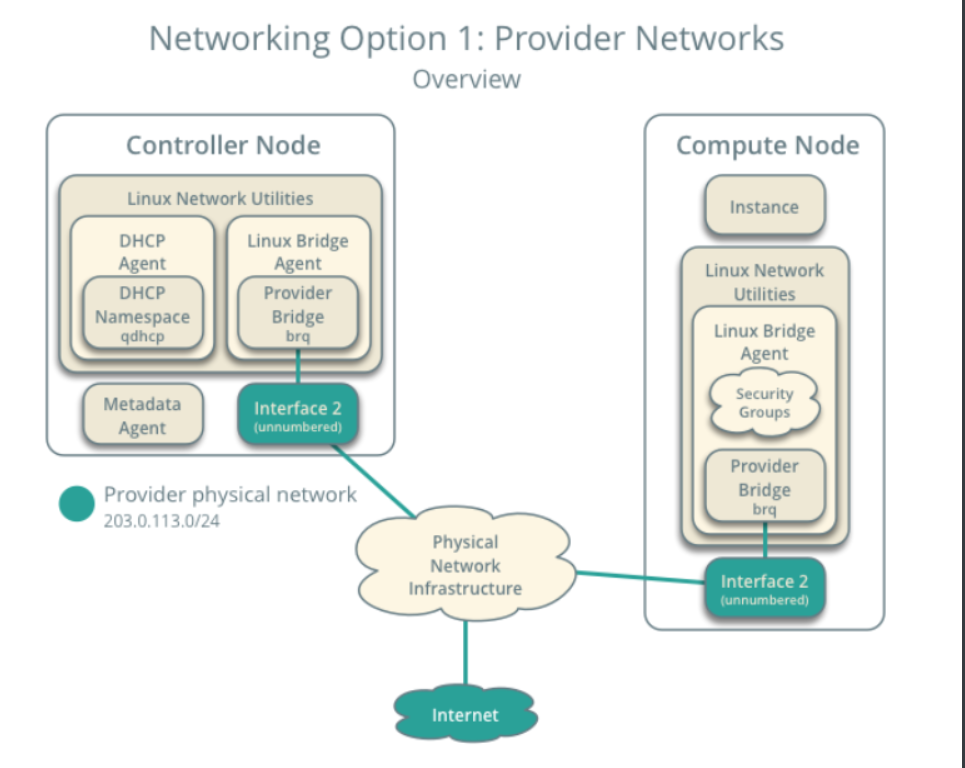
7.1)创建一个provider网络
[root@openstack-controller1 ~]# source admin.sh
[root@openstack-controller1 ~]# yum -y install bridge-utils
[root@openstack-controller1 ~]# openstack network create  --share --external \
                                         --provider-physical-network external \
                                         --provider-network-type flat external-nat
#####################第一个external表示创建一个共享网络并声明他是一个外部网络#######################
########第二个external表示创建连接的物理网络,因为我们上面neutron定义的物理网络名称为external########
############################第三个external-nat表示提供的桥接网络的名称############################
[root@openstack-controller1 ~]# openstack network list
+--------------------------------------+--------------+---------+
| ID                                   | Name         | Subnets |
+--------------------------------------+--------------+---------+
| f252f0d0-5650-48d1-be8f-4d8c8a7a103b | external-nat |         |
+--------------------------------------+--------------+---------+
7.2)创建一个子网
[root@openstack-controller1 ~]# openstack subnet create --network external-nat \
                       --allocation-pool start=192.168.139.100,end=192.168.139.200 \
                       --dns-nameserver 114.114.114.114 --gateway 192.168.139.2 \
                       --subnet-range 192.168.139.0/24 external-sub
############################创建external-nat的子网external-sub############################
`验证`
[root@openstack-controller1 ~]# brctl show
bridge name bridge id       STP enabled interfaces
brqf252f0d0-56      8000.000c29fa4bc4   no      eth0
                                               tap08f78267-82
[root@openstack-node1 ~]# brctl show
bridge name bridge id       STP enabled interfaces
brqf252f0d0-56      8000.000c29b864f7   no      eth0
                                               tap3ebdcf25-3a
####注意如果没有interfaces没有相应信息,可以通过:
#[root@openstack-controller1/node1 ~]# brctl addif brqf252f0d0-56 eth0 #这个命令强制把网桥指向eth0
7.3)创建虚拟机类型
[root@openstack-controller1 ~]# openstack flavor create --id 0 --vcpus 1 --ram 64 --disk 1 m1.nano
+----------------------------+---------+
| Field                      | Value   |
+----------------------------+---------+
| OS-FLV-DISABLED:disabled   | False   |
| OS-FLV-EXT-DATA:ephemeral  | 0       |
| disk                       | 1       |
| id                         | 0       |
| name                       | m1.nano |
| os-flavor-access:is_public | True    |
| properties                 |         |
| ram                        | 64      |
| rxtx_factor                | 1.0     |
| swap                       |         |
| vcpus                      | 1       |
+----------------------------+---------+
7.4)生成密钥对
[root@openstack-controller1 ~]# source admin.sh
[root@openstack-controller1 ~]# ssh-keygen -q -N ""
[root@openstack-controller1 ~]# openstack keypair create --public-key ~/.ssh/id_rsa.pub mykey
+-------------+-------------------------------------------------+
| Field       | Value                                           |
+-------------+-------------------------------------------------+
| fingerprint | ea:d2:d5:d2:6d:88:59:51:ee:75:77:ff:74:e2:44:eb |
| name        | mykey                                           |
| user_id     | 5c4b6243d95742799de0fc97ef119967                |
+-------------+-------------------------------------------------+
`验证`
[root@openstack-controller1 ~]# openstack keypair list
+-------+-------------------------------------------------+
| Name  | Fingerprint                                     |
+-------+-------------------------------------------------+
| mykey | ea:d2:d5:d2:6d:88:59:51:ee:75:77:ff:74:e2:44:eb |
+-------+-------------------------------------------------+
7.5)添加安全组规则
[root@openstack-controller1 ~]# openstack security group rule create --proto icmp default
`开始ssh`
[root@openstack-controller1 ~]# openstack security group rule create --proto tcp --dst-port 22 default
7.6)在provider network启动实例
7.6.1)前期验证
`验证有没有虚拟机类型`
[root@openstack-controller1 ~]# openstack flavor list
+----+---------+-----+------+-----------+-------+-----------+
| ID | Name    | RAM | Disk | Ephemeral | VCPUs | Is Public |
+----+---------+-----+------+-----------+-------+-----------+
| 0  | m1.nano |  64 |    1 |         0 |     1 | True      |
+----+---------+-----+------+-----------+-------+-----------+
`验证有没有镜像`
[root@openstack-controller1 ~]# openstack image list
+--------------------------------------+--------------+--------+
| ID                                   | Name         | Status |
+--------------------------------------+--------------+--------+
| 060a4a23-5aa8-4176-8f31-0ccd318ebf2a | cirros-0.4.0 | active |
+--------------------------------------+--------------+--------+
`验证有没有网络`
[root@openstack-controller1 ~]# openstack network list
+--------------------------------------+--------------+--------------------------------------+
| ID                                   | Name         | Subnets                              |
+--------------------------------------+--------------+--------------------------------------+
| f252f0d0-5650-48d1-be8f-4d8c8a7a103b | external-nat | f7506645-9107-40f8-990b-62f96ac0a589 |
+--------------------------------------+--------------+--------------------------------------+
`验证有没有安全组`
[root@openstack-controller1 ~]# openstack security group list
+--------------------------------------+---------+------------------------+----------------------------------+------+
| ID                                   | Name    | Description            | Project                          | Tags |
+--------------------------------------+---------+------------------------+----------------------------------+------+
| 78604af7-1d74-4737-8273-2367053e6c71 | default | Default security group | 227934ef1b5b44cc942a8e4f1f5f7695 | []   |
+--------------------------------------+---------+------------------------+----------------------------------+------+
7.6.2)创建虚拟机
[root@openstack-controller1 ~]# openstack server create --flavor m1.nano --image cirros-0.4.0 \
                             --nic net-id=f252f0d0-5650-48d1-be8f-4d8c8a7a103b --security-group default \
                             --key-name mykey linux-stj
#################################参数解释#######################################
###m1.nano:为虚拟机类型;
###cirros-0.4.0:为镜像;
###net-id=[网络ID=openstack network list列出来的ID];
###mykey:为ssh密钥对;
###default为默认的安全组;
###linux-stj为虚拟机名称
#############################################################################
7.6.3)验证虚拟机状态
[root@openstack-controller1 ~]# openstack server list
+--------------------------------------+-----------+--------+------------------------------+--------------+---------+
| ID                                   | Name      | Status | Networks                     | Image        | Flavor  |
+--------------------------------------+-----------+--------+------------------------------+--------------+---------+
| 310cf36c-5597-4411-a953-f7364e2b8f89 | linux-stj | ACTIVE | external-nat=192.168.139.140 | cirros-0.4.0 | m1.nano |
+--------------------------------------+-----------+--------+------------------------------+--------------+---------+
###一定要拿到IP地址 external-nat=*****
[root@openstack-controller1 ~]# ping 192.168.139.140
PING 192.168.139.140 (192.168.139.140) 56(84) bytes of data.
64 bytes from 192.168.139.140: icmp_seq=1 ttl=64 time=11.3 ms
7.6.4)使用虚拟控制台访问实例
[root@openstack-controller1 ~]# openstack console url show linux-stj
+-------+-----------------------------------------------------------------------------------------------------------+
| Field | Value                                                                                                     |
+-------+-----------------------------------------------------------------------------------------------------------+
| type  | novnc                                                                                                     |
| url   | http://openstack-vip.stangj.local:6080/vnc_auto.html?path=%3Ftoken%3Daf3747c8-60ff-4b18-aac3-52e5f58a51f7 |
+-------+-----------------------------------------------------------------------------------------------------------+
访问上面给的网址: http://openstack-vip.stangj.local:6080/vnc_auto.html?path=%3Ftoken%3Daf3747c8-60ff-4b18-aac3-52e5f58a51f7 |
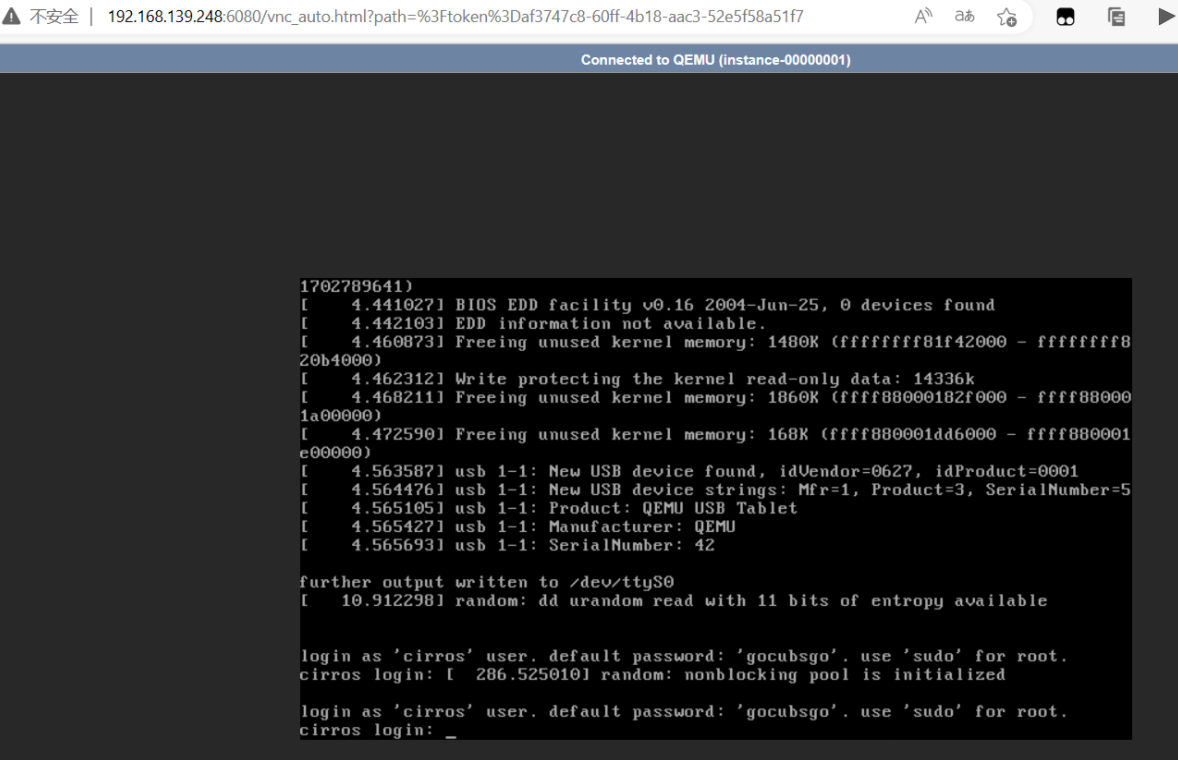

注意:如果你的访问出现下面这种情况
解决办法:
[root@openstack-node1 ~]# virsh capabilities
[root@openstack-node1 ~]# vim /etc/nova/nova.conf
# 搜索下面两个hw_machine_type/cpu_mode信息,并添加后面对应内容
hw_machine_type = x86_64=pc-i440fx-rhel7.2.0
cpu_mode = host-passthrough
`重启nova`
[root@openstack-node1 ~]# bash restart-nova.sh
######理论上还用重启openstack对应你要访问的虚拟机#######
如果没有出现上面的问题则不用修改nova配置文件操作