tomcat通过redis实现session共享
架构
| IP | |
|---|---|
| tomcat01 | 192.168.139.35 |
| tomcat02 | 192.168.139.99 |
| redis | 192.168.139.71 |
| nginx | 192.168.139.100 |
tomcat新增一个虚拟主机
-
两台tomcat服务器上操作
vim /apps/tomcat/conf/server.xml
# 新增下面这些内容
.......
<Host name="session.stj.com" appBase="/session"
unpackWARs="true" autoDeploy="true">
<Valve className="org.apache.catalina.valves.AccessLogValve" directory="logs"
prefix="localhost_access_log" suffix=".txt"
pattern="%h %l %u %t "%r" %s %b" />
</Host>
........
mkdir /session/ROOT -p
配置访问页面
-
两台tomcat服务器上操作
vim /session/ROOT/index.jsp
<%@ page import="java.util.*" %>
<!DOCTYPE html>
<html lang="en">
  <head>
    <meta charset="UTF-8">
  <title>tomcat test</title>
  </head>
   <body>
     <div>On <%=request.getServerName() %></div>
     <div><%=request.getLocalAddr() + ":" + request.getLocalPort() %></div>
     <div>SessionID = <span style="color:blue"><%=session.getId() %></span></div>
     <%=new Date()%>
   </body>
</html>
配置nginx反向代理
[root@nginx ~]# vim /etc/nginx/conf.d/www.conf
upstream tomcat {
    server 192.168.139.35:8080;
    server 192.168.139.99:8080;
}
server {
    listen  80;
    server_name session.stj.com;
    location ~* \.(jsp|do)$ {
       proxy_pass http://tomcat;
       proxy_set_header Host $host;
       proxy_set_header X-Forwarded-For $proxy_add_x_forwarded_for;
       proxy_set_header X-Real-IP $remote_addr;
    }
}
[root@nginx ~]# nginx -t
nginx: the configuration file /etc/nginx/nginx.conf syntax is ok
nginx: configuration file /etc/nginx/nginx.conf test is successful
[root@nginx ~]# nginx -s reload
访问浏览器
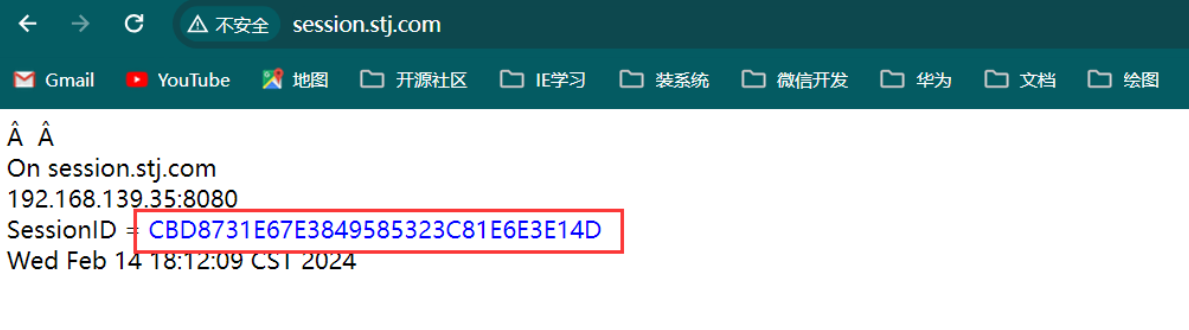
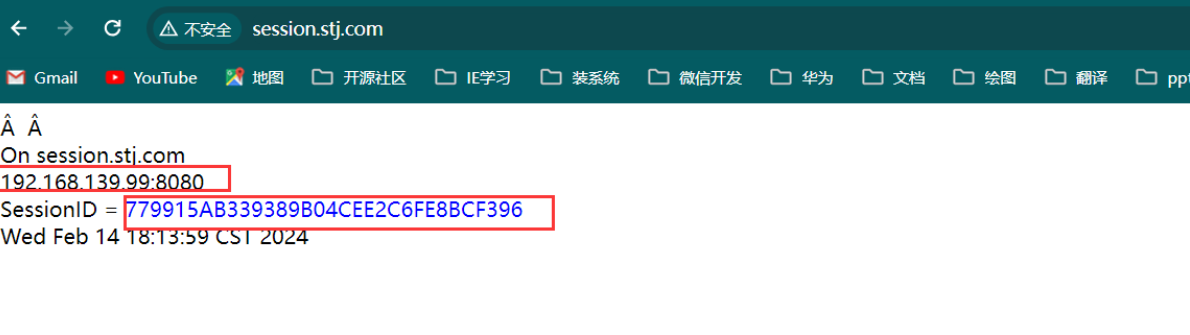
每次访问的sessionID不一样
配置redis
[root@redis ~]# vim /etc/redis.conf
.....
bind 192.168.139.71 127.0.0.1
.....
requirepass 123456
.....
[root@redis ~]# systemctl restart redis
[root@redis ~]# ss -tnl
State      Recv-Q Send-Q                    Local Address:Port                                   Peer Address:Port
LISTEN     0      128                           127.0.0.1:6379                                              *:*
LISTEN     0      128                      192.168.139.71:6379                                              *:*
[root@redis ~]# redis-cli
127.0.0.1:6379> AUTH 123456
OK
下载TomcatClusterRedisSessionManager
-
两台tomcat服务器上操作
https://github.com/ran-jit/tomcat-cluster-redis-session-manager
[root@tomcat02 src]# ll
total 900
-rw-r--r-- 1 root root 921429 Feb 14 18:27 tomcat-cluster-redis-session-manager.zip
[root@tomcat02 src]# unzip tomcat-cluster-redis-session-manager.zip
[root@tomcat02 src]# cd tomcat-cluster-redis-session-manager/lib/
[root@tomcat02 lib]# ll
total 1000
-rw-r--r-- 1 root root 129174 May 20  2019 commons-pool2-2.6.2.jar
-rw-r--r-- 1 root root 587115 May 20  2019 jedis-3.0.1.jar
-rw-r--r-- 1 root root  41139 May 20  2019 slf4j-api-1.7.26.jar
-rw-r--r-- 1 root root 255297 May 13  2020 tomcat-cluster-redis-session-manager-4.0.jar
[root@tomcat02 lib]# cp *.jar /apps/tomcat/lib/
[root@tomcat02 lib]# cp ../conf/redis-data-cache.properties /apps/tomcat/conf/
配置redis-data-cache.properties
-
两台tomcat服务器上操作
[root@tomcat02 ~]# grep '^[^#]' /apps/tomcat/conf/redis-data-cache.properties
redis.hosts=192.168.139.71:6379
redis.password=123456
redis.cluster.enabled=false
redis.sentinel.enabled=false
redis.sentinel.master=mymaster
redis.database=1
redis.timeout=2000
lb.sticky-session.enabled=false
session.persistent.policies=DEFAULT
redis.sso.timeout=0
配置context.xml
-
两台tomcat服务器上操作
[root@tomcat02 ~]# vim /apps/tomcat/conf/context.xml
# 添加前面下面内容
.......
  <Valve className="tomcat.request.session.redis.SessionHandlerValve" />
  <Manager className="tomcat.request.session.redis.SessionManager" />
</Context>
配置tomcatlconf/web.xml中的会话过期时间(分钟)
-
两台tomcat服务器上操作
[root@tomcat02 ~]# vim /apps/tomcat/conf/web.xml
....
    <session-config>
        <session-timeout>60</session-timeout>
    </session-config>
....
重启tomcat验证session共享
-
两台tomcat服务器上操作
systemctl restart tomcat.service
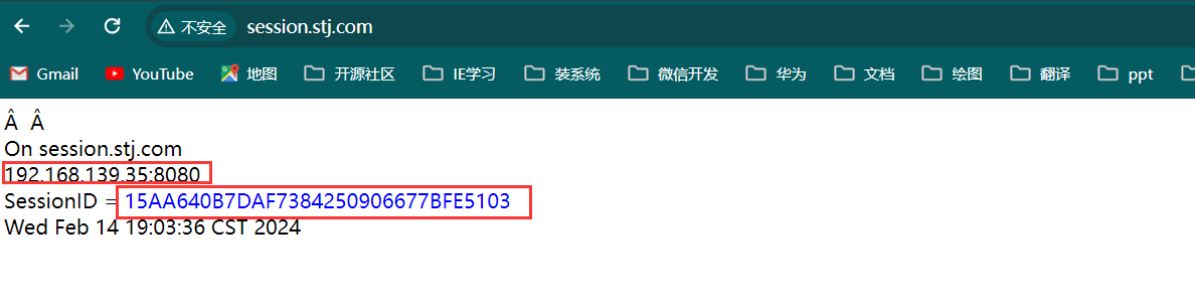
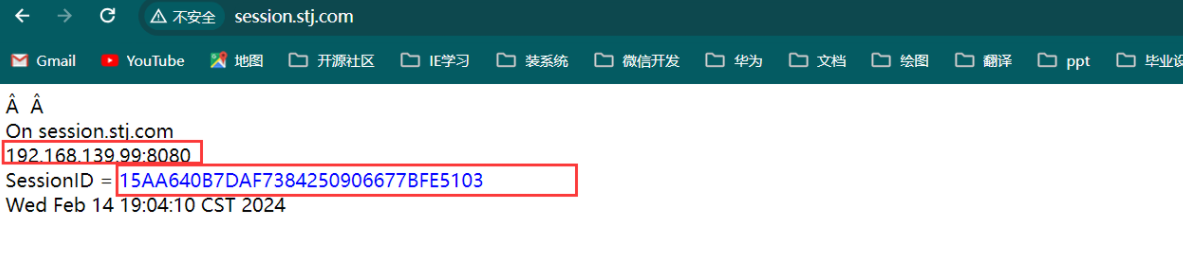
可以看到调度的后端服务器在改变,而SessionID保持不变

文章评论