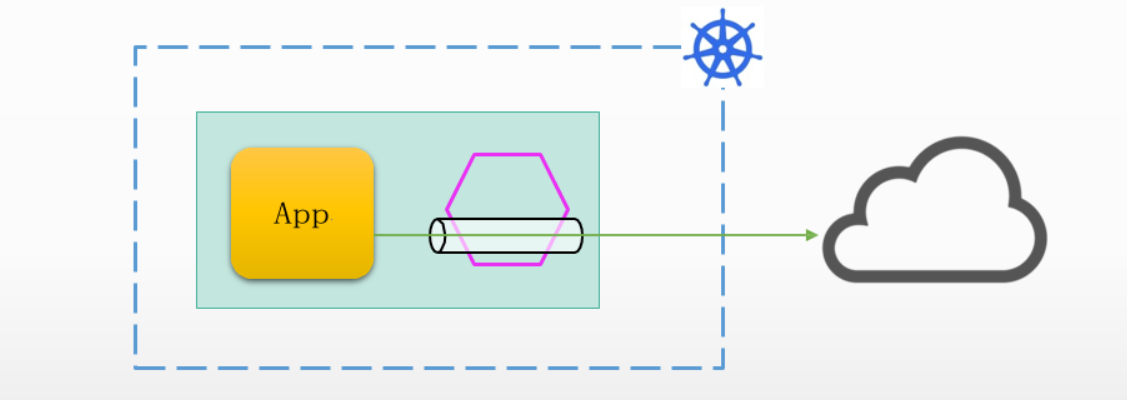
ServiceEntry 资源规范
ServiceEntry的功能
重定向和转发访问外部目标的流量,例如那些访问网格外部的传统服务的流量;
为外部的目标添加retry、timeout、fault injection和circuit breaker等一类的功能;
将VM(Virtual Machine)添加至网格中,从而能够在VM上运行网格的服务;
将不同集群中的服务添加至网格中,从而在Kubernetes上配置多集群的Istio网格;
ServiceEntry用于将未能自动添加至网格中的服务,以手动形式添加至网格中,以使得网格内的自动发现机制能够访问或路由到这些服务
未能自动添加至网格中的服务的类型
网格外部的服务
运行于Kubernetes上,但却非为Istio网格管理的名称空间中的Pod上,或者是Kubernetes集群外部的VM或裸服务上
在ServiceEntry中,这类服务称为MESH_EXTERNAL
位于网格内部但自身并未注册于Istio注册表的服务,也能够手动添加至Istio的内部的服务注册表中
运行于Istio网格内部,但未能自动注册到Istio注册表中
在ServiceEntry中,这类服务称为MESH_INTERNAL
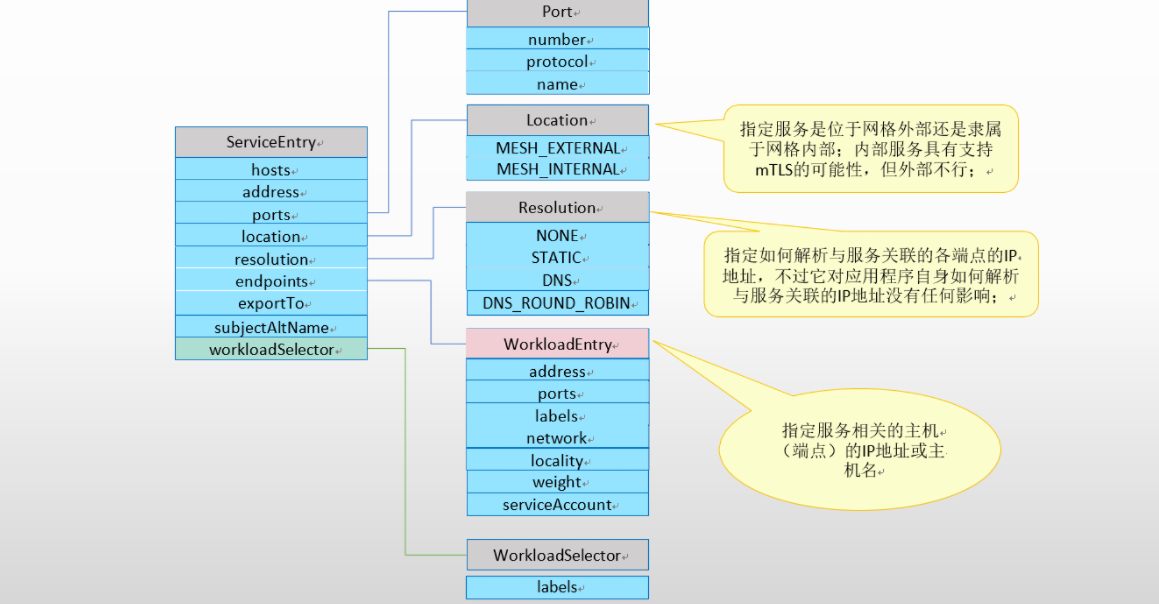
配置示例
 请求路径(给予版本路由)
                                                                               192.168.139.201
 client(pod)  --> client.envoy --> (外部服务) nginx.stangj.com(ServiceEntry)  192.168.139.202
                                                                               192.168.139.203
前期准备
通过docker-compose部署3个nginx服务
root@ubuntu2204-4:~/Deploy-Nginx# tree
.
├── docker-compose.yml
└── html
├── nginx2501
│ └── index.html
├── nginx2502
│ └── index.html
└── nginx2601
└── index.html
root@ubuntu2204-4:~/Deploy-Nginx# ip addr show eth0
2: eth0: <BROADCAST,MULTICAST,UP,LOWER_UP> mtu 1500 qdisc fq_codel state UP group default qlen 1000
link/ether 00:0c:29:1b:a8:91 brd ff:ff:ff:ff:ff:ff
altname enp2s1
altname ens33
inet 192.168.139.100/24 brd 192.168.139.255 scope global eth0
valid_lft forever preferred_lft forever
inet 192.168.139.201/24 brd 192.168.139.255 scope global secondary eth0
valid_lft forever preferred_lft forever
inet 192.168.139.202/24 brd 192.168.139.255 scope global secondary eth0
valid_lft forever preferred_lft forever
inet 192.168.139.203/24 brd 192.168.139.255 scope global secondary eth0
valid_lft forever preferred_lft forever
inet6 fe80::20c:29ff:fe1b:a891/64 scope link
valid_lft forever preferred_lft forever
root@ubuntu2204-4:~/Deploy-Nginx# cat docker-compose.yml
version: '3.3'
services:
nginx2501:
image: nginx:1.25-alpine
volumes:
- ./html/nginx2501:/usr/share/nginx/html/
networks:
nginx_net:
ipv4_address: 172.31.201.11
aliases:
- nginx
expose:
- "80"
ports:
- "192.168.139.201:8091:80"
nginx2502:
image: nginx:1.25-alpine
volumes:
- ./html/nginx2502:/usr/share/nginx/html/
networks:
nginx_net:
ipv4_address: 172.31.201.12
aliases:
- nginx
expose:
- "80"
ports:
- "192.168.139.202:8091:80"
nginx2601:
image: nginx:1.26-alpine
volumes:
- ./html/nginx2601:/usr/share/nginx/html/
networks:
nginx_net:
ipv4_address: 172.31.201.13
aliases:
- nginx
- canary
expose:
- "80"
ports:
- "192.168.139.203:8091:80"
networks:
nginx_net:
driver: bridge
ipam:
config:
- subnet: 172.31.201.0/24
`编排服务`
root@ubuntu2204-4:~/Deploy-Nginx# docker-compose up -d
k8s部署访问客户端
# cat deployment-client.yaml
apiVersion: apps/v1
kind: Deployment
metadata:
labels:
app: client
name: client
spec:
replicas: 1
selector:
matchLabels:
app: client
version: v1.2
template:
metadata:
labels:
app: client
version: v1.2
spec:
hostAliases: # 在容器的hosts 文件中添加 192.168.139.201 nginx.stangj.com nginx 解析
- hostnames: ["nginx.stangj.com", "nginx"]
ip: '192.168.139.201'
containers:
- image: ikubernetes/admin-box:v1.2
name: admin-box
command: ['/bin/sh', '-c', 'sleep INFINITE']
---
apiVersion: v1
kind: Service
metadata:
labels:
app: client
name: client
spec:
ports:
- name: http-80
appProtocol: http
port: 80
protocol: TCP
targetPort: 80
selector:
app: client
version: v1.2
type: ClusterIP
`服务部署`
# kubectl apply -f deployment-client.yaml
部署治理外部服务的 serviceentry
# cat serviceentry-nginx.yaml
apiVersion: networking.istio.io/v1
kind: ServiceEntry
metadata:
name: nginx-external
spec:
hosts:
- nginx.stangj.com
- nginx
addresses:
- "192.168.139.201"
- "192.168.139.202"
- "192.168.139.203"
# Service Port
ports:
- number: 8091
name: http
protocol: HTTP
location: MESH_EXTERNAL
resolution: STATIC
endpoints:
- address: "192.168.139.201"
ports:
http: 8091
- address: "192.168.139.202"
ports:
http: 8091
- address: "192.168.139.203"
ports:
http: 8091
# cat destinationrule-nginx.yaml
apiVersion: networking.istio.io/v1
kind: DestinationRule
metadata:
name: nginx-external
spec:
host: nginx.stangj.com
trafficPolicy:
loadBalancer:
consistentHash:
httpHeaderName: x-user
connectionPool:
tcp:
maxConnections: 10000
connectTimeout: 10ms
tcpKeepalive:
time: 7200s
interval: 75s
http:
http2MaxRequests: 1000
maxRequestsPerConnection: 10
outlierDetection:
maxEjectionPercent: 50
consecutive5xxErrors: 5
interval: 2m
baseEjectionTime: 1m
minHealthPercent: 40
# cat virtualservice-nginx.yaml
apiVersion: networking.istio.io/v1
kind: VirtualService
metadata:
name: nginx-external
spec:
hosts:
- nginx.stangj.com
http:
- name: falut-injection
match:
- headers:
X-Testing:
exact: "true"
route:
- destination:
host: nginx.stangj.com
fault:
delay:
percentage:
value: 5
fixedDelay: 2s
abort:
percentage:
value: 5
httpStatus: 555
- name: nginx-external
route:
- destination:
host: nginx.stangj.com
# kubectl apply -f serviceentry-nginx.yaml -f destinationrule-nginx.yaml -f virtualservice-nginx.yaml
root@k8s-master01:~# istioctl pc clusters client-8c59875f9-ggsgb | grep 'nginx.stangj.com'
nginx.stangj.com 8091 - outbound EDS
访问测试
root@client-8c59875f9-ggsgb # while true; do curl nginx.stangj.com:8091;sleep 1 ;done
<title>nginx.stangj.com</title>
Nginx 2501 ~~
<title>nginx.stangj.com</title>
Nginx 2502 ~~
<title>nginx.stangj.com</title>
Nginx 2601 ~~
<title>nginx.stangj.com</title>
Nginx 2502 ~~
root@client-8c59875f9-ggsgb # while true; do curl -I -H 'x-testing: true' nginx.stangj.com:8091;sleep 1 ;done
HTTP/1.1 200 OK
server: envoy
date: Sun, 29 Dec 2024 14:26:43 GMT
content-type: text/html
content-length: 46
last-modified: Sun, 29 Dec 2024 14:04:13 GMT
etag: "677156dd-2e"
accept-ranges: bytes
x-envoy-upstream-service-time: 0
HTTP/1.1 555 Unknown # 故障 555
content-length: 18
content-type: text/plain
date: Sun, 29 Dec 2024 14:26:44 GMT
server: envoy
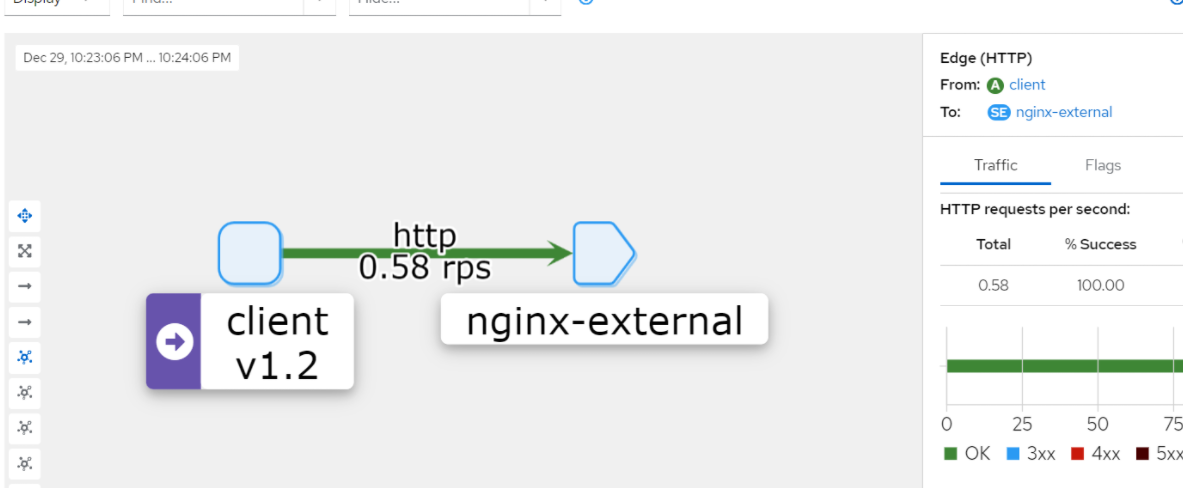
WorkloadEntry资源规范
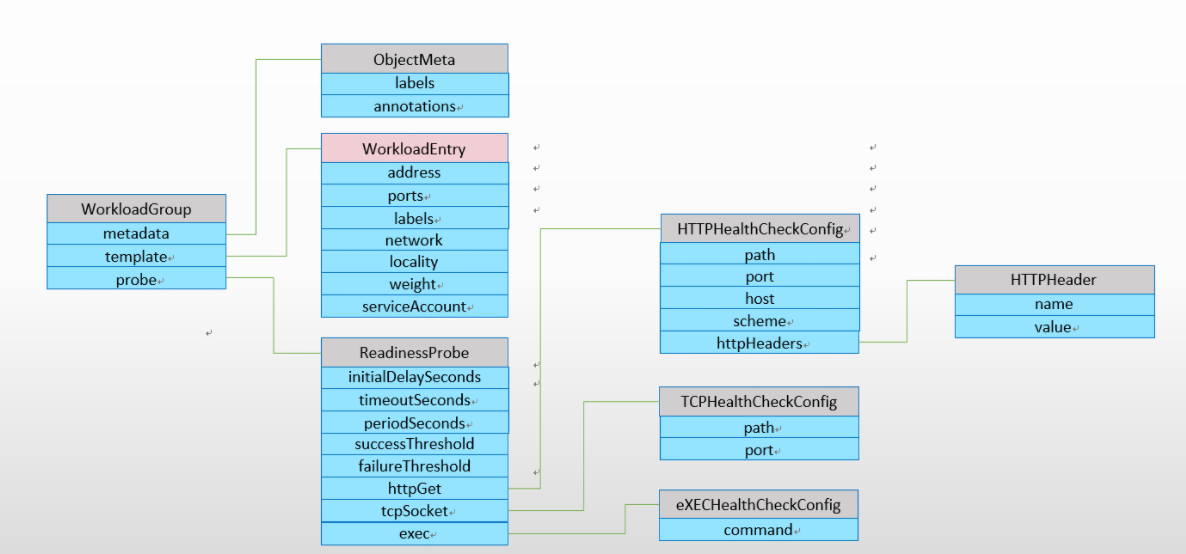
部署示例1
`定义workloadentry`
# cat 01-workloadentry-nginx.yaml
apiVersion: networking.istio.io/v1
kind: WorkloadEntry
metadata:
name: workload-nginx2501
labels:
version: v1.25
spec:
address: "192.168.139.201"
ports:
http: 8091
labels:
app: nginx
version: v1.25
instance-id: Nginx2501
---
apiVersion: networking.istio.io/v1
kind: WorkloadEntry
metadata:
name: workload-nginx2502
labels:
version: v1.25
spec:
address: "192.168.139.202"
ports:
http: 8091
labels:
app: nginx
version: v1.25
instance-id: Nginx2502
---
apiVersion: networking.istio.io/v1
kind: WorkloadEntry
metadata:
name: workload-nginx2601
labels:
version: v1.26
spec:
address: "192.168.139.203"
ports:
http: 8091
labels:
app: nginx
version: v1.26
instance-id: Nginx2601
`定义 serviceentry 通过标签匹配 workloadentry`
# cat 02-serviceentry-nginx.yaml
apiVersion: networking.istio.io/v1
kind: ServiceEntry
metadata:
name: nginx-external
spec:
hosts:
- nginx.stangj.com
ports:
- number: 80 # 访问 80 转发到后端 8091 ,就像 k8s 的 service 定义的 Port 和 targetPort
name: http
protocol: HTTP
targetPort: 8091
location: MESH_EXTERNAL
# NONE, STATIC, DNS, DNS_ROUND_ROBIN
resolution: STATIC
workloadSelector: # 标签匹配 workloadentry
labels:
app: nginx
# cat 03-destinationrule-nginx.yaml
apiVersion: networking.istio.io/v1
kind: DestinationRule
metadata:
name: nginx-external
spec:
host: nginx.stangj.com
trafficPolicy:
loadBalancer:
simple: RANDOM
connectionPool:
tcp:
maxConnections: 10000
connectTimeout: 10ms
tcpKeepalive:
time: 7200s
interval: 75s
http:
http2MaxRequests: 1000
maxRequestsPerConnection: 10
outlierDetection:
maxEjectionPercent: 50
consecutive5xxErrors: 5
interval: 2m
baseEjectionTime: 1m
minHealthPercent: 40
# cat 04-virtualservice-nginx.yaml
apiVersion: networking.istio.io/v1
kind: VirtualService
metadata:
name: nginx-external
spec:
hosts:
- nginx.stangj.com
http:
- name: falut-injection
route:
- destination:
host: nginx.stangj.com
fault:
delay:
percentage:
value: 5
fixedDelay: 2s
abort:
percentage:
value: 5
httpStatus: 555
~ # kubectl apply -f . # 启用所有配置
访问测试
 # 不用在加 8091 端口 直接通过 80 即可 在 ServiceEntry 有一个 80 转 8091 的配置
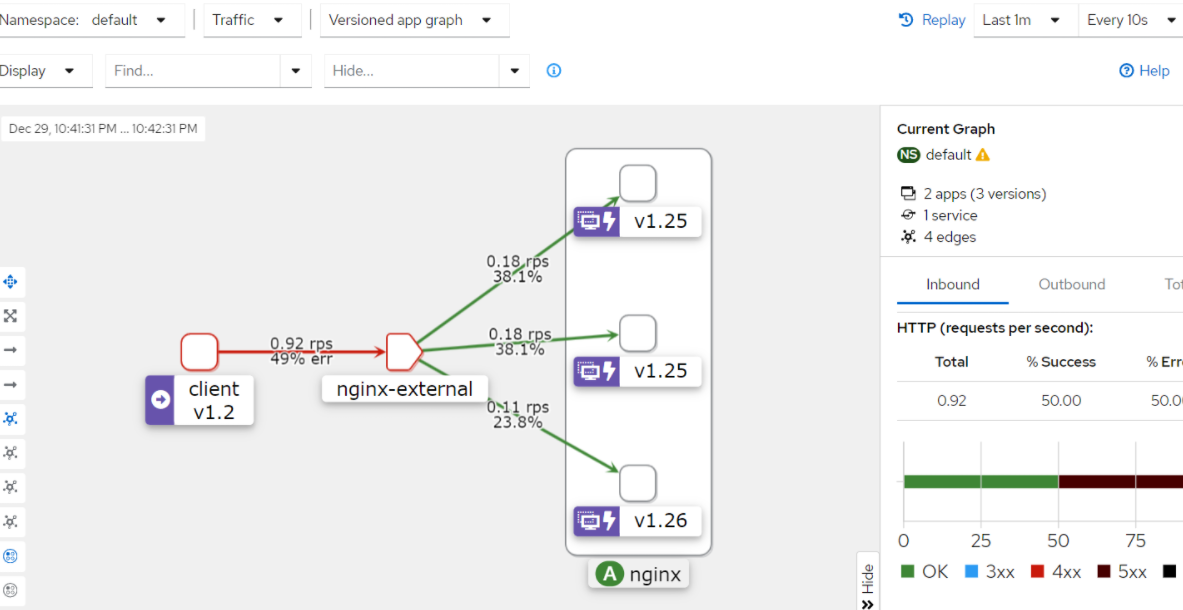
 root@client-8c59875f9-ggsgb # while true; do curl  nginx.stangj.com;sleep 1 ;done
 <title>nginx.stangj.com</title>
 Nginx 2601 ~~
 <title>nginx.stangj.com</title>
 Nginx 2601 ~~
 <title>nginx.stangj.com</title>
 Nginx 2502 ~~
 <title>nginx.stangj.com</title>
 Nginx 2502 ~~
 <title>nginx.stangj.com</title>
 Nginx 2501 ~~
 .....
部署示例2(给予subset)
# cat 01-workloadentry-nginx.yaml
apiVersion: networking.istio.io/v1
kind: WorkloadEntry
metadata:
name: workload-nginx2501
spec:
address: "192.168.139.201"
ports:
http: 8091
labels:
app: nginx
version: "v1.25"
instance-id: Nginx2501
---
apiVersion: networking.istio.io/v1
kind: WorkloadEntry
metadata:
name: workload-nginx2502
spec:
address: "192.168.139.202"
ports:
http: 8091
labels:
app: nginx
version: "v1.25"
instance-id: Nginx2502
---
apiVersion: networking.istio.io/v1
kind: WorkloadEntry
metadata:
name: workload-nginx2601
spec:
address: "192.168.139.203"
ports:
http: 8091
labels:
app: nginx
version: "v1.26"
instance-id: Nginx2601
# cat 02-serviceentry-nginx.yaml
---
apiVersion: networking.istio.io/v1
kind: ServiceEntry
metadata:
name: nginx-external
spec:
hosts:
- nginx.stangj.com
ports:
- number: 80
name: http
protocol: HTTP
targetPort: 8091
location: MESH_EXTERNAL
resolution: STATIC
workloadSelector:
labels:
app: nginx
# cat 03-destinationrule-subsets.yaml
apiVersion: networking.istio.io/v1
kind: DestinationRule
metadata:
name: nginx-external
spec:
host: nginx.stangj.com
trafficPolicy:
loadBalancer:
simple: RANDOM
connectionPool:
tcp:
maxConnections: 10000
connectTimeout: 10ms
tcpKeepalive:
time: 7200s
interval: 75s
http:
http2MaxRequests: 1000
maxRequestsPerConnection: 10
outlierDetection:
maxEjectionPercent: 50
consecutive5xxErrors: 5
interval: 2m
baseEjectionTime: 1m
minHealthPercent: 40
subsets:
- name: v25
labels:
version: "v1.25"
- name: v26
labels:
version: "v1.26"
# cat 04-virtualservice-weighted-based-routing.yaml # 给予权重
apiVersion: networking.istio.io/v1
kind: VirtualService
metadata:
name: nginx-external
spec:
hosts:
- nginx.stangj.com
http:
- name: default
route:
- destination:
host: nginx.stangj.com
subset: v26
weight: 30
- destination:
host: nginx.stangj.com
subset: v25
weight: 70
# cat 05-virtualservice-headers-based-routing.yaml # 给予 headers 头
apiVersion: networking.istio.io/v1
kind: VirtualService
metadata:
name: nginx-external
spec:
hosts:
- nginx.stangj.com
http:
- name: falut-injection
match:
- headers:
x-canary:
exact: "true"
route:
- destination:
host: nginx.stangj.com
subset: v26
fault:
delay:
percentage:
value: 5
fixedDelay: 2s
- name: default
route:
- destination:
host: nginx.stangj.com
subset: v25
fault:
abort:
percentage:
value: 5
httpStatus: 555
`部署给予权重`
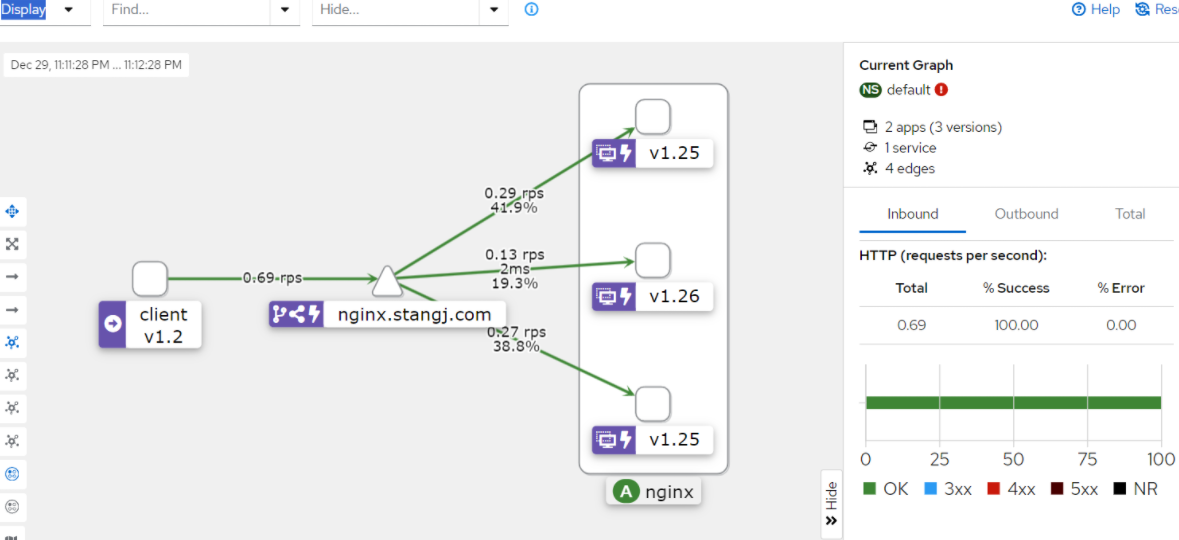
# kubectl apply -f 01-workloadentry-nginx.yaml -f 02-serviceentry-nginx.yaml -f 03-destinationrule-subsets.yaml -f 04-virtualservice-weighted-based-routing.yaml
访问测试
root@client-8c59875f9-ggsgb # while true; do curl nginx.stangj.com; sleep 1 ;done
<title>nginx.stangj.com</title>
Nginx 2501 ~~
<title>nginx.stangj.com</title>
Nginx 2601 ~~
<title>nginx.stangj.com</title>
Nginx 2601 ~~
<title>nginx.stangj.com</title>
Nginx 2601 ~~
<title>nginx.stangj.com</title>
Nginx 2502 ~~
<title>nginx.stangj.com</title>
Nginx 2502 ~~
<title>nginx.stangj.com</title>
Nginx 2501 ~~
<title>nginx.stangj.com</title>
Nginx 2501 ~~
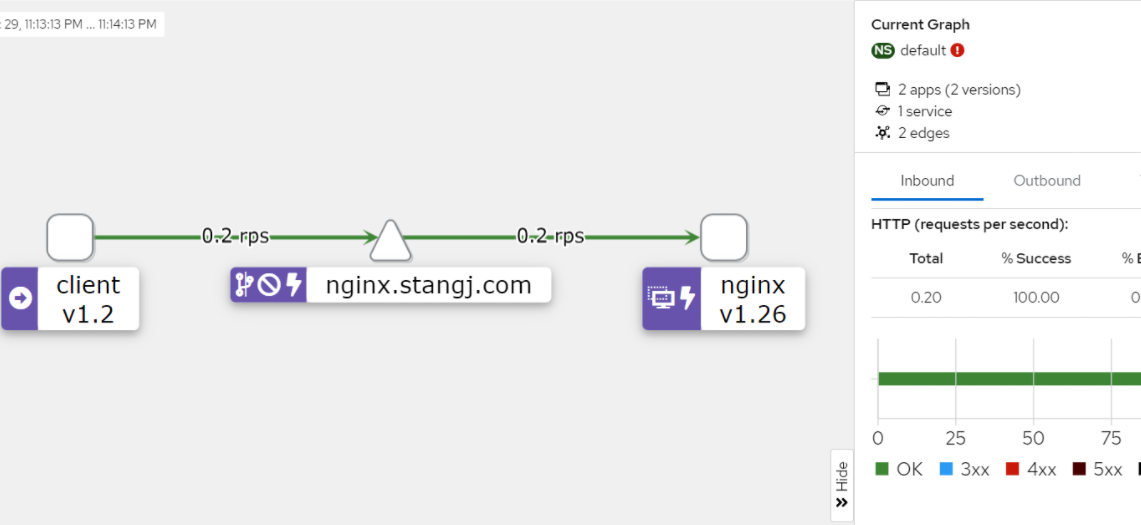
 # kubectl apply -f 05-virtualservice-headers-based-routing.yaml
 root@client-8c59875f9-ggsgb # while true; do curl -H 'x-canary: true'  nginx.stangj.com; sleep 1 ;done
 <title>nginx.stangj.com</title>
 Nginx 2601 ~~
 <title>nginx.stangj.com</title>
 Nginx 2601 ~~
 <title>nginx.stangj.com</title>
 Nginx 2601 ~~
 <title>nginx.stangj.com</title>
 Nginx 2601 ~~
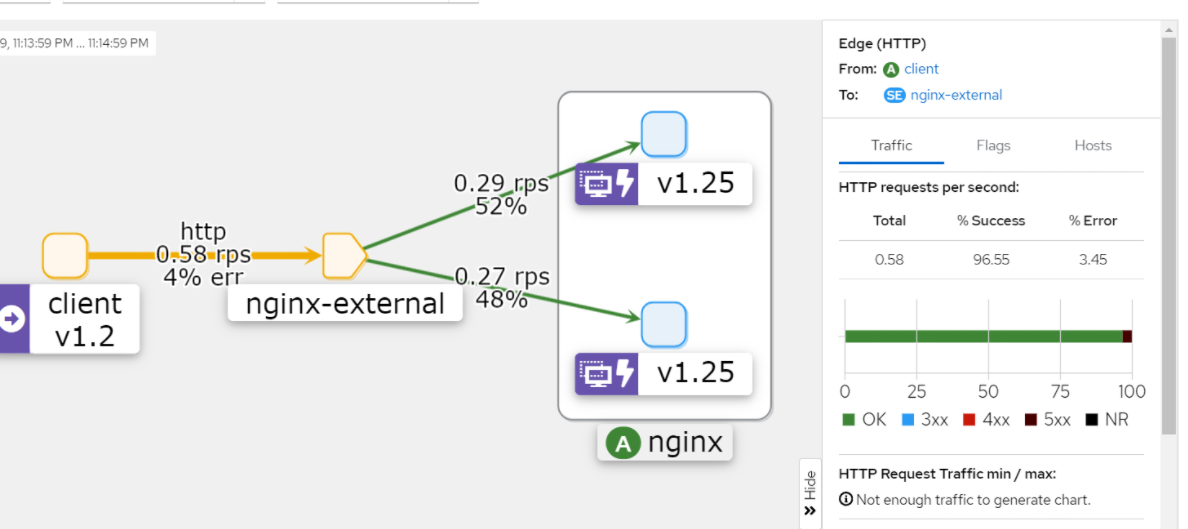
 root@client-8c59875f9-ggsgb # while true; do curl nginx.stangj.com; sleep 1 ;done
 root@client-8c59875f9-ggsgb # while true; do curl nginx.stangj.com; sleep 1 ;done
 <title>nginx.stangj.com</title>
 Nginx 2502 ~~
 <title>nginx.stangj.com</title>
 Nginx 2501 ~~
 <title>nginx.stangj.com</title>
 Nginx 2502 ~~
 <title>nginx.stangj.com</title>
 Nginx 2501 ~~
 <title>nginx.stangj.com</title>
 Nginx 2502 ~~
 fault filter abort<title>nginx.stangj.com</title>
 Nginx 2501 ~~
 <title>nginx.stangj.com</title>
 Nginx 2502 ~~
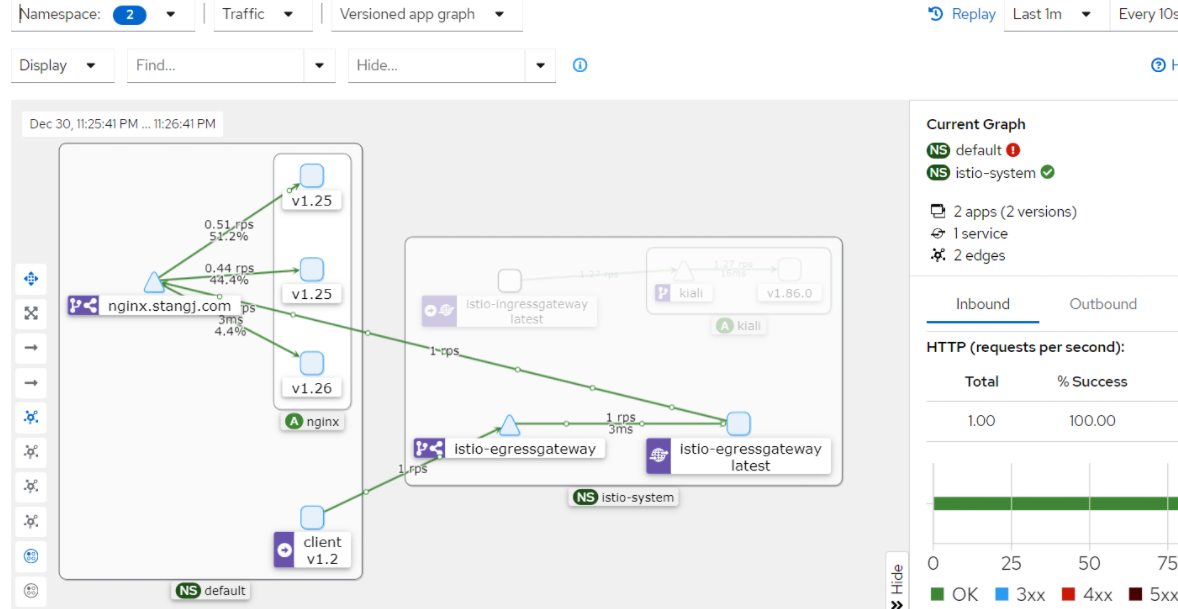
EgressGateway
 请求路径(给予版本路由)
                                                                                                 192.168.139.201
 client(pod)  --> client.envoy --> egress-gateway -->(外部服务) nginx.stangj.com(ServiceEntry)  192.168.139.202
                                                                                                 192.168.139.203
部署示例
`删除前面的所有配置`
# kubectl delete -f .
# cat 01-workloadentry-nginx.yaml
apiVersion: networking.istio.io/v1
kind: WorkloadEntry
metadata:
name: workload-nginx2501
spec:
address: "192.168.139.201"
ports:
http: 8091
labels:
app: nginx
version: "v1.25"
instance-id: Nginx2501
---
apiVersion: networking.istio.io/v1
kind: WorkloadEntry
metadata:
name: workload-nginx2502
spec:
address: "192.168.139.202"
ports:
http: 8091
labels:
app: nginx
version: "v1.25"
instance-id: Nginx2502
---
apiVersion: networking.istio.io/v1
kind: WorkloadEntry
metadata:
name: workload-nginx2601
spec:
address: "192.168.139.203"
ports:
http: 8091
labels:
app: nginx
version: "v1.26"
instance-id: Nginx2601
# cat 02-serviceentry-nginx.yaml
---
apiVersion: networking.istio.io/v1
kind: ServiceEntry
metadata:
name: nginx-external
spec:
hosts:
- nginx.stangj.com
ports:
- number: 80
name: http
protocol: HTTP
targetPort: 8091
location: MESH_EXTERNAL
resolution: STATIC
workloadSelector:
labels:
app: nginx
# cat 03-destinationrule-subsets.yaml
apiVersion: networking.istio.io/v1
kind: DestinationRule
metadata:
name: nginx-external
spec:
host: nginx.stangj.com
trafficPolicy:
loadBalancer:
simple: RANDOM
connectionPool:
tcp:
maxConnections: 10000
connectTimeout: 10ms
tcpKeepalive:
time: 7200s
interval: 75s
http:
http2MaxRequests: 1000
maxRequestsPerConnection: 10
outlierDetection:
maxEjectionPercent: 50
consecutive5xxErrors: 5
interval: 2m
baseEjectionTime: 1m
minHealthPercent: 40
subsets:
- name: v25
labels:
version: "v1.25"
- name: v26
labels:
version: "v1.26"
# cat 04-gateway-egress.yaml
apiVersion: networking.istio.io/v1
kind: Gateway
metadata:
name: egress-gateway
spec:
selector:
app: istio-egressgateway
servers:
- port:
number: 80
name: http
protocol: HTTP
hosts:
- "*"
# cat 05-virtualservice-weighted-based-routing.yaml
apiVersion: networking.istio.io/v1
kind: VirtualService
metadata:
name: nginx-external
spec:
hosts:
- nginx.stangj.com
gateways:
- egress-gateway
- mesh
http:
- match:
- gateways:
- mesh
route:
- destination:
host: istio-egressgateway.istio-system.svc.cluster.local
- match:
- gateways:
- egress-gateway
route:
- destination:
host: nginx.stangj.com
subset: v26
weight: 5
- destination:
host: nginx.stangj.com
subset: v25
weight: 95
# kubectl apply -f 01-workloadentry-nginx.yaml -f 02-serviceentry-nginx.yaml -f 03-destinationrule-subsets.yaml -f 04-gateway-egress.yaml -f 05-virtualservice-weighted-based-routing.yaml
访问测试
 root@client-8c59875f9-ggsgb # while true; do curl nginx.stangj.com; sleep 1 ;done
 <title>nginx.stangj.com</title>
 Nginx 2502 ~~
 <title>nginx.stangj.com</title>
 Nginx 2502 ~~
 <title>nginx.stangj.com</title>
 Nginx 2501 ~~
 <title>nginx.stangj.com</title>
 Nginx 2501 ~~
 <title>nginx.stangj.com</title>
 Nginx 2502 ~~
 <title>nginx.stangj.com</title>
 Nginx 2502 ~~
 <title>nginx.stangj.com</title>
 Nginx 2502 ~~

文章评论