K8s 版本 1.29.4
1) Tekton
Tekton系统组件
Tekton Pipelines ◼ Tekton最核心的组件,由一组CRD和相关的Operator、Webhook共同组成 ◼ 需要部署并运行于Kubernetes集群之上,作为Kubernetes的集群扩展 Tekton Triggers ◼ 触发器,可触发Pipeline的实例化;可选组件; Tekton CLI ◼ 命令行客户端工具,用于与Tekton进行交互;可选组件; Tekton Dashboard ◼ Tekton Pipelines的基于Web的图形界面;可选组件; Tekton Catalog ◼ 由社区贡献的Tekton构建块(building blocks,例如Tasks和Pipelines等),用户可直接使用 Tekton Hub ◼ 用于访问Catalog的图形界面,基于Web Tekton Operator
 ◼ Tekton支持如下几种类型的resource
     ◆git:一个特定的git repository
     ◆Pull Request:某git repository上的一次特定的PR
     ◆Image:容器镜像
     ◆Cluster:Kubernetes集群
     ◆Storage:Blob存储上的object或directory
     ◆CloudEven
Parameters
Parameters是使得Task及Pipeline资源定义出的“模板”更加具有通用性的关键要素之一
Pipeline和Task上的数据共享
常见的解决方案有两种
◼ Results
◆由Task声明
◆它将Task中Step生成的结果保存于临时文件中(/tekton/results/<NAME>),而后由同一Task中后面的Step引用,或者由后面其它Task中的Step引用
⚫ 文件名也能够以变量形式引用,例如“$(results.<NAME>.path)”
◆由Tekton的Results API负责实现,仅可用于共享小于4096字节规模的小数据片
◼ Workspace
◆由Task声明的,且需要由TaskRun在运行时提供的文件系统
◆通常对应于Kubernetes上的ConfigMap、Secret、emptyDir、静态PVC类型的卷,或者是VolumeClaimTemplate动态请求的PVC
◆emptyDir的生命周期与Pod相同,因此仅能在一个TaskRun的各Step间共享数据
◆若要跨Task共享数据,则需要使用PVC
部署Tekton
https://tekton.dev/docs/getting-started/tasks/
 root@k8s-master01:~# kubectl apply --filename https://storage.googleapis.com/tekton-releases/pipeline/latest/release.yaml
 root@k8s-master01:~# kubectl api-resources --api-group=tekton.dev
 NAME                   SHORTNAMES   APIVERSION            NAMESPACED   KIND
 clustertasks                        tekton.dev/v1beta1    false        ClusterTask
 customruns                          tekton.dev/v1beta1    true         CustomRun
 pipelineruns           pr,prs       tekton.dev/v1         true         PipelineRun
 pipelines                           tekton.dev/v1         true         Pipeline
 stepactions                         tekton.dev/v1beta1    true         StepAction
 taskruns               tr,trs       tekton.dev/v1         true         TaskRun
 tasks                               tekton.dev/v1         true         Task
 verificationpolicies                tekton.dev/v1alpha1   true         VerificationPolicy
部署Tekton CLI
https://github.com/tektoncd/cli/releases
 root@k8s-master01:~# wget https://github.com/tektoncd/cli/releases/download/v0.39.0/tektoncd-cli-0.39.0_Linux-64bit.deb
 root@k8s-master01:~# dpkg -i tektoncd-cli-0.39.0_Linux-64bit.deb
 root@k8s-master01:~# tkn version
 Client version: 0.39.0
 Pipeline version: v0.66.0
部署Tekton Dashboard
root@k8s-master01:~# kubectl apply --filename https://storage.googleapis.com/tekton-releases/dashboard/latest/release.yaml
root@k8s-master01:~# kubectl get pod -n tekton-pipelines
NAME READY STATUS RESTARTS AGE
tekton-dashboard-658f8fb7cb-w95v8 1/1 Running 0 39s
tekton-events-controller-6744cc47f8-4wnzp 1/1 Running 0 24m
tekton-pipelines-controller-c996b46c7-vwn2p 1/1 Running 0 24m
tekton-pipelines-webhook-58c8446979-pd4vl 1/1 Running 0 24m
`配置服务暴露`
# cat tekton-dashboard-virtualservice.yaml
---
apiVersion: networking.istio.io/v1
kind: DestinationRule
metadata:
name: tekton-dashboard
namespace: tekton-pipelines
spec:
host: tekton-dashboard
trafficPolicy:
tls:
mode: DISABLE
---
apiVersion: networking.istio.io/v1
kind: Gateway
metadata:
name: tekton-dashboard-gateway
namespace: istio-system
spec:
selector:
app: istio-ingressgateway
servers:
- port:
number: 80
name: http
protocol: HTTP
hosts:
- "tekton.stj.cm"
- "ci.stj.cm"
---
apiVersion: networking.istio.io/v1
kind: VirtualService
metadata:
name: tekton-dashboard-virtualservice
namespace: tekton-pipelines
spec:
hosts:
- "tekton.stj.cm"
- "ci.stj.cm"
gateways:
- istio-system/tekton-dashboard-gateway
http:
- match:
- uri:
prefix: /
route:
- destination:
host: tekton-dashboard
port:
number: 9097
# kubectl apply -f tekton-dashboard-virtualservice.yaml
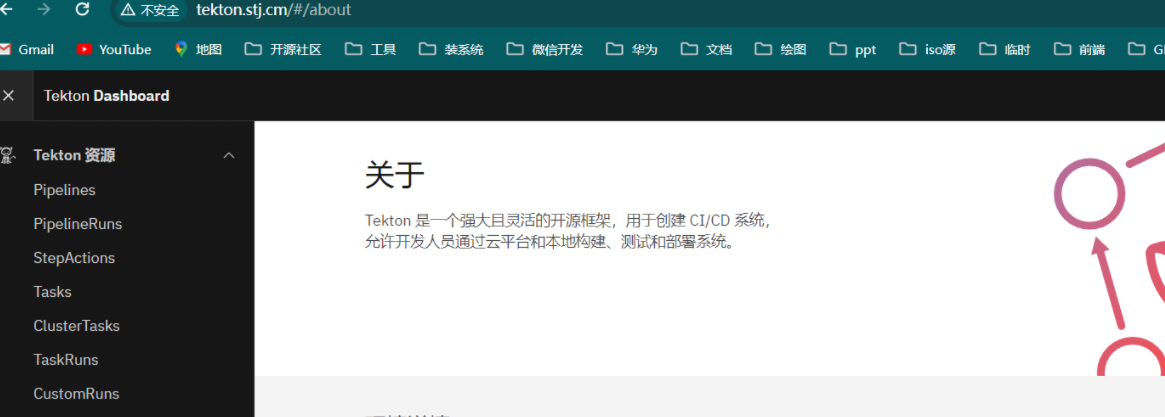
服务测试
基于Tekton创建并运行Pipeline,通常遵循的步骤
基于Tekton创建并运行Pipeline,通常遵循的步骤 1、定义Tasks,在各Task中定义Step完成具体的操作步骤; 每个Step都会运行为一个独立的容器,通常我们要根据该Step的目标来选择合用的容器Image; 2、定义Pipeline,引用Task,并以特定的次序组织这些Task的的运行顺序; 3、定义PipelineRun,手动触发Pipeline运行; 创建完成之后,就相当于自动地将Pipeline中引用的Task依次运行为TaskRun; Pipeline的触发条件: 手动:手动创建一个PipelineRun来完成; 3、定义Trigger,自动触发Pipeline执行; 创建PipelineRun Template,并订阅某类事件; 事件产生时,会自动提取事件中的属性,并赋值给PipelineRun Template,完成PipelineRun实例化
1.1) 运行简单 task 示例
示例1
# cat taskrun-hello.yaml
apiVersion: tekton.dev/v1
kind: Task
metadata:
name: hello
spec:
steps:
- name: say-hello
image: alpine:3.20
command: ['/bin/sh']
args: ['-c', 'echo Hello World']
---
apiVersion: tekton.dev/v1
kind: TaskRun
metadata:
name: hello-run-00001
spec:
taskRef:
kind: Task
name: hello
# kubectl apply -f taskrun-hello.yaml
# kubectl get pod
NAME READY STATUS RESTARTS AGE
hello-run-00001-pod 0/2 Init:1/2 0 21s

示例2(带参数)
# cat 02-task-with-params.yaml
apiVersion: tekton.dev/v1
kind: Task
metadata:
name: hello-params
spec:
params:
- name: target # 参数名称
type: string # 参数类似 支持:stangj array
description: Name of somebody or something to greet # 参数描述
default: Stangj.com # 默认值
steps:
- name: say-hello
image: alpine:3.20
command:
- /bin/sh
args: ['-c', 'echo Hello $(params.target)'] # 取值 target
# kubectl apply -f 02-task-with-params.yaml
`命令式执行 taskrun
# tkn task start hello-params --showlog
? Value for param `target` of type `string`? (Default is `Stangj.com`) (Stangj.com) # [回车既为默认值]
TaskRun started: hello-params-run-q9hcz
Waiting for logs to be available...
[say-hello] Hello Stangj.com
`传递参数`
# tkn task start hello-params --showlog -p target=tanghao
TaskRun started: hello-params-run-t8zgm
Waiting for logs to be available...
[say-hello] Hello tanghao
示例3(多步骤,单行运行)
# cat 03-task-multi-steps.yaml
apiVersion: tekton.dev/v1
kind: Task
metadata:
name: multiple
spec:
steps:
- name: first
image: alpine:3.20
command:
- /bin/sh
args: ['-c', 'echo First Step']
- name: second
image: alpine:3.20
command:
- /bin/sh
args: ['-c', 'echo Second Step']
# kubectl apply -f 03-task-multi-steps.yaml
# tkn task start multiple --showlog
TaskRun started: multiple-run-tdpmh
Waiting for logs to be available...
[first] First Step
[second] Second Step
示例4(多步骤,多行运行类脚本)
 # cat 04-task-step-with-script.yaml
 apiVersion: tekton.dev/v1
 kind: Task
 metadata:
   name: script
 spec:
   steps:
     - name: step-with-script
       image: alpine:3.20
       script: |
         #!/bin/sh
         echo "Step with Script..."
         sed -i "s@https://dl-cdn.alpinelinux.org/@https://mirrors.huaweicloud.com/@g" /etc/apk/repositories
         echo "Installing necessary tooling"
         apk update && apk add curl
         curl -s www.stangj.com &> /dev/null && echo "Success" || echo "Fail"
         echo "All done!"

 # kubectl apply -f 04-task-step-with-script.yaml
 # tkn task start script --showlog
 TaskRun started: script-run-9xq9f
 Waiting for logs to be available...
 [step-with-script] Step with Script...
 [step-with-script] Installing necessary tooling
 [step-with-script] fetch https://mirrors.huaweicloud.com/alpine/v3.20/main/x86_64/APKINDEX.tar.gz
 [step-with-script] fetch https://mirrors.huaweicloud.com/alpine/v3.20/community/x86_64/APKINDEX.tar.gz
 [step-with-script] v3.20.5-12-gd1bff4aa572 [https://mirrors.huaweicloud.com/alpine/v3.20/main]
 [step-with-script] v3.20.5-12-gd1bff4aa572 [https://mirrors.huaweicloud.com/alpine/v3.20/community]
 [step-with-script] OK: 24170 distinct packages available
 [step-with-script] (1/10) Installing ca-certificates (20241121-r1)
 [step-with-script] (2/10) Installing brotli-libs (1.1.0-r2)
 [step-with-script] (3/10) Installing c-ares (1.33.1-r0)
 [step-with-script] (4/10) Installing libunistring (1.2-r0)
 [step-with-script] (5/10) Installing libidn2 (2.3.7-r0)
 [step-with-script] (6/10) Installing nghttp2-libs (1.62.1-r0)
 [step-with-script] (7/10) Installing libpsl (0.21.5-r1)
 [step-with-script] (8/10) Installing zstd-libs (1.5.6-r0)
 [step-with-script] (9/10) Installing libcurl (8.11.1-r0)
 [step-with-script] (10/10) Installing curl (8.11.1-r0)
 [step-with-script] Executing busybox-1.36.1-r29.trigger
 [step-with-script] Executing ca-certificates-20241121-r1.trigger
 [step-with-script] OK: 13 MiB in 24 packages
 [step-with-script] Success
 [step-with-script] All done!
示例5(脚本加参数)
# cat 05-task-script-and-parameters.yaml
apiVersion: tekton.dev/v1
kind: Task
metadata:
name: logger
spec:
params:
- name: text
type: string
description: something to log
default: "-"
steps:
- name: log
image: alpine:3.20
script: |
sed -i "s@https://dl-cdn.alpinelinux.org/@https://mirrors.huaweicloud.com/@g" /etc/apk/repositories
apk update && apk add -q tzdata
cp /usr/share/zoneinfo/Asia/Shanghai /etc/localtime
DATETIME=$(date "+%F %T")
echo [$DATETIME] - $(params.text)
# kubectl apply -f 05-task-script-and-parameters.yaml
# tkn task start logger --showlog -p text="tanghao"
TaskRun started: logger-run-wvhtq
Waiting for logs to be available...
[log] fetch https://mirrors.huaweicloud.com/alpine/v3.20/main/x86_64/APKINDEX.tar.gz
[log] fetch https://mirrors.huaweicloud.com/alpine/v3.20/community/x86_64/APKINDEX.tar.gz
[log] v3.20.5-12-gd1bff4aa572 [https://mirrors.huaweicloud.com/alpine/v3.20/main]
[log] v3.20.5-12-gd1bff4aa572 [https://mirrors.huaweicloud.com/alpine/v3.20/community]
[log] OK: 24170 distinct packages available
[log] [2025-01-12 17:08:50] - tanghao
1.2) 运行简单 Pipeline案例
示例6(指定task依赖某task运行) Pipeline
 # cat 06-pipeline-demo.yaml
 apiVersion: tekton.dev/v1
 kind: Pipeline
 metadata:
   name: pipeline-demo
 spec:
   tasks:
     - name: first-task
       taskRef:
         name: hello  # 执行前面定义的 hello task 任务
     - name: second-task
       taskRef:
         name: multiple # 执行前面定义的 multiple task 任务
       runAfter:   # 在 first-task 执行后才执行 second-task
         - first-task

 `命令式运行pipeline`
 # tkn pipeline start pipeline-demo --showlog
 PipelineRun started: pipeline-demo-run-dv9x8
 Waiting for logs to be available...
 [first-task : say-hello] Hello World
 ....
 [second-task : first] First Step
 [second-task : second] Second Step
注意:如果不指定 runAfter 则 first-task 和 second-task 同时运行
示例7(Pipeline带参数)
# cat 08-pipeline-with-params.yaml
apiVersion: tekton.dev/v1
kind: Pipeline
metadata:
name: pipeline-with-params
spec:
params:
- name: text # 定义的 参数名
type: string
- name: target # 定义的 参数名
type: string
tasks:
- name: task-one
taskRef:
name: hello-params # 此前定义的 hello-params task
params:
- name: target # 该参数名传递 需要和 logger task 定义的一致
value: $(params.target)
- name: task-two
taskRef:
name: logger # 此前定义的 logger task
params:
- name: text # 该参数名传递 需要和 logger task 定义的一致
value: $(params.text)
# cat 09-pipelinerun-with-params.yaml
apiVersion: tekton.dev/v1
kind: PipelineRun
metadata:
name: pipeline-with-params-run-xxxxx
namespace: default
spec:
params:
- name: target
value: "Stangj CloudNative Course"
- name: text
value: "Stangj has happened ~~."
pipelineRef:
name: pipeline-with-params
# kubectl apply -f 08-pipeline-with-params.yaml -f 09-pipelinerun-with-params.yaml
# tkn pipelinerun list
NAME STARTED DURATION STATUS
pipeline-with-params-run-xxxxx 28 seconds ago 8s Succeeded
pipeline-demo-run-dv9x8 8 minutes ago 1m14s Succeeded
# tkn pipelinerun logs pipeline-with-params-run-xxxxx -f
[task-one : say-hello] Hello Stangj CloudNative Course
[task-one : istio-proxy] 2025/01/12 09:30:11 Exiting...
[task-two : log] fetch https://mirrors.huaweicloud.com/alpine/v3.20/main/x86_64/APKINDEX.tar.gz
[task-two : log] fetch https://mirrors.huaweicloud.com/alpine/v3.20/community/x86_64/APKINDEX.tar.gz
[task-two : log] v3.20.5-12-gd1bff4aa572 [https://mirrors.huaweicloud.com/alpine/v3.20/main]
[task-two : log] v3.20.5-12-gd1bff4aa572 [https://mirrors.huaweicloud.com/alpine/v3.20/community]
[task-two : log] OK: 24170 distinct packages available
[task-two : log] [2025-01-12 17:29:49] - Stangj has happened ~~.
[task-two : istio-proxy] 2025/01/12 09:30:11 Exiting...
示例8(pipeline多task顺序指定)
            task-b ->
  task-a ->           task-c
            task-c ->
# cat 10-pipeline-with-ordered-task.yaml
apiVersion: tekton.dev/v1
kind: Pipeline
metadata:
name: pipeline-task-ordering
spec:
tasks:
- name: task-a
taskRef:
name: logger
params:
- name: text
value: "task-A executed"
- name: task-b
taskRef:
name: logger
params:
- name: text
value: "Executed after task-A"
runAfter: ["task-a"]
- name: task-c
taskRef:
name: logger
params:
- name: text
value: "Executed after task-A"
runAfter: ["task-a"]
- name: task-d
taskRef:
name: logger
params:
- name: text
value: "Executed after task-B and task-C"
runAfter: ["task-b", "task-c"]
# kubectl apply -f 10-pipeline-with-ordered-task.yaml
# tkn pipeline start pipeline-task-ordering
# tkn pipelinerun list
NAME STARTED DURATION STATUS
pipeline-task-ordering-run-nd2gn 2 minutes ago 42s Succeeded
pipeline-with-params-run-xxxxx 12 minutes ago 8s Succeeded
pipeline-demo-run-dv9x8 20 minutes ago 1m14s Succeeded
# tkn pipelinerun logs pipeline-task-ordering-run-nd2gn -f
1.3) Tekton Pipeline进阶
  流水线中的数据传递:
      Workspaces:
        卷:ConfigMap/Secret,EmptyDir,PVC
            EmptyDir:生命周期同Pod,其数据可以在各Step间共享,但不能跨Task;
            PVC:有独立的生命周期,其数据可以跨Task共享;
                动态置备PV,volumeClaimTemplate
                    NFS CSI Driver
        Task如何使用Workspace:
            得先声明,运行为TaskRun需要为其指定关联的Vo
        Pipeline也需声明Workspace
            Task:其workspace由Pipeline声明的Workspace
        Pipeline运行为PipelineRun的时候,向Pipeline的各Workspaces指定关联的卷,这些卷最终会基于赋值间接传递给相应的
        PipelineRun自动创建和使用卷:emptyDir, volumeClaimTemplate
            生命周期与PipelineR
            事先独立创建并存在的PVC卷:独立生命周期
Workspace
Workspace用于为Task中的各Step提供工作目录,基于该Task运行的TaskRun需要在运行时提供该目录
◼ TaskRun的实际运行形式为Pod,因而Workspace对应的实际组件为Pod上的Volume
◆ConfigMap和Secret:只读式的Workspace
◆PersistentVolumeClaim:支持跨Task共享数据的Workspace
⚫ 静态预配
⚫ 动态预配:基于VolumeClaimTemplate动态创建
◆emptyDir:临时工作目录,用后即弃
Workspace的功用
◼ 跨Task共享数据
◆定义在Pipeline上的Workspace
◼ 借助于Secrets加载机密凭据
◼ 借助于ConfigMap加载配置数据
◼ 持久化存储数据
◼ 为Task提供缓存以加速构建过程
◆定义在Task上的Workspace
◆也可用于与Sidecar共享数据
数据的持久化和共享:
1、基于VolumeClaimTemplate支撑的Workspace,能够在同一个PipelineRun的多个TaskRun之间共享数据;
2、TaskRun上基于PVC卷直接存储的数据,是可以跨多个PipelineRun共享的;
Task上使用Workspace
 在Task配置Workspace
 ◼ 定义在spec.wordspaces字段中
 ◼ 支持嵌套如下字段
     ◆name:必选字段,该Workspace的唯一标识符
     ◆description:描述信息,通常标明其使用目的
     ◆readOnly:是否为只读,默认为false
     ◆optional:是否为可选,默认为false
     ◆mountPath:在各Step中的挂载路径,默认为“/workspace/<name>”,其中<name>是当前Workspace的名称

 在Task中可用的workspace变量
 ◼ $(workspaces.<name>.path):由<name>指定的Workspace挂载的路径,对于可选且TaskRun未声明时,其值为空;
 ◼ $(workspaces.<name>.bound):其值为true或false,用于标识指定的Workspace是已经绑定;
     ◆对于optional为false的Workspace,该变量的值将始终为true;
 ◼ $(workspaces.<name>.claim):由<name>标示的Workspace所使用的PVC的名称
     ◆对于非PVC类型的存储卷,该变量值为空
 ◼ $(workspaces.<name>.volume):由<name>标示的Workspace所使用的存储卷的名称
1.3.1) Workspace使用示例 emptyDir存储卷(不能跨 task共享数据,可以同task下的steps共享数据)
简单示例(1):task下的workspaces
# cat 01-task-workspace-demo.yaml
apiVersion: tekton.dev/v1
kind: Task
metadata:
name: workspace-demo
spec:
params:
- name: target
type: string
default: Stangj
steps:
- name: write-message
image: alpine:3.20
script: |
#!/bin/sh
set -xe
if [ "$(workspaces.messages.bound)" == "true" ] ; then
echo "Hello $(params.target)" > $(workspaces.messages.path)/message
cat $(workspaces.messages.path)/message
fi
echo "Mount Path: $(workspaces.messages.path)"
echo "Volume Name: $(workspaces.messages.volume)"
workspaces:
- name: messages
description: |
The folder where we write the message to. If no workspace
is provided then the message will not be written.
optional: true
mountPath: /data
# kubectl apply -f 01-task-workspace-demo.yaml
# tkn task start workspace-demo --showlog -p target="Stangj Cloud" -w name=messages,emptyDir=""
TaskRun started: workspace-demo-run-jtrq5
Waiting for logs to be available...
[write-message] + '[' true '==' true ]
[write-message] + echo 'Hello Stangj Cloud'
[write-message] + cat /data/message
[write-message] Hello Stangj Cloud
[write-message] Mount Path: /data
[write-message] Volume Name: ws-c0038
[write-message] + echo 'Mount Path: /data'
[write-message] + echo 'Volume Name: ws-c0038'
 # 也直接在命令行启动TaskRun进行测试
 # -w 或--workspace 选项用于为TaskRun指定使用的Workspace
 # 其中的参数,name为相应的workspace的名称,而emptyDir则是指定存储卷
验证共享数据-改造 yaml 文件
# cat 01-task-workspace-demo.yaml
apiVersion: tekton.dev/v1
kind: Task
metadata:
name: workspace-demo
spec:
params:
- name: target
type: string
default: Stangj
steps:
- name: write-message
image: alpine:3.20
script: |
#!/bin/sh
set -xe
if [ "$(workspaces.messages.bound)" == "true" ] ; then
echo "Hello $(params.target)" > $(workspaces.messages.path)/message
fi
echo "Mount Path: $(workspaces.messages.path)"
echo "Volume Name: $(workspaces.messages.volume)"
- name: print-message
image: alpine:3.16
script: |
#!/bin/sh
set -xe
if [ "$(workspaces.messages.bound)" == "true" ] ; then
cat $(workspaces.messages.path)/message
fi
workspaces:
- name: messages
description: |
The folder where we write the message to. If no workspace
is provided then the message will not be written.
optional: true
mountPath: /data
# kubectl apply -f 01-task-workspace-demo.yaml
# tkn task start workspace-demo --showlog -p target="Stangj Cloud" -w name=messages,emptyDir=""
TaskRun started: workspace-demo-run-5g8st
Waiting for logs to be available...
[write-message] + '[' true '==' true ]
[write-message] + echo 'Hello Stangj Cloud'
[write-message] + echo 'Mount Path: /data'
[write-message] + echo 'Volume Name: ws-c0038'
[write-message] Mount Path: /data
[write-message] Volume Name: ws-c0038
[print-message] + '[' true '==' true ]
[print-message] + cat /data/message
[print-message] Hello Stangj Cloud
简单示例(2):共享git数据
# cat 02-task-with-workspace.yaml
apiVersion: tekton.dev/v1
kind: Task
metadata:
name: source-lister
spec:
params:
- name: git-repo
type: string
description: Git repository to be cloned
workspaces:
- name: source
steps:
- name: git-clone
image: alpine/git:v2.45.2
script: git clone -v $(params.git-repo) $(workspaces.source.path)/source
- name: list-files
image: alpine:3.20
command:
- /bin/sh
args:
- '-c'
- 'ls $(workspaces.source.path)/source'
# kubectl apply -f 02-task-with-workspace.yaml
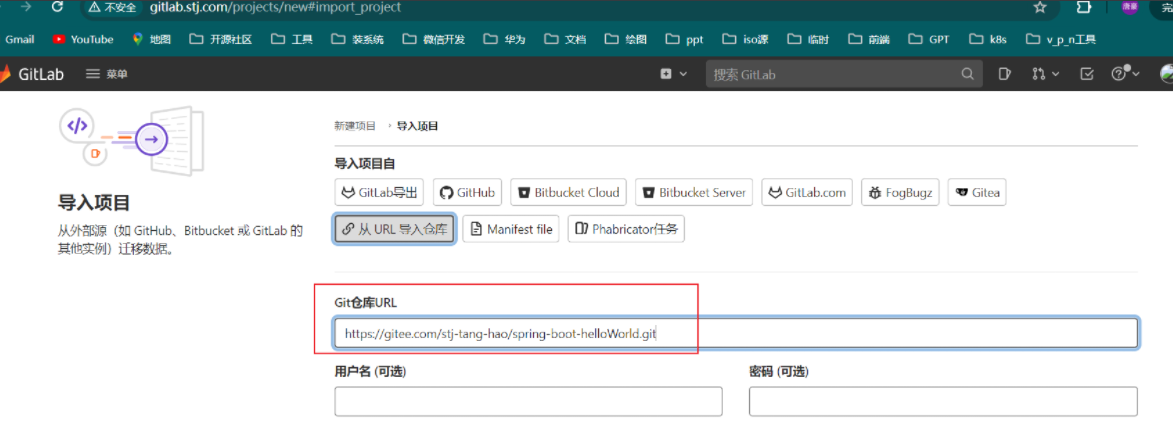
导入测试项目到本地
# tkn task start source-lister --showlog -p  git-repo="http://code.gitlab.svc.cluster.local/root/spring-boot-helloWorld.git" -w name=source,emptyDir=""
TaskRun started: source-lister-run-8nx4m
Waiting for logs to be available...
[git-clone] Cloning into '/workspace/source/source'...
[git-clone] POST git-upload-pack (175 bytes)
[git-clone] POST git-upload-pack (517 bytes)

[list-files] Dockerfile
[list-files] Jenkinsfile
[list-files] LICENSE
[list-files] README.md
[list-files] deploy
[list-files] pom.xml
[list-files] rollouts
[list-files] src
简单示例(3):Pipeline上的Workspace和Parameters
依赖上面环境
# cat 03-pipeline-workspace.yaml
apiVersion: tekton.dev/v1
kind: Pipeline
metadata:
  name: pipeline-source-lister
spec:
  workspaces:
  - name: codebase
  params:
  - name: git-url
    type: string
    description: Git repository url to be cloned
  tasks:
  - name: git-clone
    taskRef:
      name: source-lister   # 下面的 source 和 git-repo 都是前面案例定义的 必须一致task才能获取正确变量
    workspaces:  # 将 codebase 传递给 source
    - name: source
      workspace: codebase
    params:      # 将 git-url 变量传递给 git-repo
    - name: git-repo
      value: $(params.git-url)

# kubectl apply -f 03-pipeline-workspace.yaml
# tkn pipeline start pipeline-source-lister --showlog -p  git-url="http://code.gitlab.svc.cluster.local/root/spring-boot-helloWorld.git" -w name=codebase,emptyDir=""
PipelineRun started: pipeline-source-lister-run-t8w4b
Waiting for logs to be available...
[git-clone : git-clone] Cloning into '/workspace/source/source'...
[git-clone : git-clone] POST git-upload-pack (175 bytes)
[git-clone : git-clone] POST git-upload-pack (517 bytes)

[git-clone : list-files] Dockerfile
[git-clone : list-files] Jenkinsfile
[git-clone : list-files] LICENSE
[git-clone : list-files] README.md
[git-clone : list-files] deploy
[git-clone : list-files] pom.xml
[git-clone : list-files] rollouts
[git-clone : list-files] src
1.3.2) Workspace使用示例 Volume存储卷(跨task共享存储)
k8s创建nfs
kubectl create ns nfs
kubectl create -f <(curl -s https://raw.githubusercontent.com/kubernetes-csi/csi-driver-nfs/master/deploy/example/nfs-provisioner/nfs-server.yaml | sed 's/namespace: default/namespace: nfs/')
k8s创建install-csi-driver-v4.8.0
https://github.com/kubernetes-csi/csi-driver-nfs/blob/master/docs/install-csi-driver-v4.8.0.md
root@k8s-master01:~# curl -skSL https://raw.githubusercontent.com/kubernetes-csi/csi-driver-nfs/v4.8.0/deploy/install-driver.sh | bash -s v4.8.0 --

root@k8s-master01:~# kubectl get pod -n kube-system -l app=csi-nfs-node
NAME                 READY   STATUS    RESTARTS        AGE
csi-nfs-node-87jfz   3/3     Running   3 (20s ago)     5m53s
csi-nfs-node-9742s   3/3     Running   1 (4m16s ago)   5m53s
csi-nfs-node-p65rl   3/3     Running   1 (4m19s ago)   5m53s
csi-nfs-node-qb7h6   3/3     Running   1 (4m24s ago)   5m53s
root@k8s-master01:~# kubectl get pod -n kube-system -l app=csi-nfs-controller
NAME                                  READY   STATUS    RESTARTS      AGE
csi-nfs-controller-7694bcc6cc-96vrv   4/4     Running   2 (39s ago)   6m13s
k8s创建 StorageClass
https://github.com/kubernetes-csi/csi-driver-nfs/blob/master/deploy/example/storageclass-nfs.yaml
root@k8s-master01:~# vim nfs-csi.yaml
---
apiVersion: storage.k8s.io/v1
kind: StorageClass
metadata:
  name: nfs-csi
provisioner: nfs.csi.k8s.io
parameters:
  server: nfs-server.nfs.svc.cluster.local  # nfs 名称空间下的 nfs服务
  share: /
  # csi.storage.k8s.io/provisioner-secret is only needed for providing mountOptions in DeleteVolume
  # csi.storage.k8s.io/provisioner-secret-name: "mount-options"
  # csi.storage.k8s.io/provisioner-secret-namespace: "default"
reclaimPolicy: Delete
volumeBindingMode: Immediate
allowVolumeExpansion: true
mountOptions:
  - nfsvers=4.1

root@k8s-master01:~# kubectl apply -f nfs-csi.yaml
root@k8s-master01:~# kubectl get sc
NAME      PROVISIONER      RECLAIMPOLICY   VOLUMEBINDINGMODE   ALLOWVOLUMEEXPANSION   AGE
nfs-csi   nfs.csi.k8s.io   Delete          Immediate           true                   29s
k8s给予StorageClass测试动态pv
https://github.com/kubernetes-csi/csi-driver-nfs/blob/master/deploy/example/pvc-nfs-csi-dynamic.yaml
root@k8s-master01:~# vim pvc-nfs-csi-dynamic.yaml
---
apiVersion: v1
kind: PersistentVolumeClaim
metadata:
  name: pvc-nfs-dynamic
  namespace: default
spec:
  accessModes:
    - ReadWriteMany
  resources:
    requests:
      storage: 3Gi
  storageClassName: nfs-csi

root@k8s-master01:~# kubectl apply -f pvc-nfs-csi-dynamic.yaml
root@k8s-master01:~# kubectl get pvc
NAME              STATUS   VOLUME                                     CAPACITY   ACCESS MODES   STORAGECLASS   VOLUMEATTRIBUTESCLASS   AGE
pvc-nfs-dynamic   Bound    pvc-fa2a7467-9638-4751-b386-830783f7ef2f   3Gi        RWX            nfs-csi        <unset>                 13s
创建没有问题删除掉即可
root@k8s-master01:~# kubectl delete pvc pvc-nfs-dynamic
简单示例(4)PipelineRun上的Workspace和Parameters
# cat 04-pipeline-worlspace-02.yaml
apiVersion: tekton.dev/v1
kind: Pipeline
metadata:
  name: volume-share
spec:
  params:
    - name: git-url
      type: string
  workspaces:
    - name: codebase
  tasks:
    - name: fetch-from-source
      params:
        - name: url
          value: $(params.git-url)
      taskSpec:
        workspaces:
          - name: source
        params:
          - name: url
        steps:
          - name: git-clone
            image: alpine/git:v2.45.2
            script: git clone -v $(params.url) $(workspaces.source.path)/source
      workspaces:
        - name: source
          workspace: codebase
    - name: source-lister
      runAfter:
        - fetch-from-source
      taskSpec:
        steps:
          - name: list-files
            image: alpine:3.20
            script: ls $(workspaces.source.path)/source
        workspaces:
          - name: source
      workspaces:
        - name: source
          workspace: codebase
---
apiVersion: tekton.dev/v1
kind: PipelineRun
metadata:
  name: volume-share-run-xxxx
spec:
  pipelineRef:
    name: volume-share
  params:
    - name: git-url
      value: "http://code.gitlab.svc.cluster.local/root/spring-boot-helloWorld.git"
      # value: https://gitee.com/stj-tang-hao/spring-boot-helloWorld.git
  workspaces:
    - name: codebase
      volumeClaimTemplate:
        spec:
          accessModes:
            - ReadWriteOnce
          resources:
            requests:
              storage: 1Gi
          storageClassName: nfs-csi

# kubectl apply -f 04-pipeline-worlspace-02.yaml
# tkn pipelinerun list
NAME                               STARTED        DURATION   STATUS
volume-share-run-xxxx              1 minute ago   ---        Running
pipeline-source-lister-run-t8w4b   1 hour ago     9s         Succeeded
pipeline-task-ordering-run-mggbf   4 hours ago    1m37s      Succeeded
pipeline-task-ordering-run-nd2gn   4 hours ago    42s        Succeeded
pipeline-with-params-run-xxxxx     4 hours ago    8s         Succeeded
pipeline-demo-run-dv9x8            5 hours ago    1m14s      Succeeded

root@k8s-master01:~#  tkn pipelinerun logs volume-share-run-xxxx -f
[fetch-from-source : git-clone] Cloning into '/workspace/source/source'...
[fetch-from-source : git-clone] POST git-upload-pack (175 bytes)
[fetch-from-source : git-clone] POST git-upload-pack (517 bytes)

[fetch-from-source : istio-proxy] 2025/01/12 14:53:33 Exiting...

[source-lister : list-files] Dockerfile
[source-lister : list-files] Jenkinsfile
[source-lister : list-files] LICENSE
[source-lister : list-files] README.md
[source-lister : list-files] deploy
[source-lister : list-files] pom.xml
[source-lister : list-files] rollouts
[source-lister : list-files] src

[source-lister : istio-proxy] 2025/01/12 14:53:40 Exiting...
生产示例5(克隆代码加编译代码)
# cat 05-pipeline-source-to-package.yaml
apiVersion: tekton.dev/v1
kind: Pipeline
metadata:
  name: source-2-package
spec:
  params:
    - name: git-url
      type: string
  workspaces:
    - name: codebase
  tasks:
    - name: fetch-from-source
      params:
        - name: url
          value: $(params.git-url)
      taskSpec:
        workspaces:
          - name: source
        params:
          - name: url
        steps:
          - name: git-clone
            image: alpine/git:v2.45.2
            script: git clone -v $(params.url) $(workspaces.source.path)/source
      workspaces:
        - name: source
          workspace: codebase
    - name: build-package
      runAfter:
        - fetch-from-source
      taskSpec:
        steps:
          - name: build
            image: maven:3.8.7-eclipse-temurin-11-alpine
            workingDir: $(workspaces.source.path)/source   # 定义工作空间
            script: |
              cat maven/settings.xml > /usr/share/maven/conf/settings.xml
              mvn clean install
        workspaces:
          - name: source
      workspaces:
        - name: source
          workspace: codebase
---
apiVersion: tekton.dev/v1
kind: PipelineRun
metadata:
  name: source-2-package-run-001
spec:
  pipelineRef:
    name: source-2-package
  params:
    - name: git-url
      value: "http://code.gitlab.svc.cluster.local/root/spring-boot-helloWorld.git"
      # value: https://gitee.com/stj-tang-hao/spring-boot-helloWorld.git
  workspaces:
    - name: codebase
      volumeClaimTemplate:
        spec:
          accessModes:
            - ReadWriteOnce
          resources:
            requests:
              storage: 1Gi
          storageClassName: nfs-csi

# kubectl apply -f 05-pipeline-source-to-package.yaml

生产示例6(静态卷保存打包缓存)
静态卷加动态卷(静态卷保存缓存,用于后续打包复用;动态卷用于同步各个task内容)
# cat 06-pipeline-source-to-package.yaml
apiVersion: v1
kind: PersistentVolumeClaim
metadata:
  name: maven-cache
spec:
  storageClassName: nfs-csi
  accessModes:
    - ReadWriteMany
  resources:
    requests:
      storage: 1Gi
---
apiVersion: tekton.dev/v1
kind: Pipeline
metadata:
  name: source-2-package
spec:
  params:
    - name: git-url
      type: string
  workspaces:
    - name: codebase
  tasks:
    - name: fetch-from-source
      params:
        - name: url
          value: $(params.git-url)
      taskSpec:
        workspaces:
          - name: source
        params:
          - name: url
        steps:
          - name: git-clone
            image: alpine/git:v2.45.2
            script: git clone -v $(params.url) $(workspaces.source.path)/source
      workspaces:
        - name: source
          workspace: codebase
    - name: build-package
      runAfter:
        - fetch-from-source
      taskSpec:
        steps:
          - name: build
            image: maven:3.8.7-eclipse-temurin-11-alpine
            workingDir: $(workspaces.source.path)/source  # 定义工作空间
            volumeMounts:
              - name: m2
                mountPath: /root/.m2
            script: |
              cat maven/settings.xml > /usr/share/maven/conf/settings.xml
              mvn clean install
        workspaces:
          - name: source
        volumes:  # 挂载静态卷,用于保存打包缓存
          - name: m2
            persistentVolumeClaim:
              claimName: maven-cache
      workspaces:
        - name: source
          workspace: codebase
---
apiVersion: tekton.dev/v1
kind: PipelineRun
metadata:
  name: source-2-package-run-002
spec:
  pipelineRef:
    name: source-2-package
  params:
    - name: git-url
      value: "http://code.gitlab.svc.cluster.local/root/spring-boot-helloWorld.git"
      # value: https://gitee.com/stj-tang-hao/spring-boot-helloWorld.git
  workspaces:
    - name: codebase
      volumeClaimTemplate:
        spec:
          accessModes:
            - ReadWriteOnce
          resources:
            requests:
              storage: 1Gi
          storageClassName: nfs-csi


# kubectl apply -f 06-pipeline-source-to-package.yaml
# kubectl get pvc
NAME              STATUS   VOLUME                                     CAPACITY   ACCESS MODES   STORAGECLASS   VOLUMEATTRIBUTESCLASS   AGE
maven-cache       Bound    pvc-1eca5c24-c80a-4403-8da7-5d28620cb2af   1Gi        RWX            nfs-csi        <unset>                 73s
pvc-06e270a874    Bound    pvc-8df67c6f-b218-4c8a-b6f7-0185758b27f7   1Gi        RWO            nfs-csi        <unset>                 24h
pvc-11849c3458    Bound    pvc-f4e63d1b-3239-4a9d-a5e6-8d9c879ffdf6   1Gi        RWO            nfs-csi        <unset>                 24h
pvc-80209b3175    Bound    pvc-9efc7082-fd8d-4b4e-b66d-02de675c1181   1Gi        RWO            nfs-csi        <unset>                 72s
pvc-nfs-dynamic   Bound    pvc-4a768549-94e2-49f4-b5ab-d2c427686fe0   3Gi        RWX            nfs-csi        <unset>                 24h
第一次需要下载

`修改PipelineRun名 运行第二次`
# cat 06-pipeline-source-to-package.yaml
....
apiVersion: tekton.dev/v1
kind: PipelineRun
metadata:
  name: source-2-package-run-002
...

# kubectl apply -f 06-pipeline-source-to-package.yaml
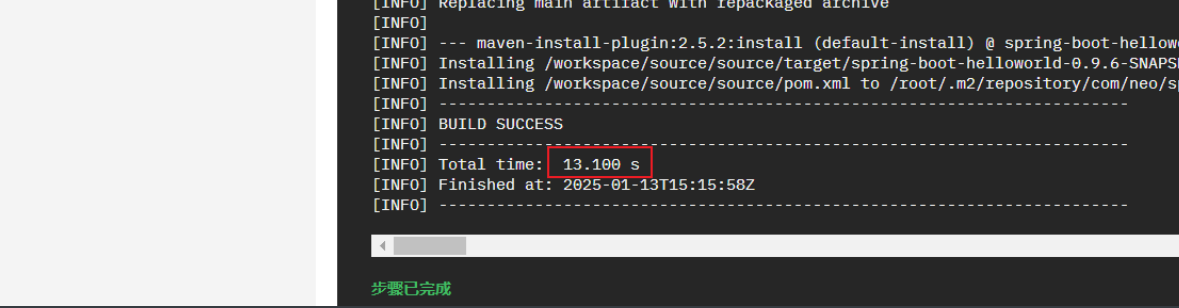
第二次复用缓存
1.3.4) 使用Results 进行数据传递
Results简介
◼ 在Pipeline的Task之间使用同一个共享的Workspace可以完成数据共享,但对于简单的字符串数据的传递,则可
以使用Results API完成
◼ Results用于让Task及其Step保存执行结果,并可在同一Pipeline中的后续Task中调用该结果

在Task中使用Results
◼ 以列表形式定义在spec.results字段中
◼ Task将会为每个results条目自动创建一个文件以进行保存,这些文件统一放置于 /tektons/results 目录中
◼ 每个results条目的相关值(value)需要在Step中进行生成并保存,且Task不会对相关数据进行任何多余的操作
◼ 在Step代码中引用results条目的便捷格式为“$(results.<resultName>.path)”,这样可以避免硬编码
	◆注意: $(results.<resultName>.path)”会被替换为 文件路径,获取结果值需要获取该文件中保存的内容

在Task中引用Results时使用的变量
◼ results.<resultName>.path
◼ results['<resultName>'].path 或 results["<resultName>"].path
在Pipeline中引用Results时使用的变量
◼ tasks.<taskName>.results.<resultName>
◼ tasks.<taskName>.results['<resultName>'] 或 tasks.<taskName>.results["<resultName>"]
简单示例7(通过Results传递数据)
# cat 07-results-demo.yaml
apiVersion: tekton.dev/v1
kind: Task
metadata:
  name: generate-buildid
spec:
  params:
    - name: version
      description: The version of the application
      type: string
      default: "v0.9"
  results:
    - name: datetime
      description: The current date and time
    - name: buildId
      description: The build ID
  steps:
    - name: generate-datetime
      image: registry.cn-zhangjiakou.aliyuncs.com/tanghao-public/admin-box:v1.2
      script: |
        #!/usr/bin/env bash
        datetime=`date +%Y%m%d-%H%M%S`
        echo -n ${datetime} | tee $(results.datetime.path) # 将 datetime 的结果保存在 results 文件中
    - name: generate-buildid
      image: ikubernetes/admin-box:v1.2
      script: |
        #!/usr/bin/env bash
        buildDatetime=`cat $(results.datetime.path)`  # 从 results 获取值
        buildId=$(params.version)-${buildDatetime}
        echo -n ${buildId} | tee $(results.buildId.path)

# kubectl apply -f 07-results-demo.yaml
# tkn task start generate-buildid --showlog -p version=v0.9
TaskRun started: generate-buildid-run-cgnj8
Waiting for logs to be available...
[generate-datetime] 20250113-152949

[generate-buildid] v0.9-20250113-152949
1.4) 在Pipeline上定义Task的执行方式
使用taskRef或taskSpec可将Task添加至Pipeline上,它们以列表形式定义在spec.tasks字段中;
对于这些Task的运行,它们允许用户
◼ 使用when表达式来为其添加执行条件
◼ 使用conditions添加限制条件(已弃用)
◼ 使用timeout定义任务超时时长
◼ 使用runAfter定义任务的执行顺序
◼ 定义finally任务,定义一个最终任务
◼ 使用retries定义重试次数
1.4.1) 在Pipeline上使用When表达式
When表达式共有三个字段组成
◼ input
	◆被评估的内容,支持使用静态值或者变量(Parameters或者Results变量)
	◆默认值为空;
◼ operator
	◆比较操作符
	◆仅支持in或notin两个
◼ values
	◆由字符串组成的列表
	◆必须定义,且不能使用空值,但允许使用静态值或者变量
1.4.2) 在Pipeline上使用Finally Task
关于finally task
◼ 用于在tasks中的各任务执行结束后运行最后的任务
◼ 其定义格式与tasks字段相似
◼ 支持嵌套定义多个Task
◼ 这些Task上支持使用Parameters和Results
◼ 支持使用When表达式

常用场景
◼ 发送通知
	◆将Pipeline的执行结果通知给相关用户
	◆例如右图中的构建和测试的pipeline
◼ 清理资源
	◆清理此前任务遗留的资源
	◆释放此前的任务运行时占用的资源
◼ 终止任务执行
1.5) 生产案例
 Pipeline中的各Task
◆ git-clone:克隆项目的源代码
◆ build-to-package:代码测试、构建和打包
◆ generate-build-id:生成Build ID
◆ image-build-and-push:镜像构建(和推送)
◆ deploy-to-cluster:将新版本的镜像更新到Kubernetes集群上

Workspace
◆ 基于PVC建立,跨Task共享
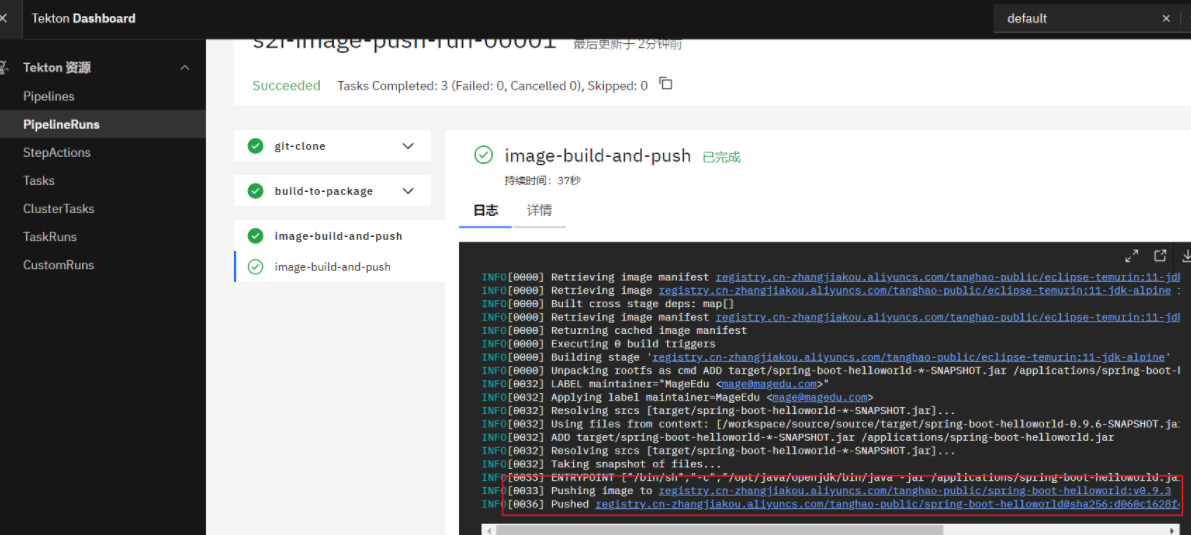
部署示例1(构建推送镜像)
`克隆代码`
# cat 01-task-git-clone.yaml
apiVersion: tekton.dev/v1
kind: Task
metadata:
  name: git-clone
spec:
  description: Clone the code repository to the workspace.
  params:
    - name: url
      type: string
      description: git url to clone
      default: ""
    - name: branch
      type: string
      description: git branch to checkout
      default: "main"
  workspaces:
    - name: source
      description: The git repo will be cloned onto the volume backing this workspace
  steps:
    - name: git-clone
      image: alpine/git:v2.45.2
      script: git clone -b $(params.branch) -v $(params.url) $(workspaces.source.path)/source

`打包镜像`
# cat 02-task-source-build.yaml
apiVersion: tekton.dev/v1
kind: Task
metadata:
  name: build-to-package
spec:
  description: build application and package the files to image
  workspaces:
    - name: source
      description: The git repo that cloned onto the volume backing this workspace
  steps:
    - name: build
      image: maven:3.8.7-eclipse-temurin-11-alpine
      workingDir: $(workspaces.source.path)/source
      volumeMounts:
        - name: m2
          mountPath: /root/.m2
      script: |
        cat maven/settings.xml > /usr/share/maven/conf/settings.xml
        mvn clean install
  volumes:
    - name: m2
      persistentVolumeClaim:
        claimName: maven-cache

`推送镜像`
# cat 03-task-build-image.yaml
apiVersion: tekton.dev/v1
kind: Task
metadata:
  name: image-build-and-push
spec:
  description: package the application files to image
  params:
    - name: dockerfile
      description: The path to the dockerfile to build (relative to the context)
      default: Dockerfile
    - name: image-url
      description: Url of image repository
    - name: image-tag
      description: Tag to apply to the built image
      default: latest
  workspaces:
    - name: source
    - name: dockerconfig
      # Secret resource which contains identity to image registry
      mountPath: /kaniko/.docker
  steps:
    - name: image-build-and-push
      image: registry.cn-zhangjiakou.aliyuncs.com/tanghao-public/executor:v1.23.2
      securityContext:
        runAsUser: 0
      env:
        - name: DOCKER_CONFIG
          value: /kaniko/.docker
      command:
        - /kaniko/executor
      args:
        - --dockerfile=$(params.dockerfile)
        - --context=$(workspaces.source.path)/source
        - --insecure
        - --insecure-pull
        - --skip-tls-verify
        - --skip-tls-verify-pull
        - --skip-push-permission-check
        - --destination=$(params.image-url):$(params.image-tag)

`pipline`
# cat 04-pipeline-source-to-image.yaml
apiVersion: tekton.dev/v1
kind: Pipeline
metadata:
  name: source-to-image
spec:
  params:
    - name: git-url
    - name: pathToContext
      description: The path to the build context, used by Kaniko - within the workspace
      default: .
    - name: image-url
      description: Url of image repository
    - name: image-tag
      description: Tag to apply to the built image
  workspaces:
    - name: codebase
    - name: docker-config
  tasks:
    - name: git-clone
      taskRef:
        name: git-clone
      params:
        - name: url
          value: "$(params.git-url)"
      workspaces:
        - name: source
          workspace: codebase
    - name: build-to-package
      taskRef:
        name: build-to-package
      workspaces:
        - name: source
          workspace: codebase
      runAfter:
        - git-clone
    - name: image-build-and-push
      taskRef:
        name: image-build-and-push
      params:
        - name: image-url
          value: "$(params.image-url)"
        - name: image-tag
          value: "$(params.image-tag)"
      workspaces:
        - name: source
          workspace: codebase
        - name: dockerconfig
          workspace: docker-config
      runAfter:
        - build-to-package

# cat 05-pipelinerun-source-to-image.yaml
apiVersion: tekton.dev/v1
kind: PipelineRun
metadata:
  name: s2i-image-push-run-00001
spec:
  pipelineRef:
    name: source-to-image
  params:
    - name: git-url
      value: "http://code.gitlab.svc.cluster.local/root/spring-boot-helloWorld.git"
      # value: https://gitee.com/stj-tang-hao/spring-boot-helloWorld.git
    - name: image-url
      value: registry.cn-zhangjiakou.aliyuncs.com/tanghao-public/spring-boot-helloworld
    - name: image-tag
      value: v0.9.3
  workspaces:
    - name: codebase
      volumeClaimTemplate:
        spec:
          accessModes:
            - ReadWriteOnce
          resources:
            requests:
              storage: 1Gi
          storageClassName: nfs-csi
    - name: docker-config
      secret:
        secretName: registry-credential  # 引用创建的secret

`创建secret`
# 本地先登录
root@k8s-master01:~# docker login registry.cn-zhangjiakou.aliyuncs.com
# 通过本地文件生成secret
root@k8s-master01:~# kubectl create secret generic registry-credential --from-file=config.json=/root/.docker/config.json

`部署`
# kubectl apply -f 01-task-git-clone.yaml -f 02-task-source-build.yaml -f 03-task-build-image.yaml -f 04-pipeline-source-to-image.yaml -f 05-pipelinerun-source-to-image.yaml
部署示例2(构建推送镜像加部署)
# cat 01-task-git-clone.yaml
apiVersion: tekton.dev/v1
kind: Task
metadata:
  name: git-clone
spec:
  description: Clone the code repository to the workspace.
  params:
    - name: url
      type: string
      description: git url to clone
      default: ""
    - name: branch
      type: string
      description: git branch to checkout
      default: "main"
  workspaces:
    - name: source
      description: The git repo will be cloned onto the volume backing this workspace
  steps:
    - name: git-clone
      image: alpine/git:v2.45.2
      script: git clone -b $(params.branch) -v $(params.url) $(workspaces.source.path)/source

# cat 02-task-source-build.yaml
apiVersion: tekton.dev/v1
kind: Task
metadata:
  name: build-to-package
spec:
  description: build application and package the files to image
  workspaces:
    - name: source
      description: The git repo that cloned onto the volume backing this workspace
  steps:
    - name: build
      image: maven:3.8.7-eclipse-temurin-11-alpine
      workingDir: $(workspaces.source.path)/source
      volumeMounts:
        - name: m2
          mountPath: /root/.m2
      script: |
        cat maven/settings.xml > /usr/share/maven/conf/settings.xml
        mvn clean install
  volumes:
    - name: m2
      persistentVolumeClaim:
        claimName: maven-cache


# cat 03-generate-build-id.yaml
apiVersion: tekton.dev/v1
kind: Task
metadata:
  name: generate-build-id
spec:
  params:
    - name: version
      description: The version of the application
      type: string
  results:
    - name: datetime
      description: The current date and time
    - name: buildId
      description: The build ID
  steps:
    - name: generate-datetime
      image: registry.cn-zhangjiakou.aliyuncs.com/tanghao-public/admin-box:v1.2
      script: |
        #!/usr/bin/env bash
        datetime=`date +%Y%m%d-%H%M%S`
        echo -n ${datetime} | tee $(results.datetime.path)
    - name: generate-buildid
      image: registry.cn-zhangjiakou.aliyuncs.com/tanghao-public/admin-box:v1.2
      script: |
        #!/usr/bin/env bash
        buildDatetime=`cat $(results.datetime.path)`
        buildId=$(params.version)-${buildDatetime}
        echo -n ${buildId} | tee $(results.buildId.path)


# cat 04-task-build-image.yaml
apiVersion: tekton.dev/v1
kind: Task
metadata:
  name: image-build-and-push
spec:
  description: package the application files to image
  params:
    - name: dockerfile
      description: The path to the dockerfile to build (relative to the context)
      default: Dockerfile
    - name: image-url
      description: Url of image repository
    - name: image-tag
      description: Tag to apply to the built image
  workspaces:
    - name: source
    - name: dockerconfig
      mountPath: /kaniko/.docker
  steps:
    - name: image-build-and-push
      image: registry.cn-zhangjiakou.aliyuncs.com/tanghao-public/executor:v1.23.2
      securityContext:
        runAsUser: 0
      env:
        - name: DOCKER_CONFIG
          value: /kaniko/.docker
      command:
        - /kaniko/executor
      args:
        - --dockerfile=$(params.dockerfile)
        - --context=$(workspaces.source.path)/source
        - --insecure
        - --insecure-pull
        - --skip-tls-verify
        - --skip-tls-verify-pull
        - --skip-push-permission-check
        - --destination=$(params.image-url):$(params.image-tag)

# cat 05-task-deploy.yaml
apiVersion: tekton.dev/v1
kind: Task
metadata:
  name: deploy-using-kubectl
spec:
  workspaces:
    - name: source
      description: The git repo
  params:
    - name: deploy-config-file
      description: The path to the yaml file to deploy within the git source
    - name: image-url
      description: Image name including repository
    - name: image-tag
      description: Image tag
  steps:
    - name: update-yaml
      image: alpine:3.20
      command: ["sed"]
      args:
        - "-i"
        - "-e"
        - "s@__IMAGE__@$(params.image-url):$(params.image-tag)@g"
        - "$(workspaces.source.path)/source/deploy/$(params.deploy-config-file)"
    - name: run-kubectl
      image: registry.cn-zhangjiakou.aliyuncs.com/tanghao-public/kubectl:latest
      command: ["kubectl"]
      args:
        - "apply"
        - "-f"
        - "$(workspaces.source.path)/source/deploy/$(params.deploy-config-file)"

# cat 06-pipeline-source-to-image.yaml
apiVersion: tekton.dev/v1
kind: Pipeline
metadata:
  name: source-to-image
spec:
  params:
    - name: git-url
    - name: pathToContext
      description: The path to the build context, used by Kaniko - within the workspace
      default: .
    - name: image-url
      description: Url of image repository
    - name: deploy-config-file
      description: The path to the yaml file to deploy within the git source
      default: all-in-one.yaml
    - name: version
      description: The version of the application
      type: string
      default: "v0.9"
  #results:
  #  - name: datetime
  #    description: The current date and time
  #  - name: buildId
  #    description: The build ID
  workspaces:
    - name: codebase
    - name: docker-config
  tasks:
    - name: git-clone
      taskRef:
        name: git-clone
      params:
        - name: url
          value: "$(params.git-url)"
      workspaces:
        - name: source
          workspace: codebase
    - name: build-to-package
      taskRef:
        name: build-to-package
      workspaces:
        - name: source
          workspace: codebase
      runAfter:
        - git-clone
    - name: generate-build-id
      taskRef:
        name: generate-build-id
      params:
        - name: version
          value: "$(params.version)"
      runAfter:
        - git-clone
    - name: image-build-and-push
      taskRef:
        name: image-build-and-push
      params:
        - name: image-url
          value: "$(params.image-url)"
        - name: image-tag
          value: "$(tasks.generate-build-id.results.buildId)"
      workspaces:
        - name: source
          workspace: codebase
        - name: dockerconfig
          workspace: docker-config
      runAfter:
        - generate-build-id
        - build-to-package
    - name: deploy-to-cluster
      taskRef:
        name: deploy-using-kubectl
      workspaces:
        - name: source
          workspace: codebase
      params:
        - name: deploy-config-file
          value: $(params.deploy-config-file)
        - name: image-url
          value: $(params.image-url)
        - name: image-tag
          value: "$(tasks.generate-build-id.results.buildId)"
      runAfter:
        - image-build-and-push

# cat 07-rbac.yaml
---
apiVersion: v1
kind: ServiceAccount
metadata:
  name: helloworld-admin
---
apiVersion: rbac.authorization.k8s.io/v1
kind: ClusterRoleBinding
metadata:
  name: helloworld-admin
roleRef:
  apiGroup: rbac.authorization.k8s.io
  kind: ClusterRole
  name: cluster-admin
subjects:
- kind: ServiceAccount
  name: helloworld-admin
  namespace: default

# cat 08-pipelinerun-source-to-image.yaml
apiVersion: tekton.dev/v1
kind: PipelineRun
metadata:
  name: s2i-buildid-run-00002
spec:
  taskRunSpecs:
    - pipelineTaskName: deploy-to-cluster
      serviceAccountName: helloworld-admin   # 设置鉴权 ServiceAccount 用于 kubectl apply 使用
  pipelineRef:
    name: source-to-image
  params:
    - name: git-url
      value: http://code.gitlab.svc.cluster.local/root/spring-boot-helloWorld.git
    - name: image-url
      value: registry.cn-zhangjiakou.aliyuncs.com/tanghao-public/spring-boot-helloworld
    - name: version
      value: v0.9.3
  workspaces:
    - name: codebase
      volumeClaimTemplate:
        spec:
          accessModes:
            - ReadWriteOnce
          resources:
            requests:
              storage: 1Gi
          storageClassName: nfs-csi
    - name: docker-config
      secret:
        secretName: registry-credential

`创建secret # 如果上面创建可以忽略此步骤`
# 本地先登录
root@k8s-master01:~# docker login registry.cn-zhangjiakou.aliyuncs.com
# 通过本地文件生成secret
root@k8s-master01:~# kubectl create secret generic registry-credential --from-file=config.json=/root/.docker/config.json

`部署`
# kubectl apply -f 01-task-git-clone.yaml -f 02-task-source-build.yaml -f 03-generate-build-id.yaml -f 04-task-build-image.yaml -f 05-task-deploy.yaml -f 06-pipeline-source-to-image.yaml -f 07-rbac.yaml -f 08-pipelinerun-source-to-image.yaml
验证
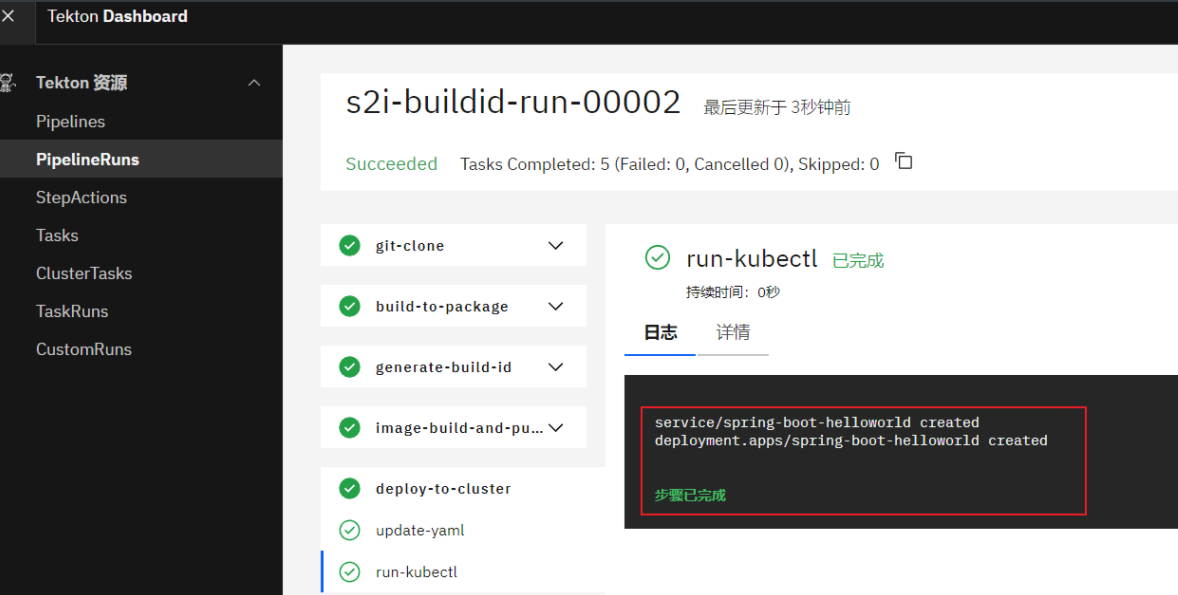
root@k8s-master01:~# kubectl get svc
NAME                     TYPE        CLUSTER-IP       EXTERNAL-IP   PORT(S)        AGE
kubernetes               ClusterIP   10.96.0.1        <none>        443/TCP        22d
spring-boot-helloworld   NodePort    10.110.234.254   <none>        80:31094/TCP   66s
root@k8s-master01:~# kubectl get pod -l app=spring-boot-helloworld
NAME                                    READY   STATUS    RESTARTS   AGE
spring-boot-helloworld-7d966fd7-sf5sl   2/2     Running   0          25s
root@k8s-master01:~# curl 10.110.234.254
Hello Spring Boot 2.0!
2.)Tekton Trigger
 Tekton Triggers简介
 ◼ 监控特定的事件,并在满足条件时自动触发Tekton Pipeline;
     ◆例如,代码仓库上的创建pull request、push代码,以及合并pull request至main分支等
 ◼ Tekton Triggers为用户提供了一种声明式API
     ◆它允许用户按需定义监视的事件,并将其与特定的Pipeline连接,从而实例化出PipelineRun
     ◆还允许将事件中的某些属性值信息注入到Pipeline中
Tekton Triggers的关键组件
Trigger
◼ EventListener Pod用于监视并筛选Event时使用的筛选条件
◼ 由TriggerTemplate、TriggerBinding和ClusterInterceptor组成
TriggerTemplate
◼ 可由EventListener筛选出的Event触发,从而实例化并完成资源创建,例如TaskRun或PipelineRun
◼ 支持通过参数从TriggerBinding接受配置信息
TriggerBinding(名称空间级别)和ClusterTriggerBinding(集群级别)
◼ 负责指定在事件上(由EventListener筛选出)感兴趣的字段,并从这些字段中取出数据传递给TriggerTemplate
◼ 而后,TriggerTemplate将相应的数据赋值给关联的TaskRun或PipelineRun资源上的参数
EventListener
◼ 以Pod形式运行于Kubernetes集群上,通过监听的特定端口接收Event
◼ Event的过滤则需由一到多个Trigger进行定义
ClusterInterceptor
◼ 负责在Trigger进行事件筛选之前,接收特定平台或系统(如GitLab)上全部事件,进而支持一些预处理操作,例如内容过滤、校验、转换、Trigger条件测试等
◼ 预处理完成后的事件,由Trigger进行筛选,符合条件的Event将传递给TriggerBinding
Tekton Triggers 各组件间的逻辑关系
 EventListener Pod是Tekton Trigger的物理表现形式,它主要由一至多个Trigger组成
 Trigger CRD既可以单独定义,也能够以内联方式定义在EventListener之上
 每个Trigger可由一个template、一组bindings以及一组interceptors构成
     ◼ template可引用一个独立的TriggerTemplate资源,亦可内联定义
     ◼ bindings可引用一至多个独立的TriggerBinding资源,亦可内联定义
     ◼ interceptors的定义,通常是引用ClusterInterceptor定义出的过滤规则
Tekton Trigger 案例
Tekton Trigger:
Trigger --> Pod
Event (GitLab)
Interceptor
PipelineRunTemplate --> PipelineRun
GitLab(Repository) --> Event --> Pod(TriggerBinding)(事件值传递给) --> TriggerTemplate (Parameters)--> Pipeline (Parameters) --> Task(Parameters)
|
|
|
Interceptor-->
Event --> Trigger Template Parameters --> Pipeline Parameter --> Task Parameter
Params=$(tt.params.NAME) Params = $(params.NAME)
2.1)部署Tekton Triggers
# kubectl apply --filename https://storage.googleapis.com/tekton-releases/triggers/latest/release.yaml
# kubectl apply --filename https://storage.googleapis.com/tekton-releases/triggers/latest/interceptors.yaml
root@k8s-master01:~# kubectl get pod -n tekton-pipelines
NAME READY STATUS RESTARTS AGE
tekton-dashboard-658f8fb7cb-w95v8 1/1 Running 3 (3d ago) 3d6h
tekton-events-controller-6744cc47f8-4wnzp 1/1 Running 3 (3d ago) 3d7h
tekton-pipelines-controller-c996b46c7-vwn2p 1/1 Running 4 (3d ago) 3d7h
tekton-pipelines-webhook-58c8446979-pd4vl 1/1 Running 3 (3d ago) 3d7h
tekton-triggers-controller-6f46448d6d-w9v7k 1/1 Running 0 3m50s
tekton-triggers-core-interceptors-7b4dccfc75-g74pr 1/1 Running 0 3m47s
tekton-triggers-webhook-7588f9d7bc-46z49 1/1 Running 0 3m50s
root@k8s-master01:~# kubectl api-resources --api-group=triggers.tekton.dev
NAME SHORTNAMES APIVERSION NAMESPACED KIND
clusterinterceptors ci triggers.tekton.dev/v1alpha1 false ClusterInterceptor
clustertriggerbindings ctb triggers.tekton.dev/v1beta1 false ClusterTriggerBinding
eventlisteners el triggers.tekton.dev/v1beta1 true EventListener
interceptors ni triggers.tekton.dev/v1alpha1 true Interceptor
triggerbindings tb triggers.tekton.dev/v1beta1 true TriggerBinding
triggers tri triggers.tekton.dev/v1beta1 true Trigger
triggertemplates tt triggers.tekton.dev/v1beta1 true TriggerTemplate
2.2)部署配置
gitlab-token-secret
# cat 01-gitlab-token-secret.yaml
apiVersion: v1
kind: Secret
metadata:
name: gitlab-webhook-token
type: Opaque
stringData:
# Generated by command "openssl rand -base64 12"
webhookToken: "DXeqvozMlTA67aQB" # 这个是 gitlab 触发的 token 随机数字即可
gitlab-eventlistener-rbac
 # cat 02-gitlab-eventlistener-rbac.yaml
 apiVersion: v1
 kind: ServiceAccount
 metadata:
   name: tekton-triggers-gitlab-sa
 secrets:
 - name: gitlab-webhook-token
 ---
 kind: Role
 apiVersion: rbac.authorization.k8s.io/v1
 metadata:
   name: tekton-triggers-gitlab-minimal
 rules:
   # Permissions for every EventListener deployment to function
 - apiGroups: ["triggers.tekton.dev"]
   resources:
   - eventlisteners
   - triggerbindings
   - interceptors
   - triggertemplates
   - triggers
   verbs:
   - get
   - list
   - watch
 - apiGroups: [""]
     # secrets are only needed for Github/Gitlab interceptors, serviceaccounts only for per trigger authorization
   resources:
   - "configmaps"
   - "secrets"
   verbs:
   - get
   - list
   - watch
 - apiGroups:
   - ""
   resources:
   - serviceaccounts
   verbs:
   - impersonate
 - apiGroups:
   - ""
   resources:
   - events
   verbs:
   - create
   - patch
   # Permissions to create resources in associated TriggerTemplates
 - apiGroups: ["tekton.dev"]
   resources:
   - pipelineruns
   - pipelineresources
   - taskruns
   verbs: ["create"]
 ---
 apiVersion: rbac.authorization.k8s.io/v1
 kind: RoleBinding
 metadata:
   name: tekton-triggers-gitlab-binding
 subjects:
   - kind: ServiceAccount
     name: tekton-triggers-gitlab-sa
 roleRef:
   apiGroup: rbac.authorization.k8s.io
   kind: Role
   name: tekton-triggers-gitlab-minimal
 ---
 kind: ClusterRole
 apiVersion: rbac.authorization.k8s.io/v1
 metadata:
   name: tekton-triggers-gitlab-minimal
 rules:
 - apiGroups:
   - triggers.tekton.dev
   resources:
   - clustertriggerbindings
   - clusterinterceptors
   verbs:
   - get
   - list
   - watch
 - apiGroups:
   - ""
   resources:
   - secrets
   verbs:
   - get
   - list
   - watch
 ---
 apiVersion: rbac.authorization.k8s.io/v1
 kind: ClusterRoleBinding
 metadata:
   name: tekton-triggers-gitlab-binding
 subjects:
   - kind: ServiceAccount
     name: tekton-triggers-gitlab-sa
     namespace: default
 roleRef:
   apiGroup: rbac.authorization.k8s.io
   kind: ClusterRole
   name: tekton-triggers-gitlab-minimal
task-deploy-to-cluster-rbac
# cat 03-task-deploy-to-cluster-rbac.yaml
---
apiVersion: v1
kind: ServiceAccount
metadata:
  name: helloworld-admin
---
apiVersion: rbac.authorization.k8s.io/v1
kind: ClusterRoleBinding
metadata:
  name: helloworld-admin
roleRef:
  apiGroup: rbac.authorization.k8s.io
  kind: ClusterRole
  name: cluster-admin
subjects:
- kind: ServiceAccount
  name: helloworld-admin
  namespace: default
pvc-manen-cache
# cat 04-pvc-manen-cache.yaml
apiVersion: v1
kind: PersistentVolumeClaim
metadata:
  name: maven-cache-cicd
spec:
  accessModes:
  - ReadWriteMany
  resources:
    requests:
      storage: 1Gi
  storageClassName: nfs-csi
tasks-source-to-image
# cat 05-tasks-source-to-image.yaml
---
apiVersion: tekton.dev/v1
kind: Task
metadata:
  name: git-clone
spec:
  description: Clone the code repository to the workspace.
  params:
    - name: git-repo-url
      type: string
      description: git repository url to clone
    - name: git-revision
      type: string
      description: git revision to checkout (branch, tag, sha, ref)
  workspaces:
    - name: source
      description: The git repo will be cloned onto the volume backing this workspace
  steps:
    - name: git-clone
      image: alpine/git:v2.45.2
      script: |
        git clone -v $(params.git-repo-url) $(workspaces.source.path)/source
        cd $(workspaces.source.path)/source && git reset --hard $(params.git-revision)
---
apiVersion: tekton.dev/v1
kind: Task
metadata:
  name: build-to-package
spec:
  description: build application and package the files to image
  workspaces:
    - name: source
      description: The git repo that cloned onto the volume backing this workspace
  steps:
    - name: build
      image: maven:3.8.7-eclipse-temurin-11-alpine
      workingDir: $(workspaces.source.path)/source
      volumeMounts:
        - name: m2
          mountPath: /root/.m2
      script: |
        cat maven/settings.xml > /usr/share/maven/conf/settings.xml
        mvn clean install
  volumes:
    - name: m2
      persistentVolumeClaim:
        claimName: maven-cache-cicd
---
apiVersion: tekton.dev/v1
kind: Task
metadata:
  name: generate-build-id
spec:
  params:
    - name: version
      description: The version of the application
      type: string
  results:
    - name: datetime
      description: The current date and time
    - name: buildId
      description: The build ID
  steps:
    - name: generate-datetime
      image: registry.cn-zhangjiakou.aliyuncs.com/tanghao-public/admin-box:v1.2
      script: |
        #!/usr/bin/env bash
        datetime=`date +%Y%m%d-%H%M%S`
        echo -n ${datetime} | tee $(results.datetime.path)
    - name: generate-buildid
      image: registry.cn-zhangjiakou.aliyuncs.com/tanghao-public/admin-box:v1.2
      script: |
        #!/usr/bin/env bash
        buildDatetime=`cat $(results.datetime.path)`
        buildId=$(params.version)-${buildDatetime}
        echo -n ${buildId} | tee $(results.buildId.path)
---
apiVersion: tekton.dev/v1
kind: Task
metadata:
  name: image-build-and-push
spec:
  description: package the application files to image
  params:
    - name: dockerfile
      description: The path to the dockerfile to build (relative to the context)
      default: Dockerfile
    - name: image-url
      description: Url of image repository
    - name: image-tag
      description: Tag to apply to the built image
  workspaces:
    - name: source
    - name: dockerconfig
      mountPath: /kaniko/.docker
  steps:
    - name: image-build-and-push
      image: registry.cn-zhangjiakou.aliyuncs.com/tanghao-public/executor:v1.23.2
      securityContext:
        runAsUser: 0
      env:
        - name: DOCKER_CONFIG
          value: /kaniko/.docker
      command:
        - /kaniko/executor
      args:
        - --dockerfile=$(params.dockerfile)
        - --context=$(workspaces.source.path)/source
        - --insecure
        - --insecure-pull
        - --skip-tls-verify
        - --skip-tls-verify-pull
        - --skip-push-permission-check
        - --destination=$(params.image-url):$(params.image-tag)
---
apiVersion: tekton.dev/v1
kind: Task
metadata:
  name: deploy-using-kubectl
spec:
  workspaces:
    - name: source
      description: The git repo
  params:
    - name: deploy-config-file
      description: The path to the yaml file to deploy within the git source
    - name: image-url
      description: Image name including repository
    - name: image-tag
      description: Image tag
  steps:
    - name: update-yaml
      image: alpine:3.20
      command: ["sed"]
      args:
        - "-i"
        - "-e"
        - "s@__IMAGE__@$(params.image-url):$(params.image-tag)@g"
        - "$(workspaces.source.path)/source/deploy/$(params.deploy-config-file)"
    - name: run-kubectl
      #image: lachlanevenson/k8s-kubectl
      image: bitnami/kubectl
      command: ["kubectl"]
      args:
        - "apply"
        - "-f"
        - "$(workspaces.source.path)/source/deploy/$(params.deploy-config-file)"
pipeline-source-to-image
 # cat 06-pipeline-source-to-image.yaml
 apiVersion: tekton.dev/v1
 kind: Pipeline
 metadata:
   name: source-to-image
 spec:
   params:
     - name: git-repo-url
       type: string
       description: git repository url to clone
     - name: git-revision
       type: string
       description: git revision to checkout (branch, tag, sha, ref)
       default: main
     - name: image-build-context
       description: The path to the build context, used by Kaniko - within the workspace
       default: .
     - name: image-url
       description: Url of image repository
     - name: version
       description: The version of the application
       type: string
       default: "v0.9"
     - name: deploy-config-file
       description: The path to the yaml file to deploy within the git source
       default: all-in-one.yaml
   #results:
   #  - name: datetime
   #    description: The current date and time
   #  - name: buildId
   #    description: The build ID
   workspaces:
     - name: codebase
     - name: docker-config
   tasks:
     - name: git-clone
       taskRef:
         name: git-clone
       params:
         - name: git-repo-url
           value: "$(params.git-repo-url)"
         - name: git-revision
           value: "$(params.git-revision)"
       workspaces:
         - name: source
           workspace: codebase
     - name: build-to-package
       taskRef:
         name: build-to-package
       workspaces:
         - name: source
           workspace: codebase
       runAfter:
         - git-clone
     - name: generate-build-id
       taskRef:
         name: generate-build-id
       params:
         - name: version
           value: "$(params.version)"
       runAfter:
         - git-clone
     - name: image-build-and-push
       taskRef:
         name: image-build-and-push
       params:
         - name: image-url
           value: "$(params.image-url)"
         - name: image-tag
           value: "$(tasks.generate-build-id.results.buildId)"
       workspaces:
         - name: source
           workspace: codebase
         - name: dockerconfig
           workspace: docker-config
       runAfter:
         - generate-build-id
         - build-to-package
     - name: deploy-to-cluster
       taskRef:
         name: deploy-using-kubectl
       workspaces:
         - name: source
           workspace: codebase
       params:
         - name: deploy-config-file
           value: $(params.deploy-config-file)
         - name: image-url
           value: $(params.image-url)
         - name: image-tag
           value: "$(tasks.generate-build-id.results.buildId)"
       runAfter:
         - image-build-and-push
gitlab-push-binding
 # cat 07-gitlab-push-binding.yaml
 apiVersion: triggers.tekton.dev/v1beta1
 kind: TriggerBinding
 metadata:
   name: s2i-binding
 spec:
   params:
   - name: git-revision
     value: $(body.checkout_sha)
   - name: git-repo-url
     value: $(body.repository.git_http_url)
   - name: image-url
     value: registry.cn-zhangjiakou.aliyuncs.com/tanghao-public/spring-boot-helloworld
   - name: version
     value: v0.9
gitlab-triggertemplate-s2i
 # cat 08-gitlab-triggertemplate-s2i.yaml
 apiVersion: triggers.tekton.dev/v1beta1
 kind: TriggerTemplate
 metadata:
   name: s2i-tt
 spec:
   params:  # 定义参数
   - name: git-revision
   - name: git-repo-url
   - name: image-url
   - name: version
   resourcetemplates:
   - apiVersion: tekton.dev/v1
     kind: PipelineRun
     metadata:
       generateName: s2i-trigger-run-  # TaskRun 名称前缀
     spec:
       pipelineRef:
         name: source-to-image
       taskRunSpecs:
         - pipelineTaskName: deploy-to-cluster
           serviceAccountName: helloworld-admin
       params:
         - name: git-repo-url
           value: $(tt.params.git-repo-url)
         - name: git-revision
           value: $(tt.params.git-revision)
         - name: image-url
           value: $(tt.params.image-url)
         - name: version
           value: $(tt.params.version)
       workspaces:
         - name: codebase
           volumeClaimTemplate:
             spec:
               accessModes:
                 - ReadWriteOnce
               resources:
                 requests:
                   storage: 1Gi
               storageClassName: nfs-csi
         - name: docker-config
           secret:
             secretName: registry-credential
gitlab-eventlistener-s2i
 # cat 09-gitlab-eventlistener-s2i.yaml
 apiVersion: triggers.tekton.dev/v1beta1
 kind: EventListener
 metadata:
   name: cicd-listener
 spec:
   serviceAccountName: tekton-triggers-gitlab-sa
   triggers:
   - name: gitlab-push-events-trigger
     interceptors:
     - ref:
         name: "gitlab"
       params:
       - name: "secretRef"
         value:
           secretName: gitlab-webhook-token
           secretKey: webhookToken
       - name: "eventTypes"
         value:   # 监听 gitlab 的push  Tag Push  Merge 事件 有该事件就触发部署
           - "Push Hook"
           - "Tag Push Hook"
           - "Merge Request Hook"
     bindings:
     - ref: s2i-binding
     template:
       ref: s2i-tt
创建secret
 `创建secret`
 # 本地先登录
 root@k8s-master01:~# docker login registry.cn-zhangjiakou.aliyuncs.com
 # 通过本地文件生成secret
 root@k8s-master01:~# kubectl create secret generic registry-credential --from-file=config.json=/root/.docker/config.json
应用所有yaml
# kubectl apply -f .
配置gitlab对接triggert
 root@k8s-master01:~# kubectl get  svc
 NAME                     TYPE        CLUSTER-IP      EXTERNAL-IP   PORT(S)             AGE
 el-cicd-listener         ClusterIP   10.102.83.86    <none>        8080/TCP,9000/TCP   61s  # 重要
 kubernetes               ClusterIP   10.96.0.1       <none>        443/TCP             23d
 spring-boot-helloworld   NodePort    10.97.140.203   <none>        80:30603/TCP        24h
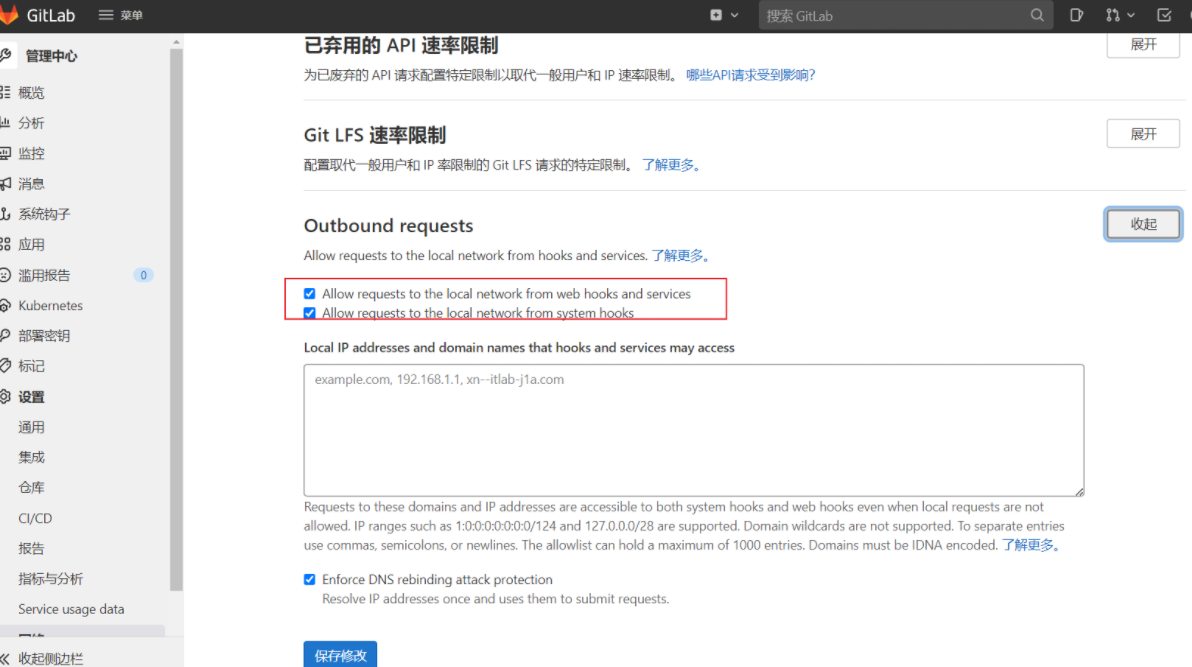
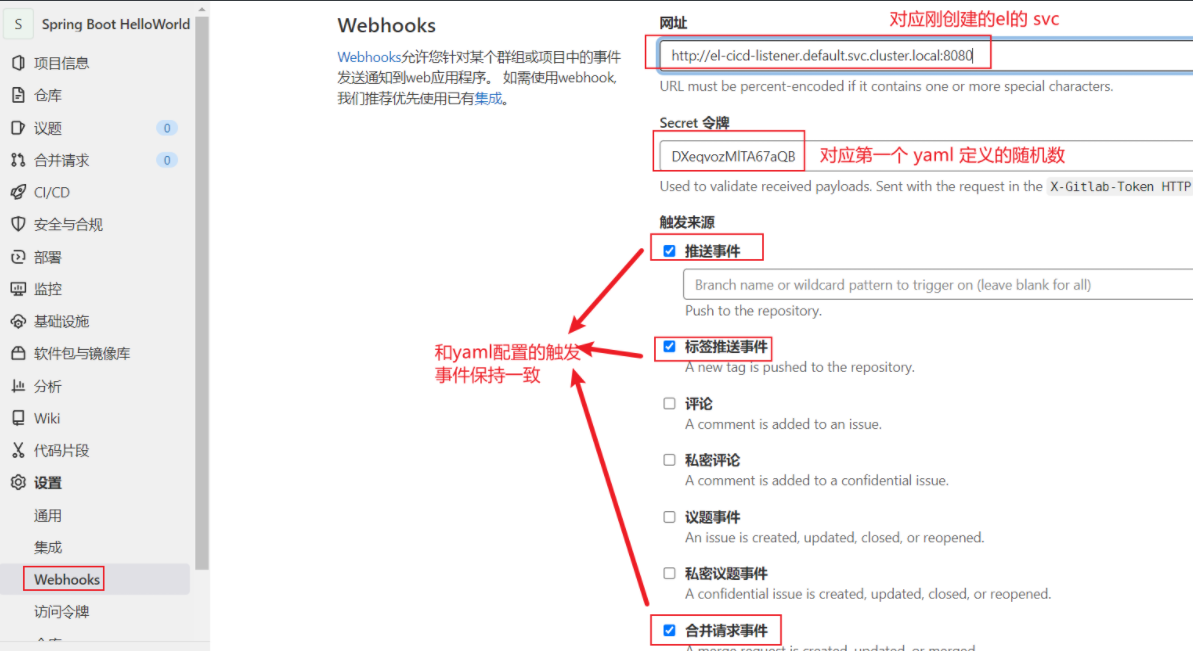

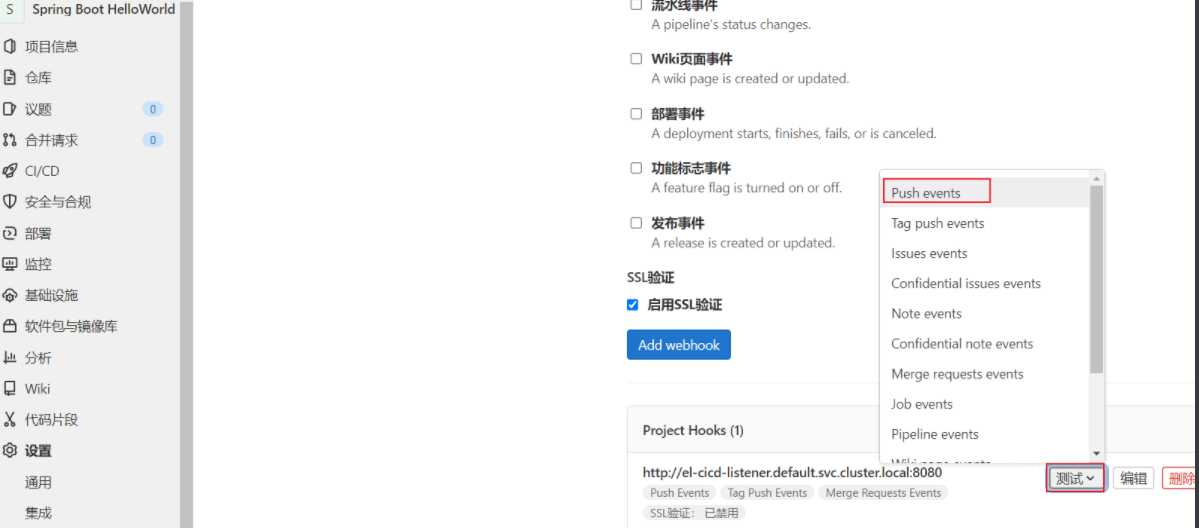

流水线已经启动
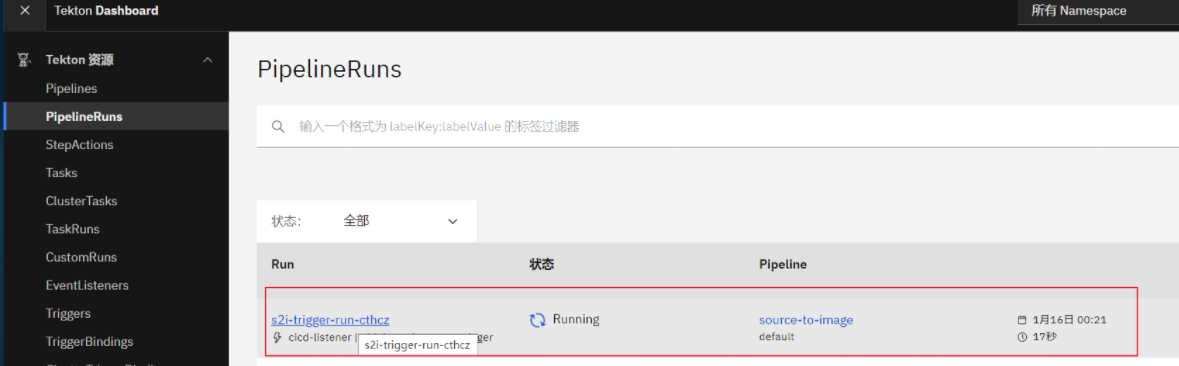
部署完成
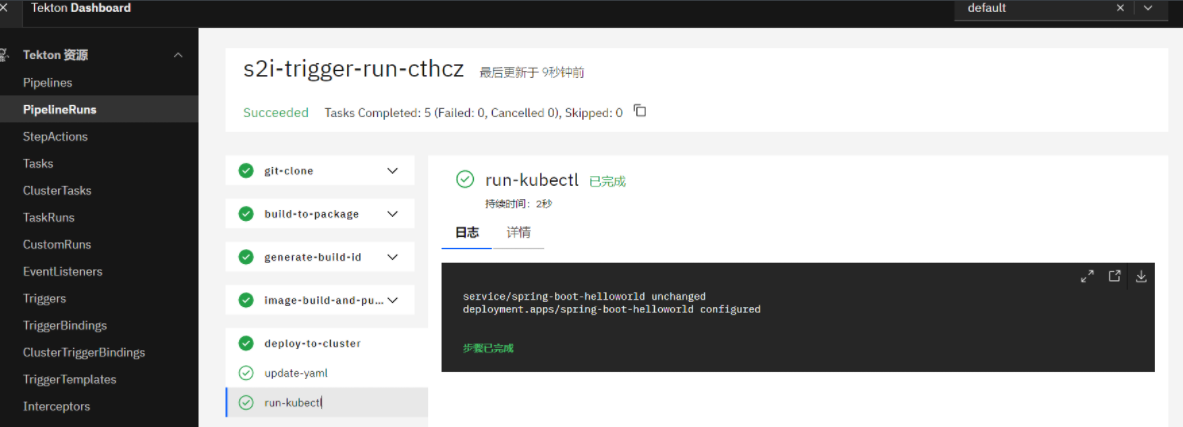
验证第一次部署
root@k8s-master01:~# kubectl get pod -l app=spring-boot-helloworld
NAME READY STATUS RESTARTS AGE
spring-boot-helloworld-c6c7697c8-gzwpx 2/2 Running 0 61s
root@k8s-master01:~# curl 10.97.140.203 && echo
Hello Spring Boot 2.0!
root@k8s-master01:~# curl 10.97.140.203/version && echo
version 0.9.6!
修改代码再次部署
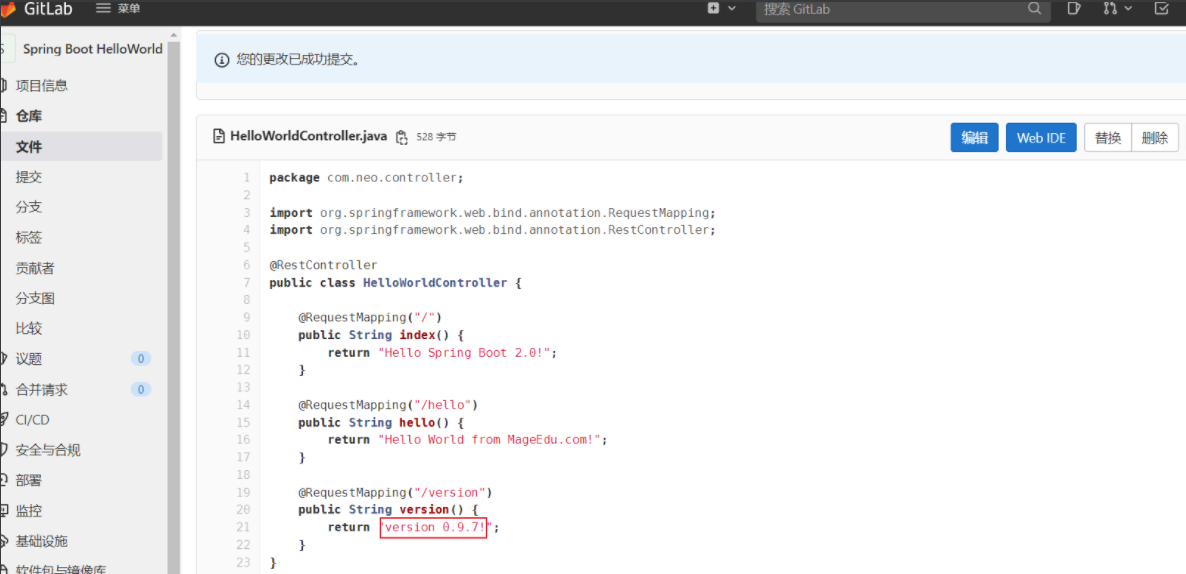
修改后直接第二次触发
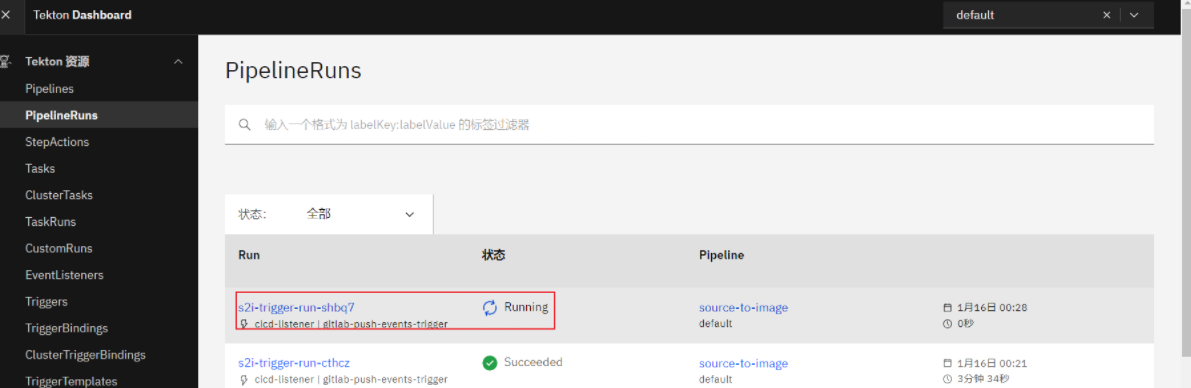
第二次部署完成
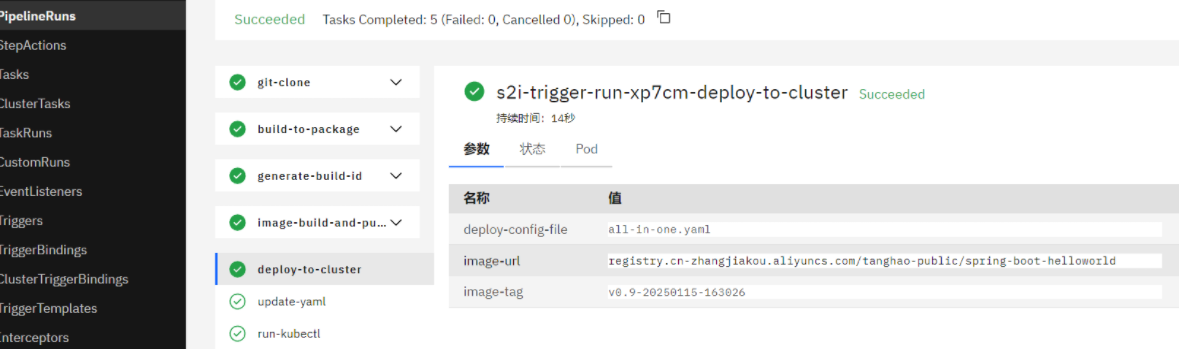
验证第二次部署
root@k8s-master01:~# kubectl get pod -l app=spring-boot-helloworld
NAME READY STATUS RESTARTS AGE
spring-boot-helloworld-94d9fb59d-wxrnt 2/2 Running 0 99s
root@k8s-master01:~# curl 10.97.140.203 && echo
Hello Spring Boot 2.0!
root@k8s-master01:~# curl 10.97.140.203/version && echo
version 0.9.7!

文章评论