部署项目
代码仓库地址
https://github.com/GoogleCloudPlatform/microservices-demo
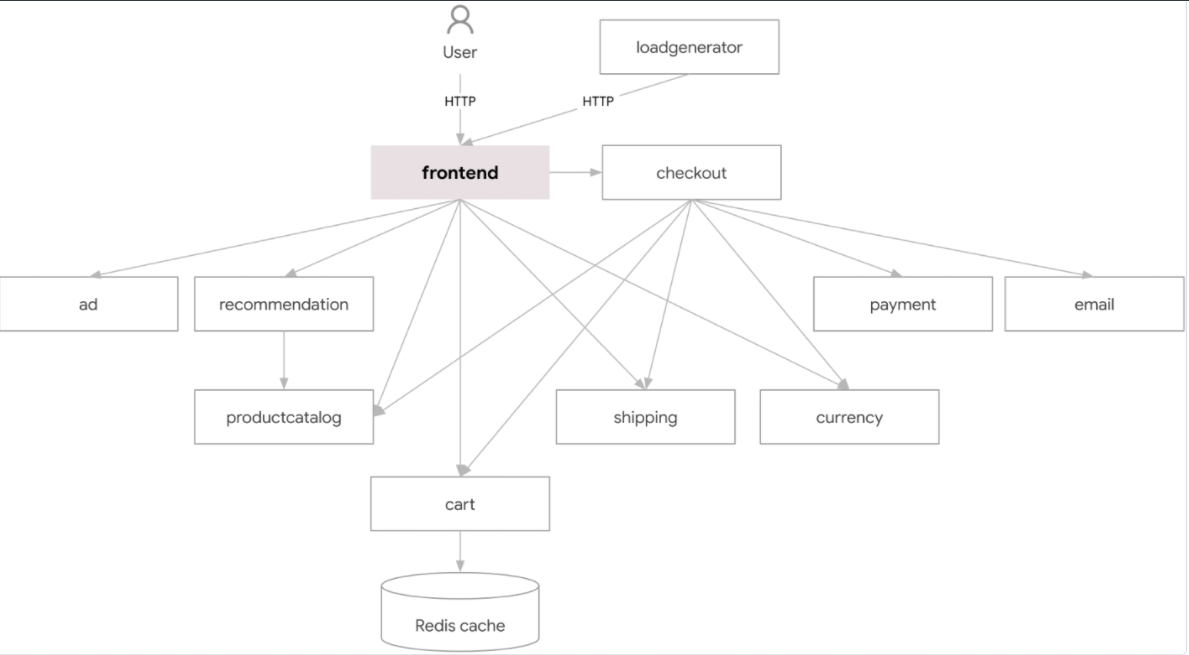
下载部署yaml
root@k8s-master01:~# git clone https://github.com/cnych/istio-demo.git
部署项目
 root@k8s-master01:~# cd istio-demo/kubernetes-manifests/
 root@k8s-master01:~/istio-demo/kubernetes-manifests# kubectl apply -f namespaces/
 root@k8s-master01:~/istio-demo/kubernetes-manifests# kubectl apply -f services/
 root@k8s-master01:~/istio-demo/kubernetes-manifests# kubectl apply -f deployments/
查看pod状态
 root@k8s-master01:~# for ns in ad cart checkout currency email frontend loadgenerator payment product-catalog recommendation redis shipping; do kubectl get po -n $ns; done;
 NAME                        READY   STATUS    RESTARTS   AGE
 adservice-c786d6958-8b2wm   1/1     Running   0          9m18s
 NAME                           READY   STATUS    RESTARTS   AGE
 cartservice-84588969d8-j47zz   1/1     Running   0          9m18s
 NAME                               READY   STATUS    RESTARTS   AGE
 checkoutservice-56947dc4b4-r97mj   1/1     Running   0          9m18s
 NAME                               READY   STATUS    RESTARTS   AGE
 currencyservice-65bc7984d6-p4r4b   1/1     Running   0          9m18s
 NAME                            READY   STATUS    RESTARTS   AGE
 emailservice-665d65d8bb-ps9s7   1/1     Running   0          9m18s
 NAME                        READY   STATUS    RESTARTS   AGE
 frontend-59786f459c-hw5m9   1/1     Running   0          9m18s
 NAME                             READY   STATUS    RESTARTS   AGE
 loadgenerator-5cc7fd95bc-sgdvw   1/1     Running   0          9m18s
 NAME                             READY   STATUS    RESTARTS   AGE
 paymentservice-bcd9f97f8-sgc4b   1/1     Running   0          9m18s
 NAME                                     READY   STATUS    RESTARTS   AGE
 productcatalogservice-69f7686596-4k5rc   1/1     Running   0          9m18s
 NAME                                     READY   STATUS    RESTARTS   AGE
 recommendationservice-5679c8f4d6-fqqzm   1/1     Running   0          9m17s
 NAME                          READY   STATUS    RESTARTS   AGE
 redis-cart-6fdfbf5757-c5hp5   1/1     Running   0          9m18s
 NAME                               READY   STATUS    RESTARTS   AGE
 shippingservice-7bb759bfbb-6t9lf   1/1     Running   0          9m18s
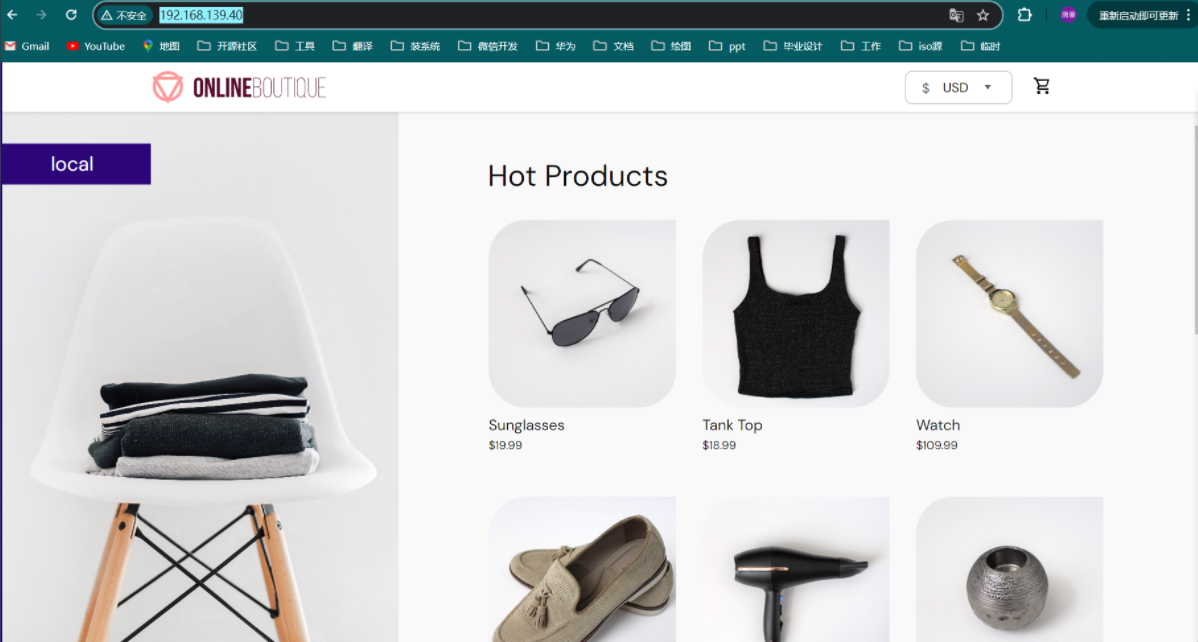
访问访问
 root@k8s-master01:~# kubectl get svc -n frontend
 NAME                TYPE           CLUSTER-IP       EXTERNAL-IP      PORT(S)        AGE
 frontend            ClusterIP      173.96.134.17    <none>           80/TCP         10m
 frontend-external   LoadBalancer   173.96.151.247   192.168.139.40   80:32518/TCP   10m
http://192.168.139.40/或者http://192.168.139.241:32518/
将项目进行istio注入
首先将上面的命名空间标记为istio-injection=enabled,这样在该命名空间中的Pod就会自动注入Istio的sidecar :
 `注入sidecar{envoy}`
 root@k8s-master01:~# for ns in ad cart checkout currency email frontend loadgenerator payment product-catalog recommendation redis shipping; do kubectl label ns $ns istio-injection=enabled --overwrite; done;
 `重启pod`
 root@k8s-master01:~# for ns in ad cart checkout currency email frontend loadgenerator payment product-catalog recommendation redis shipping; do kubectl rollout restart deploy -n $ns; done;
再次查看这些Pod 的时候,我们会发现每个Pod 都变成了两个容器了,其中一个就是新增的istio-proxy 的容器:
 root@k8s-master01:~# for ns in ad cart checkout currency email frontend loadgenerator payment product-catalog recommendation redis shipping; do kubectl get po -n $ns; done;
 NAME                        READY   STATUS    RESTARTS   AGE
 adservice-85cdcb558-689c6   2/2     Running   0          2m1s
 NAME                           READY   STATUS    RESTARTS   AGE
 cartservice-7ddf696466-46zqq   2/2     Running   0          2m1s
 NAME                               READY   STATUS    RESTARTS   AGE
 checkoutservice-6644d8c98b-nsds4   2/2     Running   0          2m1s
 NAME                               READY   STATUS    RESTARTS   AGE
 currencyservice-686985f85d-mdl9n   2/2     Running   0          2m1s
 NAME                            READY   STATUS    RESTARTS   AGE
 emailservice-75d986695b-xnbcw   2/2     Running   0          2m2s
 NAME                        READY   STATUS    RESTARTS   AGE
 frontend-5f588c974b-6jdsl   2/2     Running   0          2m1s
 NAME                             READY   STATUS    RESTARTS   AGE
 loadgenerator-7b857d965c-52lbm   2/2     Running   0          2m1s
 NAME                             READY   STATUS    RESTARTS   AGE
 paymentservice-d5dfb56b9-78jtl   2/2     Running   0          2m1s
 NAME                                     READY   STATUS    RESTARTS   AGE
 productcatalogservice-6d9c59fcf7-9v7l8   2/2     Running   0          2m1s
 NAME                                     READY   STATUS    RESTARTS   AGE
 recommendationservice-5f9dffdbfc-hvtpn   2/2     Running   0          2m
 NAME                          READY   STATUS    RESTARTS   AGE
 redis-cart-79dd6cb6c5-5r7xq   2/2     Running   0          2m
 NAME                               READY   STATUS    RESTARTS   AGE
 shippingservice-8568cdb9d6-lrttz   2/2     Running   0          2m
配置项目进行istio调度
创建frontend的入口网关gateway
 root@k8s-master01:~/istio-demo/istio-manifests# cat frontend-gateway.yaml
 apiVersion: networking.istio.io/v1beta1
 kind: Gateway
 metadata:
   name: frontend-gateway
   namespace: frontend
 spec:
   selector:
     istio: ingressgateway
   servers:
     - port:
         number: 80
         name: http
         protocol: HTTP
       hosts:
         - "*"
 root@k8s-master01:~/istio-demo/istio-manifests# kubectl apply -f frontend-gateway.yaml
创建frontend的virtualservice
 root@k8s-master01:~/istio-demo/istio-manifests# cat frontend-virtualservice.yaml
 # frontend-virtualservice.yaml
 apiVersion: networking.istio.io/v1beta1
 kind: VirtualService
 metadata:
   name: frontend-ingress
   namespace: frontend
 spec:
   hosts:
     - "*"
   gateways:
     - frontend-gateway
   http:
     - route:
         - destination:
             host: frontend
             port:
               number: 80
 root@k8s-master01:~/istio-demo/istio-manifests# kubectl apply -f frontend-virtualservice.yaml
 root@k8s-master01:~/istio-demo/istio-manifests# kubectl get svc -n istio-system -owide -l app=istio-ingressgateway
 NAME                   TYPE           CLUSTER-IP       EXTERNAL-IP      PORT(S)                                                                      AGE   SELECTOR
 istio-ingressgateway   LoadBalancer   173.96.242.153   192.168.139.41   15021:30391/TCP,80:30916/TCP,443:31474/TCP,31400:31809/TCP,15443:30091/TCP   35d   app=istio-ingressgateway,istio=ingressgateway
访问测试
http://192.168.139.241:30916/或者
金丝雀发布
Canary部署会将一小部分流量路由到微服务的新版本,然后我们可以逐步发布到整个用户群,同时逐步淘汰和弃用旧版本。如果在此过程中出现问题,可以将流量切换回旧版本。
这里我们以productcatalog-service服务为例来说明如何进行金丝雀发布。首先为现有的productcatalog服务添加一个version=v1的标签,表示该服务的版本为v1:
 root@k8s-master01:~/istio-demo/istio-manifests/canary-service# kubectl label pod productcatalogservice-6d9c59fcf7-9v7l8 -n product-catalog version=v1
 root@k8s-master01:~/istio-demo/istio-manifests/canary-service# kubectl get po -n product-catalog --show-labels
 NAME                                     READY   STATUS    RESTARTS   AGE   LABELS
 productcatalogservice-6d9c59fcf7-9v7l8   2/2     Running   0          32m   app=productcatalogservice,pod-template-hash=6d9c59fcf7,security.istio.io/tlsMode=istio,service.istio.io/canonical-name=productcatalogservice,service.istio.io/canonical-revision=latest,version=v1
定义DestinationRule、VirtualService
root@k8s-master01:~/istio-demo/istio-manifests/canary-service# cat destination-v1.yaml
apiVersion: networking.istio.io/v1beta1
kind: DestinationRule
metadata:
name: productcatalogservice
namespace: product-catalog
spec:
host: productcatalogservice.product-catalog.svc.cluster.local
subsets:
- labels:
version: v1
name: v1
root@k8s-master01:~/istio-demo/istio-manifests/canary-service# cat virtualservice-v1.yaml
apiVersion: networking.istio.io/v1beta1
kind: VirtualService
metadata:
name: productcatalogservice
namespace: frontend
spec:
hosts:
- productcatalogservice.product-catalog.svc.cluster.local
http:
- route:
- destination:
host: productcatalogservice.product-catalog.svc.cluster.local
subset: v1
root@k8s-master01:~/istio-demo/istio-manifests/canary-service# kubectl apply -f destination-v1.yaml
root@k8s-master01:~/istio-demo/istio-manifests/canary-service# kubectl apply -f virtualservice-v1.yaml
root@k8s-master01:~/istio-demo/istio-manifests/canary-service# kubectl get vs -n frontend
NAME GATEWAYS HOSTS AGE
virtualservice.networking.istio.io/frontend-ingress ["frontend-gateway"] ["*"] 28m
virtualservice.networking.istio.io/productcatalogservice ["productcatalogservice.product-catalog.svc.cluster.local"] 47s
root@k8s-master01:~/istio-demo/istio-manifests/canary-service# kubectl get dr -n product-catalog
NAME HOST AGE
productcatalogservice productcatalogservice.product-catalog.svc.cluster.local 91s
为项目配置v2版本
root@k8s-master01:~/istio-demo/istio-manifests/canary-service# kubectl create configmap products-v2 --from-file=products.json -n product-catalog
root@k8s-master01:~/istio-demo/istio-manifests/canary-service# cat productcatalog-v2.yaml
apiVersion: apps/v1
kind: Deployment
metadata:
name: productcatalogservice-v2
namespace: product-catalog
spec:
selector:
matchLabels:
app: productcatalogservice
version: v2
template:
metadata:
labels:
app: productcatalogservice
version: v2
spec:
volumes:
- name: products
configMap:
name: products-v2
containers:
- env:
- name: PORT
value: "3550"
- name: DISABLE_PROFILER
value: "1"
image: gcr.dockerproxy.com/google-samples/microservices-demo/productcatalogservice:v0.9.0
imagePullPolicy: IfNotPresent
livenessProbe:
grpc:
port: 3550
name: server
ports:
- containerPort: 3550
protocol: TCP
volumeMounts:
- name: products
subPath: products.json
mountPath: /src/products.json
readinessProbe:
grpc:
port: 3550
resources:
limits:
cpu: 200m
memory: 128Mi
requests:
cpu: 100m
memory: 64Mi
securityContext:
allowPrivilegeEscalation: false
capabilities:
drop:
- ALL
privileged: false
readOnlyRootFilesystem: true
securityContext:
fsGroup: 1000
runAsGroup: 1000
runAsNonRoot: true
runAsUser: 1000
serviceAccountName: product-catalog
terminationGracePeriodSeconds: 5
root@k8s-master01:~/istio-demo/istio-manifests/canary-service# kubectl apply -f productcatalog-v2.yaml
root@k8s-master01:~/istio-demo/istio-manifests/canary-service# kubectl get po -n product-catalog --show-labels
NAME READY STATUS RESTARTS AGE LABELS
productcatalogservice-6d9c59fcf7-9v7l8 2/2 Running 0 44m app=productcatalogservice,pod-template-hash=6d9c59fcf7,security.istio.io/tlsMode=istio,service.istio.io/canonical-name=productcatalogservice,service.istio.io/canonical-revision=latest,version=v1
productcatalogservice-v2-599558854c-lpc5r 2/2 Running 0 62s app=productcatalogservice,pod-template-hash=599558854c,security.istio.io/tlsMode=istio,service.istio.io/canonical-name=productcatalogservice,service.istio.io/canonical-revision=v2,version=v2
更新定义DestinationRule、VirtualService
root@k8s-master01:~/istio-demo/istio-manifests/canary-service# cat destination-v2.yaml
# destination-v2.yaml
apiVersion: networking.istio.io/v1beta1
kind: DestinationRule
metadata:
name: productcatalogservice
namespace: product-catalog
spec:
host: productcatalogservice.product-catalog.svc.cluster.local
subsets:
- labels:
version: v1
name: v1
- labels:
version: v2
name: v2
root@k8s-master01:~/istio-demo/istio-manifests/canary-service# cat vs-split.yaml
# vs-split-traffic.yaml
apiVersion: networking.istio.io/v1beta1
kind: VirtualService
metadata:
name: productcatalogservice
namespace: frontend
spec:
hosts:
- productcatalogservice.product-catalog.svc.cluster.local
http:
- route:
- destination:
host: productcatalogservice.product-catalog.svc.cluster.local
subset: v1
weight: 75
- destination:
host: productcatalogservice.product-catalog.svc.cluster.local
subset: v2
weight: 25
root@k8s-master01:~/istio-demo/istio-manifests/canary-service# kubectl apply -f destination-v2.yaml
root@k8s-master01:~/istio-demo/istio-manifests/canary-service# kubectl apply -f vs-split.yaml
验证

文章评论